
How to Start Tracking Your Business Budget When You're Starting from Zero
Build your first business budget from Schedule C expense categories, not guesses. Here's how expense tracking calibrates your baseline from month one


Most self-employed people treat their first business budget as a forecast — a set of numbers they're supposed to hit. That framing makes starting feel harder than it is. In the first year of self-employment, you don't have enough history to forecast accurately. The purpose of a budget at the beginning isn't prediction. It's calibration.
A budget gives you a baseline. When actual spending diverges from it, you learn something about the real cost structure of your business. That information is the product. The accuracy of the initial guess is not.
Setting up your categories
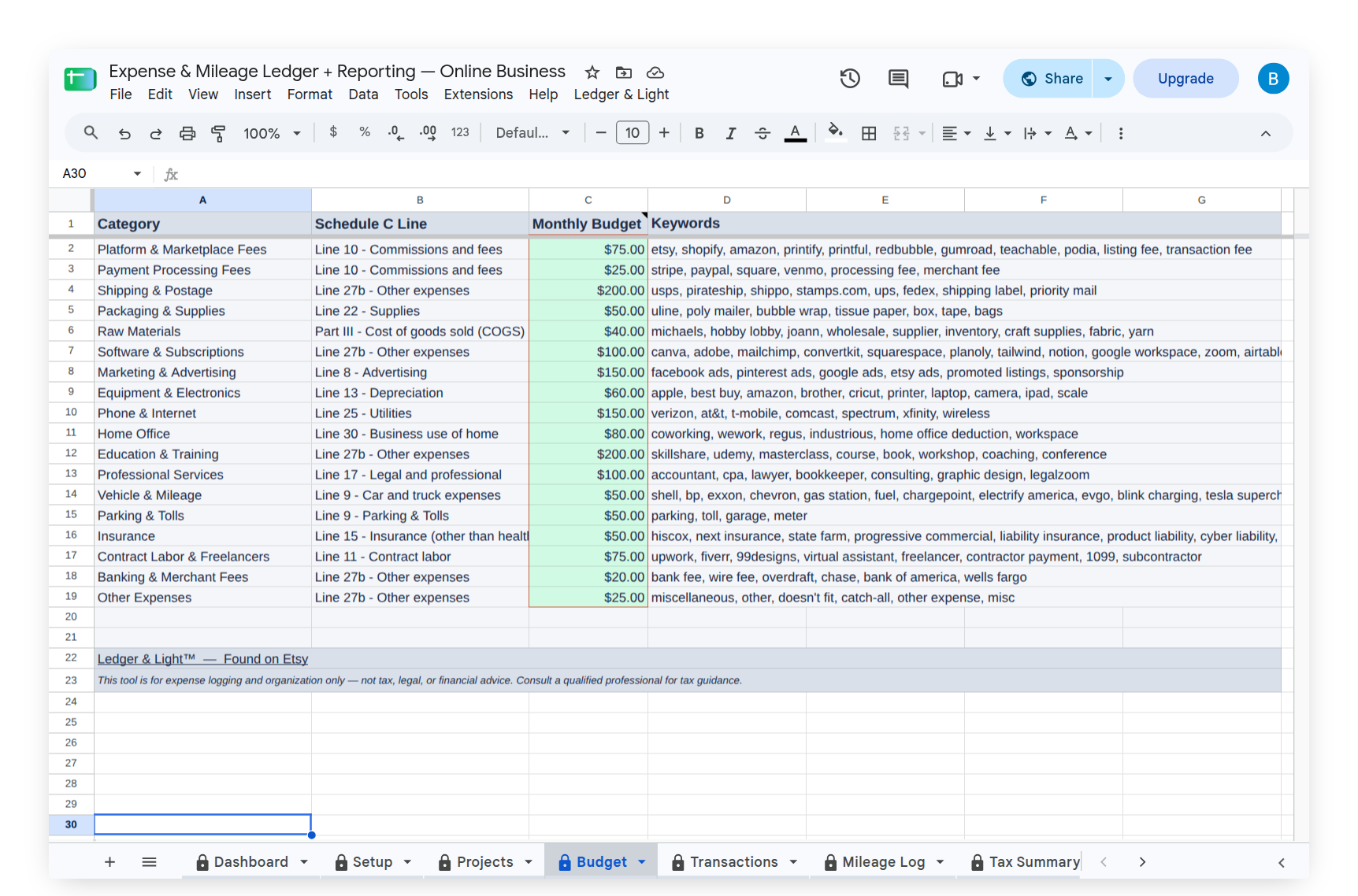
Business budgets for self-employed people run on Schedule C expense categories — the same categories the IRS uses for self-employment tax filing. There are 17 of them: advertising, car and truck expenses, commissions and fees, contract labor, depreciation, insurance, interest, legal and professional services, office expenses, pension and profit-sharing, rent or lease, repairs and maintenance, supplies, taxes and licenses, travel, meals, utilities, wages, and other expenses.
Most freelancers use a fraction of these. Start by identifying the 5–8 categories you actually spend money in — software subscriptions (Office Expenses), professional memberships (Dues), phone bills used for work (Utilities), tools of the trade (Supplies). Set a monthly budget amount for each. Your first estimates will be rough approximations. That's appropriate.
Where the numbers come from
Look at the last 2–3 months of bank and credit card statements. Identify recurring business charges: software subscriptions, professional memberships, phone, tools. These give you the floor of your fixed expenses. Add an estimate for variable expenses — client dinners, supplies you buy when needed — based on what you've spent historically or what you expect.
If you genuinely have no history, use your best guess and plan to revise quarterly. A budget that's 30% off is still useful. It tells you where you're off, and why.
The budget-to-actual gap is the point
Once you're logging expenses against categories, the comparison between what you budgeted and what you spent is the primary output. An overspent category tells you either that you underestimated or that something unusual happened. An underspent category tells you either that you overestimated or that you spent less than planned.
Logging expenses into the same categories as your budget lets you see this gap without building formulas or generating reports. Expense Ledger's Budget tab uses the same Schedule C categories your tax return uses. The Dashboard shows budget vs. actual spending in real time, updated with each expense you log through the Expense Form. You don't reconcile the budget at month-end — you see the state of it whenever you open the sheet. If you set up receipt photo upload from your instructions, the form includes that field too — attach a photo at submission and the link lands in the matching Transactions tab entry, connected to the exact expense it came from.
Refining the budget over time
A first-year business budget should be revised quarterly. At the end of each quarter, compare your actual category spending against your budget. Update the estimates that were significantly off.
By the end of year one, you'll have four quarters of real data. Your year-two budget will be built on actual spending patterns, not guesses. That's when the budget becomes genuinely useful for planning.
What makes this different from a personal budget
Personal budgeting aggregates spending into broad categories — food, housing, transportation. Business budgeting has to map to IRS categories because those categories determine your taxable income. A budget organized by Schedule C categories means your records and your tax return speak the same language. There's no translation step at year-end.
When your accountant asks for a year-end expense summary, the same structure you've been budgeting against is the structure that goes on your return. No reorganization required. With Expense & Mileage Ledger + Reporting, Email Tax Report sends your Tax Summary, expense transactions, and mileage log to your accountant as formatted PDFs, and Tab Export saves every visible tab as a PDF to your Drive folder, named by tab and year.