
Stop Scrambling at Tax Time: Track Business Expenses Year-Round
Stop reconstructing expenses from bank statements at tax time. Year-round form logging means your Tax Summary is already done when April arrives


The right way to track business expenses year-round is to log them when they happen. It's March, you're staring at a shoebox of crumpled receipts, and the system that was supposed to keep things organized has fallen behind again. Whether you're a freelancer, solo business owner, or side hustler, keeping a record of business expenses throughout the year shouldn't feel like archaeological work when tax season rolls around.
The Receipt Shuffle Struggle
Most online business owners start with good intentions. You'll keep all your receipts in one place, you'll update that sheet every week, you'll be organized this year. But life happens. Receipts get lost in purses, stuffed in car consoles, or accidentally tossed with the grocery store receipt.
Even if you manage to save everything, entering expenses into a sheet feels like homework. You put it off until you have a "big enough pile" to justify opening your laptop. Before you know it, it's been three months since your last update, and you're trying to remember what that $47 charge from "ABC SERVICES LLC" was for.
The Game-Changer: Your Phone Is the Expense Ledger
Here's what changes everything: forget about opening your sheet for data entry. Expense Ledger uses a Google Form that you bookmark right on your phone's home screen. No app to download, no monthly fees, no learning curve.
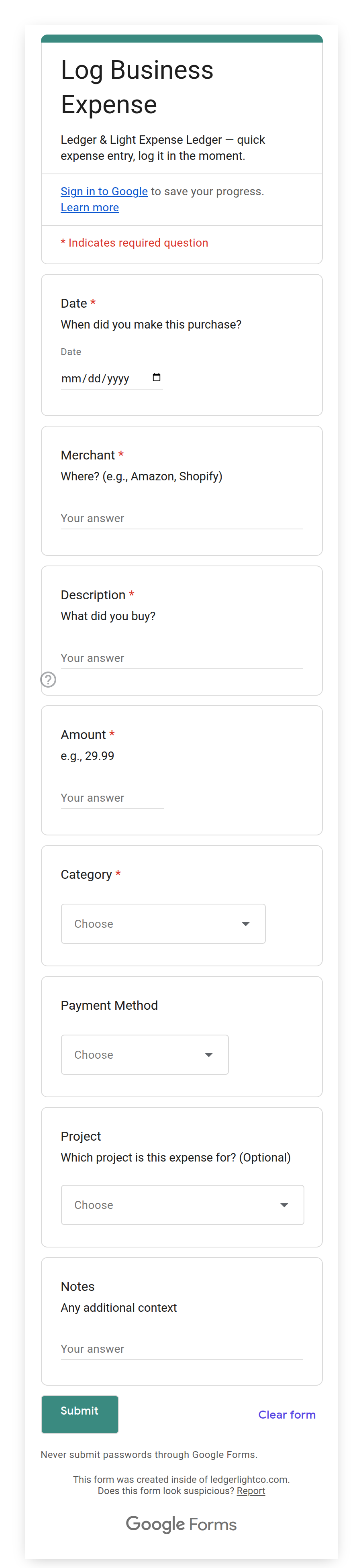
You're waiting in line at the office supply store. You open the expense form on your phone and pre-fill what you already know: the merchant, what you bought, the category, a quick note. You check out, add the total, snap a photo of the receipt, and submit before you reach your car. You held no one up, including yourself. That expense won't cross your mind again until April, when your Tax Summary is already done.
The form submits directly to your sheet, but you never have to open it directly if you don't want to. No formulas to break, no cells to accidentally delete.
Your Dashboard Shows the Big Picture
Every expense you log through the form automatically appears on a dashboard that shows your spending by category. You'll see at a glance whether you're on pace with your budgets or heading into "watch out" territory in any category. The recent expenses shown on the Dashboard reflect the month set in cell A3.
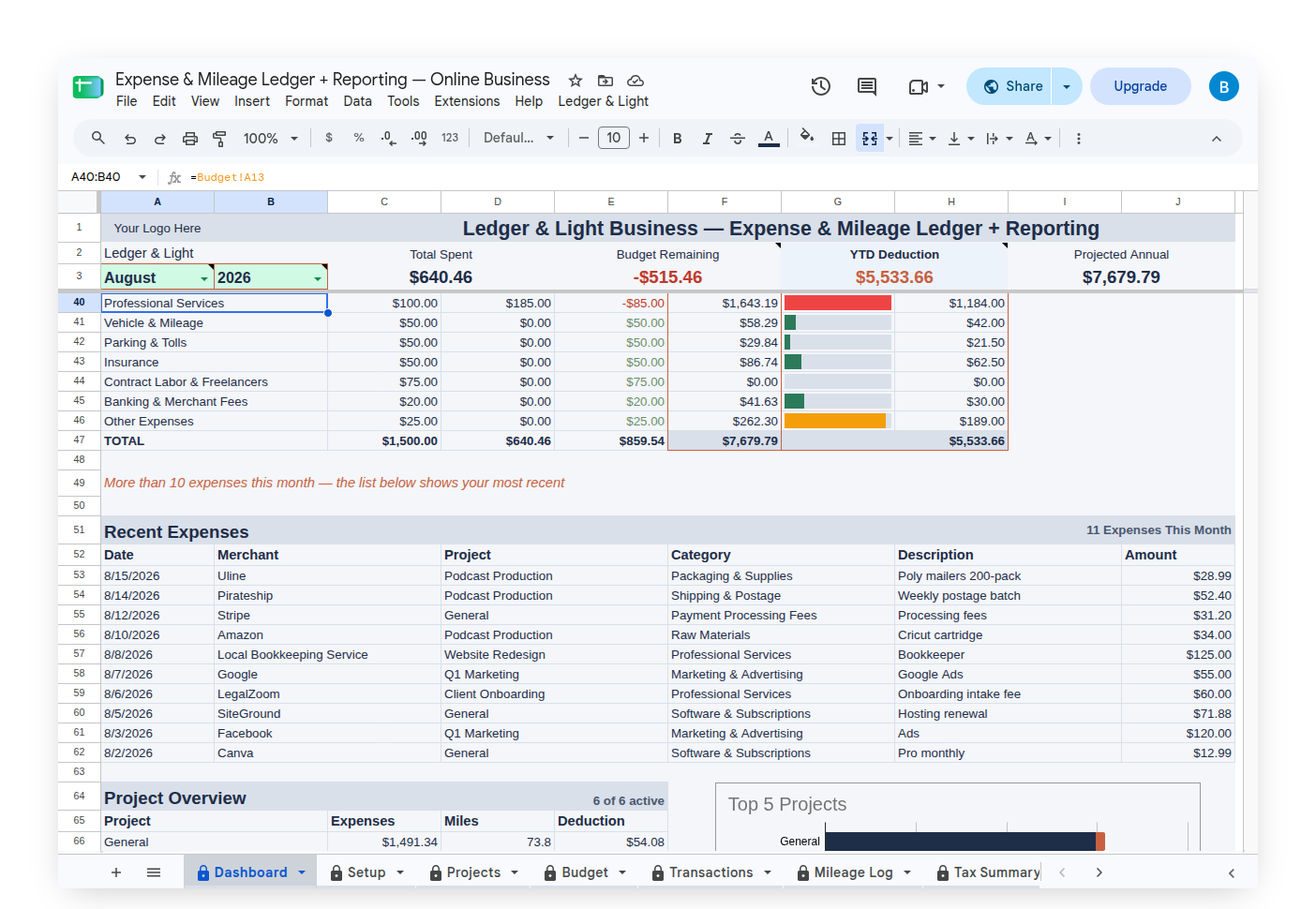
The dashboard shows your budget status for the Schedule C expense categories that apply to most solo freelancers and self-employed business owners. No manual calculations.
The Tax Summary tab maps every expense category to the IRS Schedule C line items, with your total deductions calculated and ready to go.
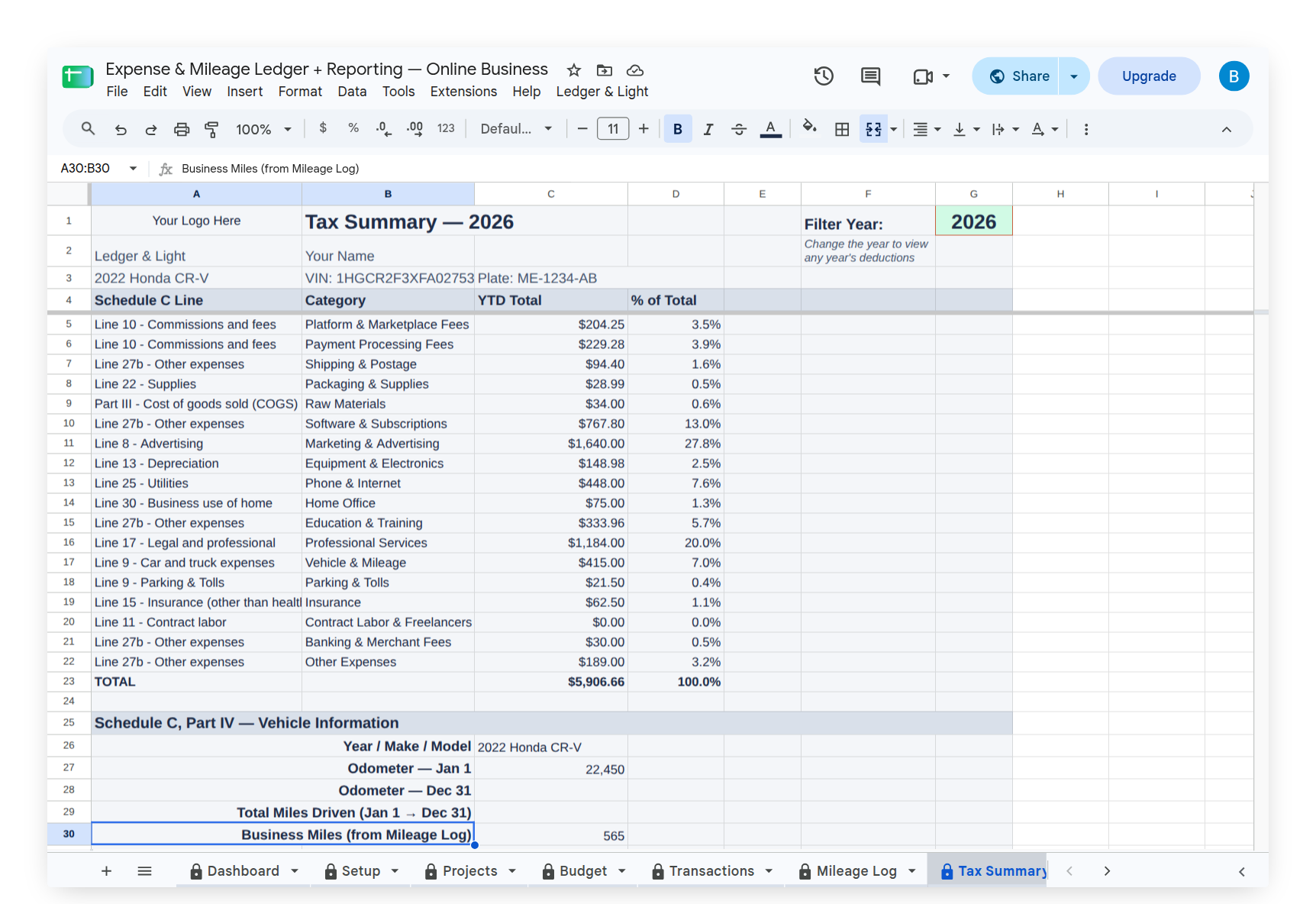
Whether you do your own taxes or work with an accountant, this summary gives you everything you need at tax time. No adding up receipts by hand, no guessing which expenses go where.
Three Products, Three Buyer Profiles
Expense Ledger is for freelancers who log business expenses and don't drive for work. You get the Expense Form, Dashboard, all the Schedule C categories, and the Tax Summary. Log receipts from your phone, see your spending by category, and hand your accountant a complete Schedule C summary at tax time. That's the full picture for most business owners.
Expense & Mileage Ledger adds mileage logging for freelancers who drive for work. Alongside everything in Expense Ledger, you get a dedicated Mileage Form for logging business trips with odometer readings, plus the Mileage Log with the IRS deduction calculated per trip. You also get Customize Forms (Trip Purposes) to tailor the purpose dropdown to your actual routes. If you drive for business, the mileage deduction alone covers the cost many times over.
Expense & Mileage Ledger + Reporting closes the loop for freelancers who want to hand off records to their accountant without any back-and-forth. It adds Email Tax Report, which sends your Tax Summary, expense transactions, and mileage log directly to your accountant as formatted PDFs, and Tab Export, which saves any tab to your Google Drive as a PDF or PNG, auto-named by year. It also extends Customize Forms to cover Payment Methods in addition to Trip Purposes. When your accountant asks for your records, you're done in a couple of clicks.
Tips That Make All the Difference
Start with zero budgets for your first month. Log your actual spending without any targets, then set realistic budgets based on what you learn about your patterns.
Bookmark the expense form on your phone's home screen. This is what makes the system work. When the form opens from your home screen, you log the expense in the moment instead of at the desk three days later.
Use the Tax Summary as your accountant handoff. It maps every expense to its Schedule C line. Print it or reference it when doing your own taxes. On Premium, the Email Tax Report button sends your Tax Summary, expense transactions, and mileage log directly to your accountant as formatted PDFs. Your accountant gets organized numbers instead of a bag of receipts.
Snap a receipt photo through the form. Add a photo upload field to your Expense Form once — your setup instructions walk you through it, since Google doesn't let the setup script create the field for you, so you add it by hand in a couple of minutes. After that, tap it at the register, attach a receipt photo, submit. If you start running low on storage from receipt photos, Google Workspace upgrades your Drive from 15GB to 30GB+ for less than $10/mo and you get a professional email address too.
Log mileage as it happens if you drive for business. The IRS requires a contemporaneous log, not year-end estimates. The Expense & Mileage Ledger's Mileage Form makes this straightforward.
Ready to End the Tax-Time Scramble?
No more digging through the shoebox at tax time, no more trying to remember what you bought three months ago, no more scrambling when April arrives. Find all three products in the Ledger & Light shop on Etsy:
Expense Ledger — expense logging, Schedule C categories, and a Tax Summary ready to hand your accountant. Built for freelancers who log expenses but don't drive for work.
Expense & Mileage Ledger — everything above, plus a Mileage Form, Mileage Log, and IRS deduction per trip. Built for freelancers who drive for clients, jobs, or supplies.
Expense & Mileage Ledger + Reporting — everything above, plus email reports sent directly to your accountant as formatted PDFs. Built for freelancers who want tax handoff to be a couple of clicks.
Your future self will thank you when April arrives.