
What I Lost Bringing the Wrong Thing to My Accountant
Self-employed clients lose deductions and cost their accountants hours when records arrive in the wrong format. Here's what the right format looks like


For accountants who spend more time reconstructing records than reviewing them — and for their clients who can do better.
I don't know exactly how much I've lost over the years from showing up to my accountant unprepared. A few thousand in deductions I couldn't substantiate. Hundreds in extra prep fees for the hours she spent reconstructing my mileage from credit card statements. Quarterly estimates I overpaid because I had no real-time view of my deductions. Receipts that faded in a drawer. And the shame of calling myself a professional but being so disorganized.
I'm not an accountant. I'm the client on the other side of that desk — the self-employed one who'd rather be doing the work than recording it. This article is about what I learned when I stopped losing money to my own disorganization, and what I built so you don't have to keep rebuilding records for clients like me.
What I was actually losing
The losses weren't dramatic. They were the kind of thing I never quite added up because each one was small, and the total only became visible in retrospect.
The deductions I couldn't defend. Charges I knew were business but had no documentation for. Bank statements show the spend; they don't show the purpose. Without contemporaneous notes, those entries either got dropped or filed with quiet anxiety about what would happen in an audit.
The miles I never logged. Short trips that didn't feel worth logging — the 4-mile run to the post office, the 6-mile round trip to a client, the supply store run on the way home. Across a year these added up to several hundred miles I couldn't claim because I had no record. At 65+ cents per mile, that's real money.
The unbilled hours I cost my accountant. Or actually billed — I started getting longer invoices because she was rebuilding records I should have brought already built. Either I paid for it directly, or some other client of hers did when she stopped taking on people like me.
The quarterly tax I overpaid. Without a year-to-date view of my deductions, my estimated payments were guesses. Conservative guesses, because the alternative was a penalty. So I floated thousands to the IRS instead of keeping it working in my business.
The faded receipts. Thermal paper fades in 6 to 12 months. I have boxes of receipts from past tax years that are now blank slips of paper. The spend happened. The documentation didn't survive.
The general loss of self-respect. I was selling myself daily to my customers but had only a vague guess about the state of my own business. Losing money on a job because I didn't log costs. Crawling back to clients to ask for more when I'd underbid because I didn't know my real overhead.
None of these were because I didn't care. They were because the system I had was too high-friction to use. I don't have the headspace at the end of the day to remember where I drove, which project I bought stuff for, or to stare at a spreadsheet and sort it all out.
What an accountant actually needs
After enough conversations with my accountant about what would have made her job easier, I started to understand the gap wasn't intent. It was format.
Most self-employed clients want to bring good records. They show up with what they have, and what they have isn't what gets used. The disconnect isn't between honest clients and demanding accountants. It's between data that exists and data in a form an accountant can work with efficiently.
Five things make the difference:
Categorized totals that map to Schedule C lines. Not "miscellaneous business expenses" lumped together. Line 8 advertising, line 13 depreciation, line 22 supplies, line 27b other. The mapping is the deliverable. A spreadsheet with 200 transactions and no category column requires the accountant to do the categorization work themselves — which is the work the client was supposed to bring.
Mileage with the four required fields. Date, destination, business purpose, miles. Contemporaneous, not reconstructed from memory or app history. An odometer-based log meets the IRS standard better than a GPS export, and it survives an audit when an algorithmically generated record doesn't. Bonus if the IRS rate is already applied per trip — Expense & Mileage Ledger does that on submit — so the total deduction is current.
Receipt access without manual handoff. A link per transaction, in the same row as the entry, beats a folder of unsorted PDFs named by date. Beats a binder. Beats an email thread asking the client to dig something up from six months ago.
Quarterly view, not just annual. Estimated tax planning is half the job. Annual-only data forces the accountant to recompute quarterly slices when the client comes in for mid-year planning. A summary that already knows how to scope to a date range is one that can be used four times a year, not just once.
A format readable without rebuilding. PDF or printable view in a structure the accountant already uses. Not a CSV requiring pivots. Not a screenshot of a spreadsheet. Not a Google Sheet the accountant has to be granted access to and learn to navigate.
Most of what I was bringing met one or two of these. None of it met all five.
The workflow I built
Once I understood the gap, the fix came down to where the work happens. It is discipline applied at the right moment — the moment of the expense, not the moment of tax prep.
Capture happens on the phone, at the moment of purchase. A Google Form lives on my home screen. When I buy something for the business, I open the form, enter the amount, pick a category, add a brief note, attach a receipt photo if I have one, and submit. It happens in the moment, not at tax time. The entry lands in a Google Sheet immediately, categorized, in the right row, with the receipt photo linked.
If you also drive for work, mileage is the same pattern. Expense & Mileage Ledger adds a separate Mileage Form you open at the start of a trip: odometer reading, destination, business purpose. At the end of the trip you log the ending odometer. The IRS rate is applied per trip automatically. The deduction is current the moment you submit.
The deduction view updates in real time. I can see what I've deducted year-to-date the moment any entry is in. My estimated quarterly payments stopped being guesses. I send what I actually owe, not what I'm afraid I might owe.
The handoff is a single send. At year-end — or quarter-end — with Expense & Mileage Ledger + Reporting, the Email Tax Report sends your Tax Summary, full transaction list, and Mileage Log to your accountant as formatted PDFs, straight from the sheet's own menu. Tab Export saves any individual tab to Drive as a PDF if you need to share a single view. She gets what she needs in the format she works in. I don't have to grant her access to anything. She doesn't have to ask me to dig anything up.
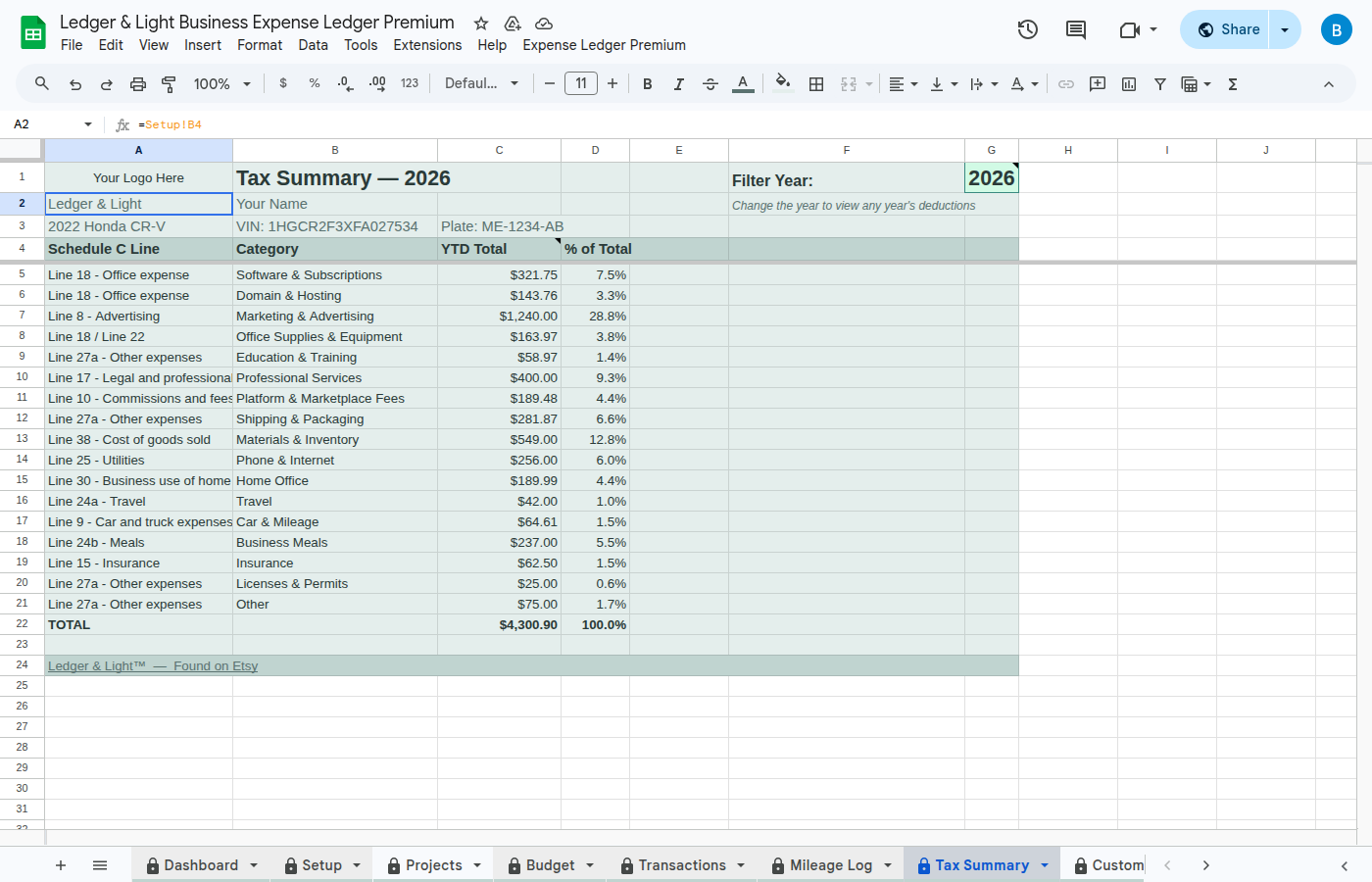
What this workflow is: a capture-to-handoff system for the self-employed client who wants to arrive with records already in the shape you work in. It covers two moments — the moment of the expense and the moment of the handoff — and it leaves the year's substantiation standing behind every number on the summary. It is a one-time purchase the client owns outright and keeps year after year, which is what most of the clients I hear from say they want.
What I'd ask if I were the accountant
A few questions an accountant evaluating this would have, with honest answers:
Who owns the file? The client. It lives in their Google Drive. You don't need access; the report comes to you as a PDF attached to an email, sent from the client's account.
What if the IRS mileage rate changes? A "Check Tax Info" function in Expense & Mileage Ledger confirms the current published rate against the rate the file is using before filing. The client confirms the number; nothing updates silently in the background.
What about wrong categories? Clients will miscategorize. That's true of any client-submitted record. The advantage of this format is that a wrong category arrives with the correct amount and a linked receipt already attached, so an accountant can correct it in place rather than reconstruct the entry from a bank statement.
Can I recommend this to multiple clients? Yes. Each client buys their own copy directly from Ledger & Light and owns it outright. If you want a referral arrangement that records which clients came through you, I'm building that. Email me if you're interested.
The offer
If you handle self-employed clients and you've been frustrated by what they bring you in April, I'd like to send you a free copy of Expense & Mileage Ledger + Reporting and Mileage Ledger. No obligation. Use it yourself, test it with a client who's open to trying something new. If it's useful, tell me. If not, tell me what's missing — I update it regularly based on accountant feedback.
Fill out this short form and I'll send a free copy within 24 hours.
Or email me directly: jon@ledgerlightco.com
The money I lost being disorganized funded the time it took to build the file that would have prevented it. I'd rather you didn't have to learn it the same way.