
A Home Inventory You Can Keep Current: How the Home Contents Ledger Works
A home inventory by room with values, serial numbers and receipt notes: how the Home Contents Ledger logs Added, Removed and Counted from a phone


A home inventory is worth keeping for as long as it can answer two questions: what do I own, and where is it. The Home Contents Ledger is built around those two questions, with room beside each item for what it is worth, when it was bought, its serial number and where its receipt is kept. It is a Google Sheet with a phone form: each time something comes home, goes out the door or gets counted, the entry travels form to sheet and the list updates from it. Logged in-the-moment, while the box is open or the chair is being carried out, the sheet holds a list worth trusting.
The form that writes to the list
The form is called Log Home Contents, and a link to it sits on the Dashboard under the heading "In-the-moment entry." It asks for five things. Date, which falls back to today when it is left blank. The Home item, chosen from a dropdown of every item on the list, A to Z. What happened: Added, Removed or Counted. Amount, a number in the item's own unit. And a Note.
Everything the form collects lands as one row on the Home Log tab, so the whole history of the home sits in one place, in order. The log holds up to 5,000 entries, and a list that reaches the limit is told on the Dashboard from 90 percent full, rather than having entries quietly dropped.
Three words for three kinds of moment
Added raises the number: something joined the home, bought, given or inherited. Removed lowers it: a chair was donated, a bike was sold, two wine glasses broke. Counted records what you find on the shelf.
Counted is what keeps the list honest. A home changes without an entry now and then: a gift passed along, a glass that broke. A Counted entry sets On Hand to the amount you counted on the shelf. The Last Counted column shows the date.
The Items tab is the list
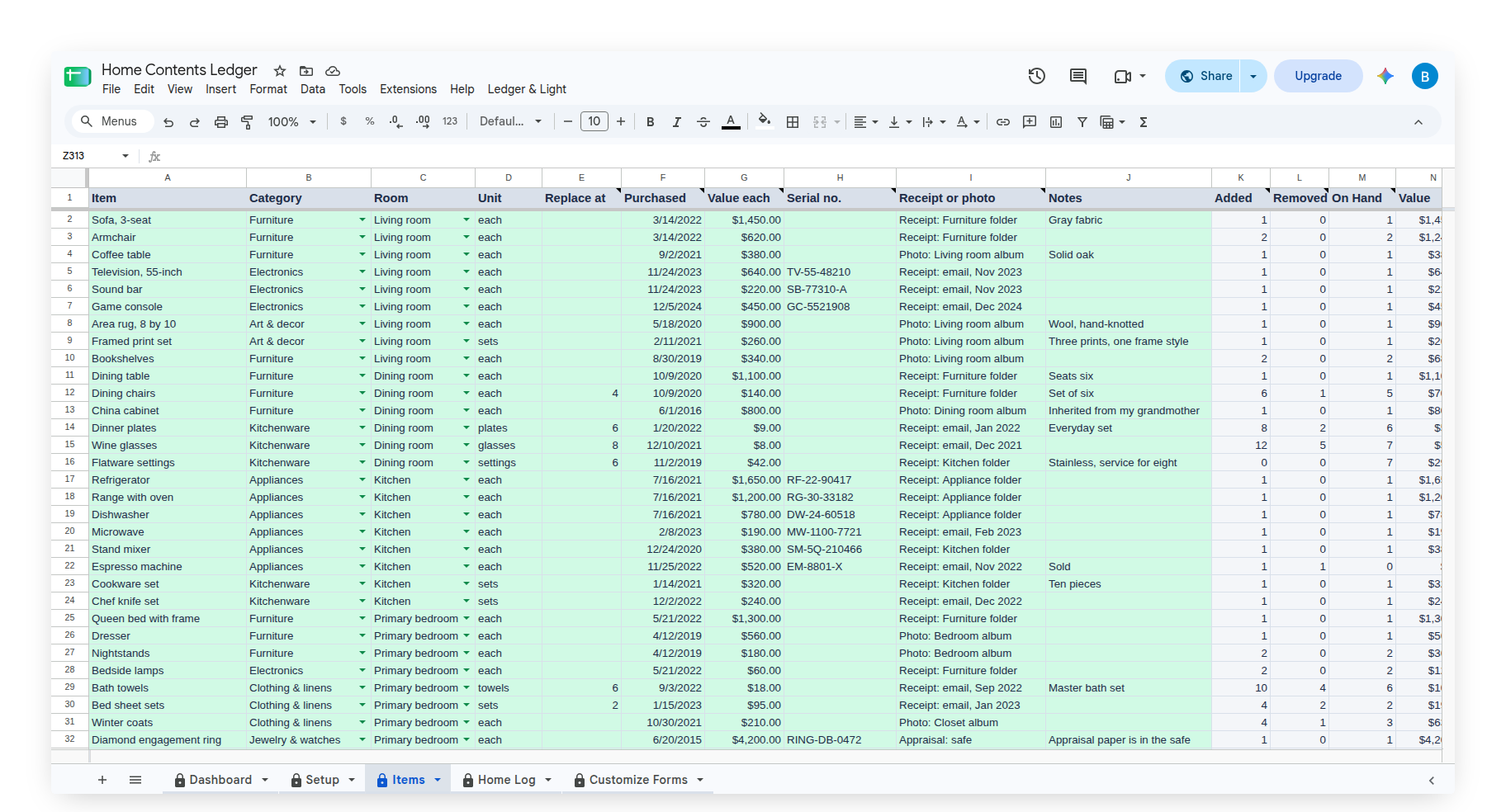
Every item has one row on the Items tab, with room for 250 of them. The owner's columns are Item, Category, Room, Unit, Replace at, Purchased, Value each, Serial no., Receipt or photo and Notes. The sheet fills in the rest: Added, Removed, On Hand, Value, Removed in the last 90 days, Status and Last Counted.
Purchased is the date the item was bought or given. Value each is the owner's own figure: what was paid, or what it would cost to replace. Serial no. is the number printed on the item or its box. Receipt or photo says where the record is kept: a folder name, an email, or a link pasted into the cell. Every one of these is optional, so an item with no receipt still has its row, and the details can be filled in as they turn up.
An item is added on the Items tab, not on the form, which keeps the form to one dropdown. As a name goes into the Item column, it appears in the form's Home item choices. Each item carries one unit, in the owner's own word: each, plates, sets or boxes. The sheet never converts between units, so a number always means what the unit beside it says.
How the On Hand number is worked out
On Hand is the most recent Counted amount, plus everything Added since that count, minus everything Removed since it. An item that has never been counted uses the whole log. It is a live formula over the log, so correcting a log row corrects the number. The Value column multiplies On Hand by Value each, and stays blank for an item with no Value each.
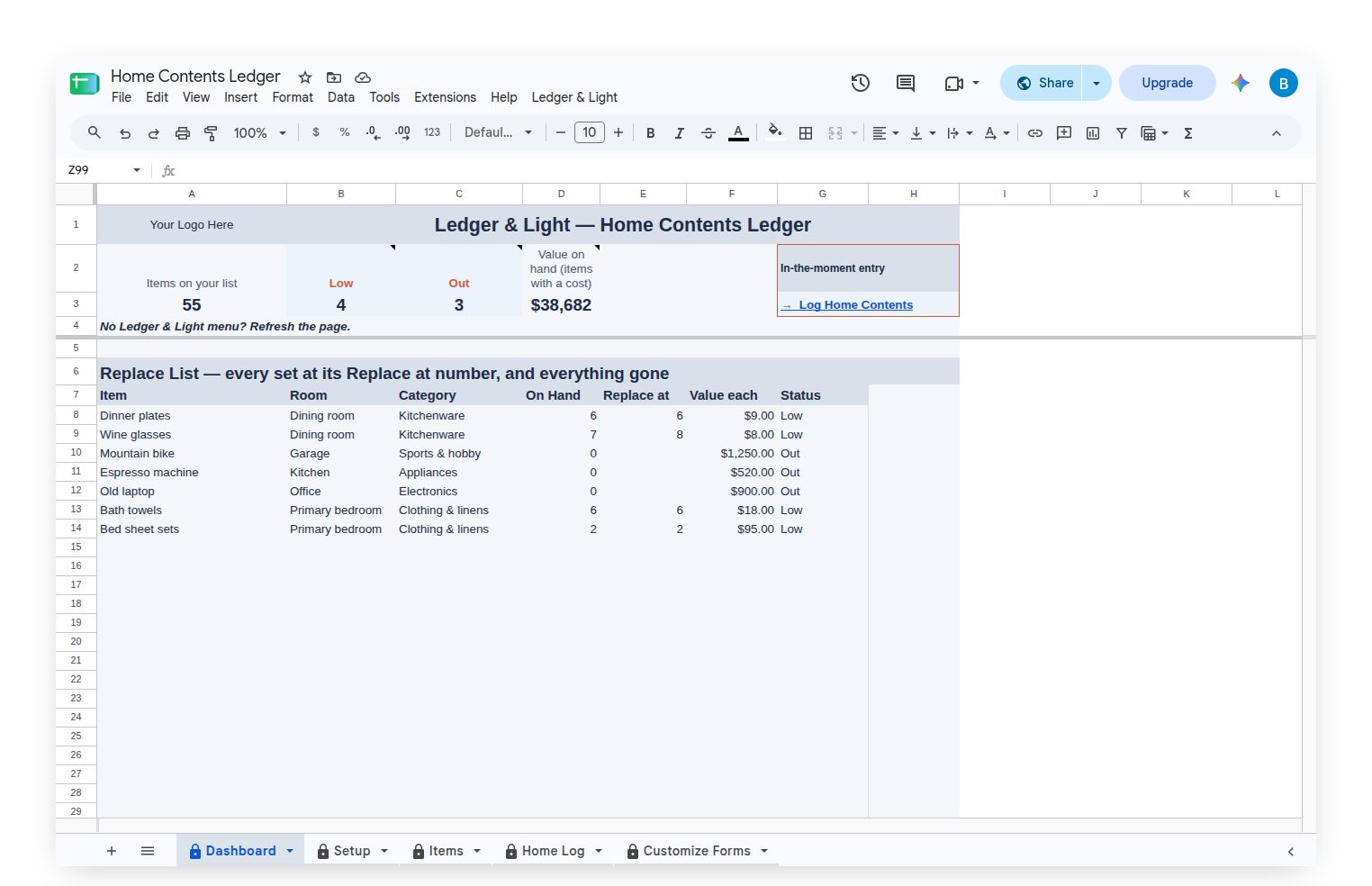
Replace at, and the Replace List
A set that should stay whole, such as glasses, chairs or towels, can carry a Replace at number: the amount at which it is time to replace some. Status reads Out at zero, Low at or below the Replace at number, and In stock otherwise. Every Low or Out item feeds the Replace List on the Dashboard, ordered by room and then by name, with its On Hand, its Replace at number, its category and its Value each beside it. A single item can leave Replace at blank and is Out only when On Hand reaches zero.
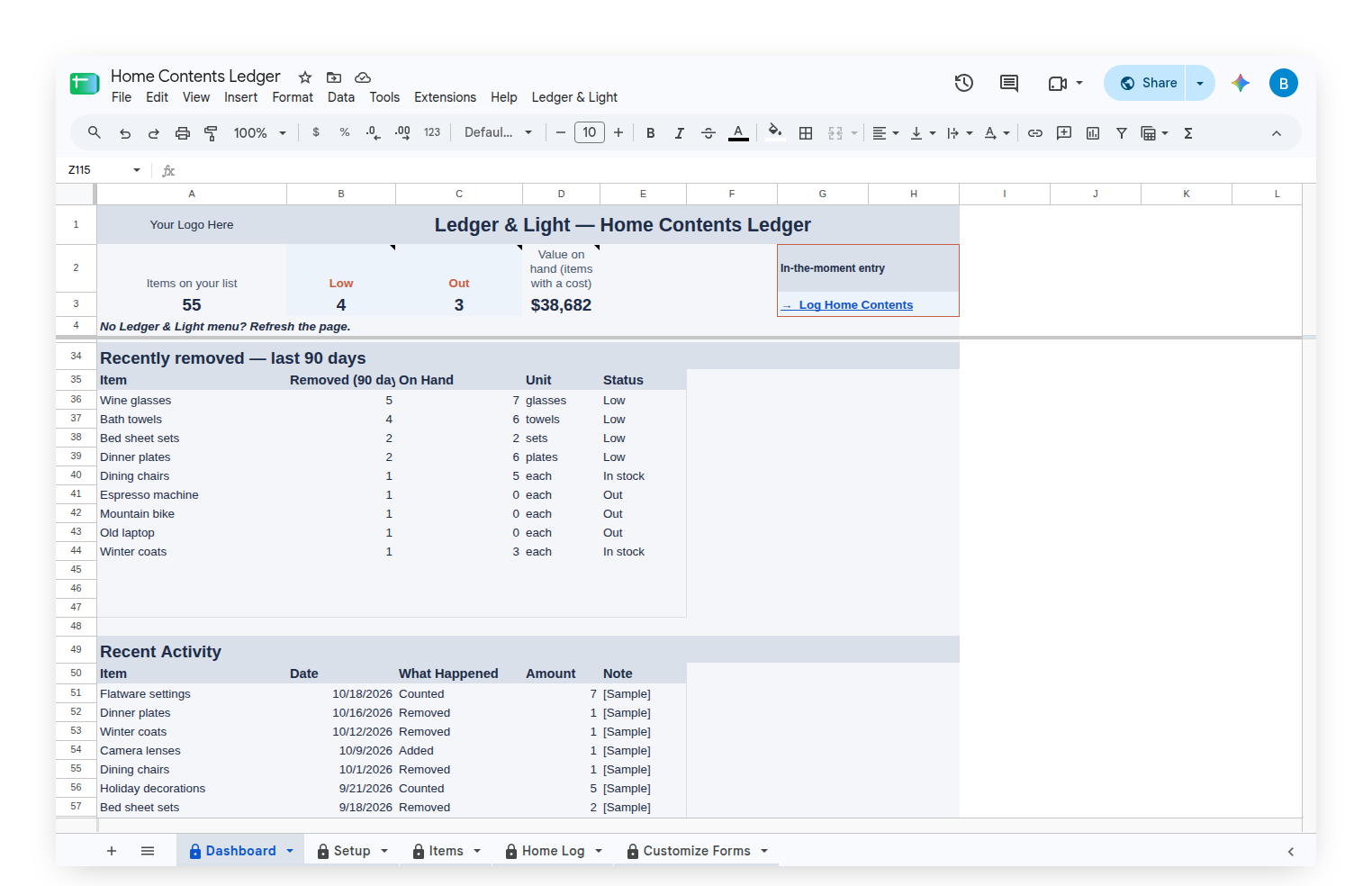
Below the Replace List sits Recently removed: the items that left the home in the last 90 days, most first, with what is on hand and the Status beside each. With nothing removed, it reads "Nothing removed in the last 90 days." The row of counts across the top shows the whole list at once: items on the list, Low, Out and the Value on hand, added up from the Value each figures the owner typed in.
Rooms and categories, in the owner's words
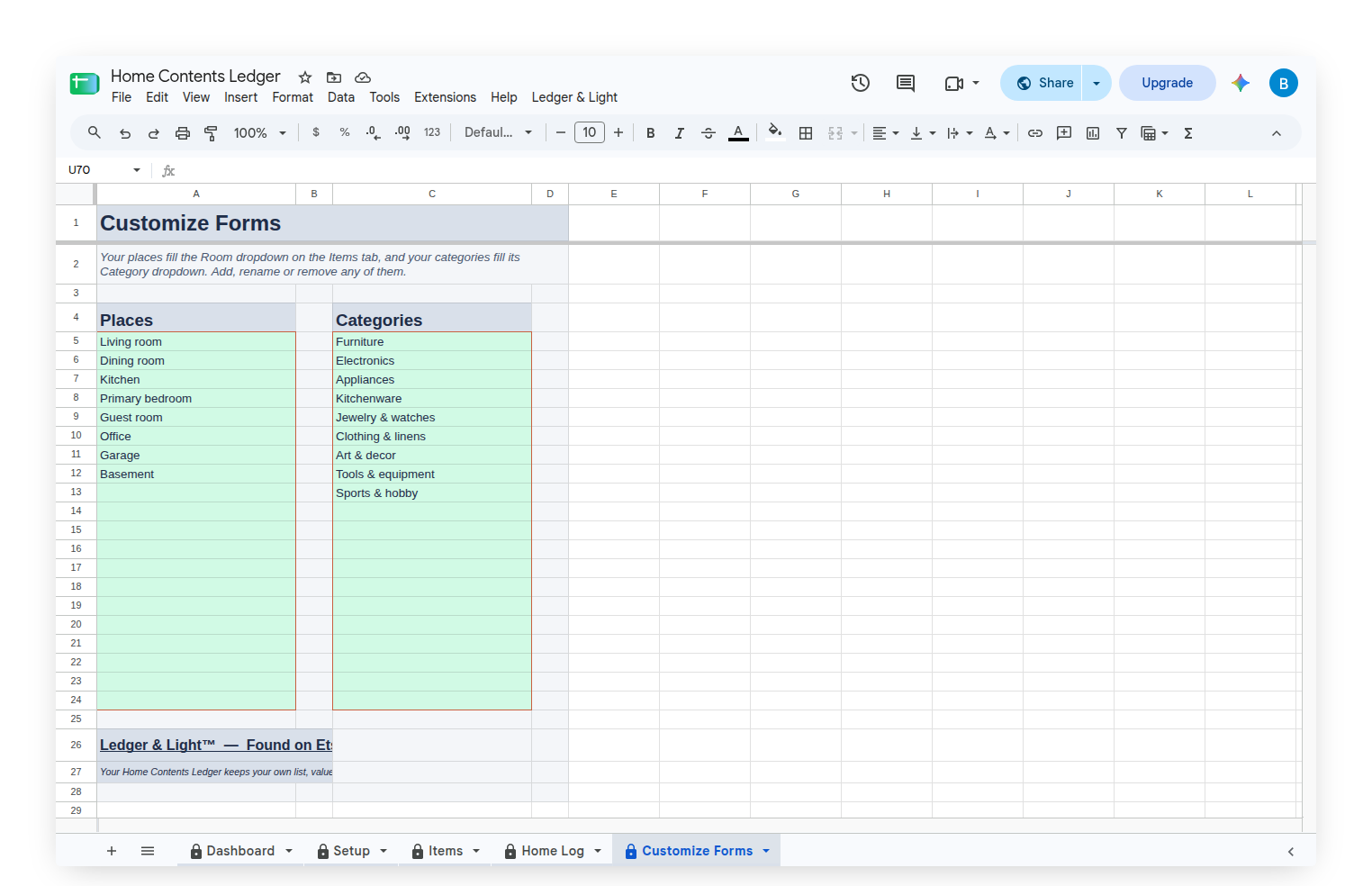
The Customize Forms tab holds two short lists: Room and Categories. They start with Living room, Dining room, Kitchen, Primary bedroom, Guest room, Office, Garage and Basement, and Furniture, Electronics, Appliances, Kitchenware, Jewelry & watches, Clothing & linens, Art & decor, Tools & equipment and Sports & hobby. They fill the dropdowns on the Items tab, and any of them can be renamed, added to or removed, so the sheet describes the owner's own home rather than a template's.
Starting with a sample home, then making it your own
The Home Contents Ledger arrives filled with a sample home: 55 items across eight rooms and nine categories, from sofas and a television to jewelry, tools and holiday boxes, with about three months of log entries, so every status and both lists on the Dashboard show something real. Clear Sample Data, on the custom Ledger & Light menu, empties the log and the items, keeps the rooms and categories, and leaves the Items tab ready for the owner's own list. Entering that list is real work, done once. After that, each entry is a short form on a phone, and the sheet does the totalling and the sorting.
The menu also carries "Show my Log Home Contents form link," so the form's address is always on the menu when it needs to be bookmarked on a phone.
Owned, not rented
The Home Contents Ledger is a Google Sheet bought once and kept, living in the owner's own Google Drive with no subscription to renew. Because the log is a list of rows, a home that grows simply adds rows to the same sheet, and the history stays in one file.
This article describes how the Home Contents Ledger works. It keeps the owner's own list, values and records. It is not an appraisal, and it does not file or support an insurance claim.