
Standard Mileage Rate vs Actual Expense Method: Which Saves You More
Two IRS methods let you deduct vehicle costs. Here's when standard mileage rate wins over actual expense method, and why you need both logs from day one


The IRS gives you two approved ways to deduct the cost of a business vehicle, and the good news is that you get to keep whichever one saves you more. The standard mileage rate vs actual expense method choice is one most self-employed drivers make at filing time, not realizing the decision was really made back in January, when the records each method needs either started getting kept or did not.
The standard mileage rate
The standard mileage rate is a single per-mile figure the IRS sets for the deductible cost of operating a vehicle for business. Multiply business miles by the current IRS standard mileage rate and the deduction is done. No receipts to sort, no depreciation schedule, no separating fuel from insurance. That one number is built to cover every operating cost of the vehicle: fuel, maintenance, oil changes, tires, registration, and depreciation. Because the rate changes from year to year, it is worth confirming for the specific tax year being filed rather than carrying a number over from a past return.
For most self-employed drivers with reliable vehicles and steady business use, standard mileage is both the simpler method and often the larger deduction. A vehicle logging heavy business miles produces a substantial deduction at the standard rate, regardless of what the vehicle actually cost to run that year.
The actual expense method
The actual expense method replaces the flat per-mile rate with the real cost of running the vehicle, prorated for business use. You total what you spent: fuel, insurance, repairs, registration, and depreciation. Then you multiply by the business-use percentage, calculated as business miles divided by total miles for the year.
A vehicle used 70% for business with $8,000 in annual operating costs produces a $5,600 deduction on actual expense. Whether that beats the standard-rate figure depends on the vehicle, and the only way to know is to run both calculations.
The actual method tends to favor drivers with high-cost vehicles, heavy maintenance, expensive insurance, or relatively low annual mileage. A newer truck with loan payments, high insurance, and frequent repairs driven only a few thousand business miles a year may produce a larger deduction on actual than on standard.
The switching rules
The IRS does not allow free switching between the two methods year to year. The key restriction: if you have ever claimed depreciation using MACRS (the standard accelerated depreciation schedule) or Section 179 expensing on the vehicle, you are locked into the actual expense method for that vehicle's remaining life.
The reverse is less restrictive. You can generally switch from actual to standard in a later year, provided you have not used accelerated depreciation. Starting with the standard rate preserves the option to switch. Starting with actual expense and taking Section 179 in year one commits you to actual for that vehicle.
The records requirement starts the same for both
Both methods require a mileage log. The actual expense method also requires a record of every vehicle cost: fuel, repairs, insurance, registration.
The insight most people reach too late is that you cannot decide in December which method gives the larger deduction if you only kept one set of records since January. Miles but no cost records means standard is the only option left. Neither one means there is no deductible amount to claim.
The only way to let an accountant run both calculations at year-end is to have kept both records throughout the year: odometer readings in the mileage log, and fuel, repair, and insurance costs captured as they occur.
Where the two ledgers fit
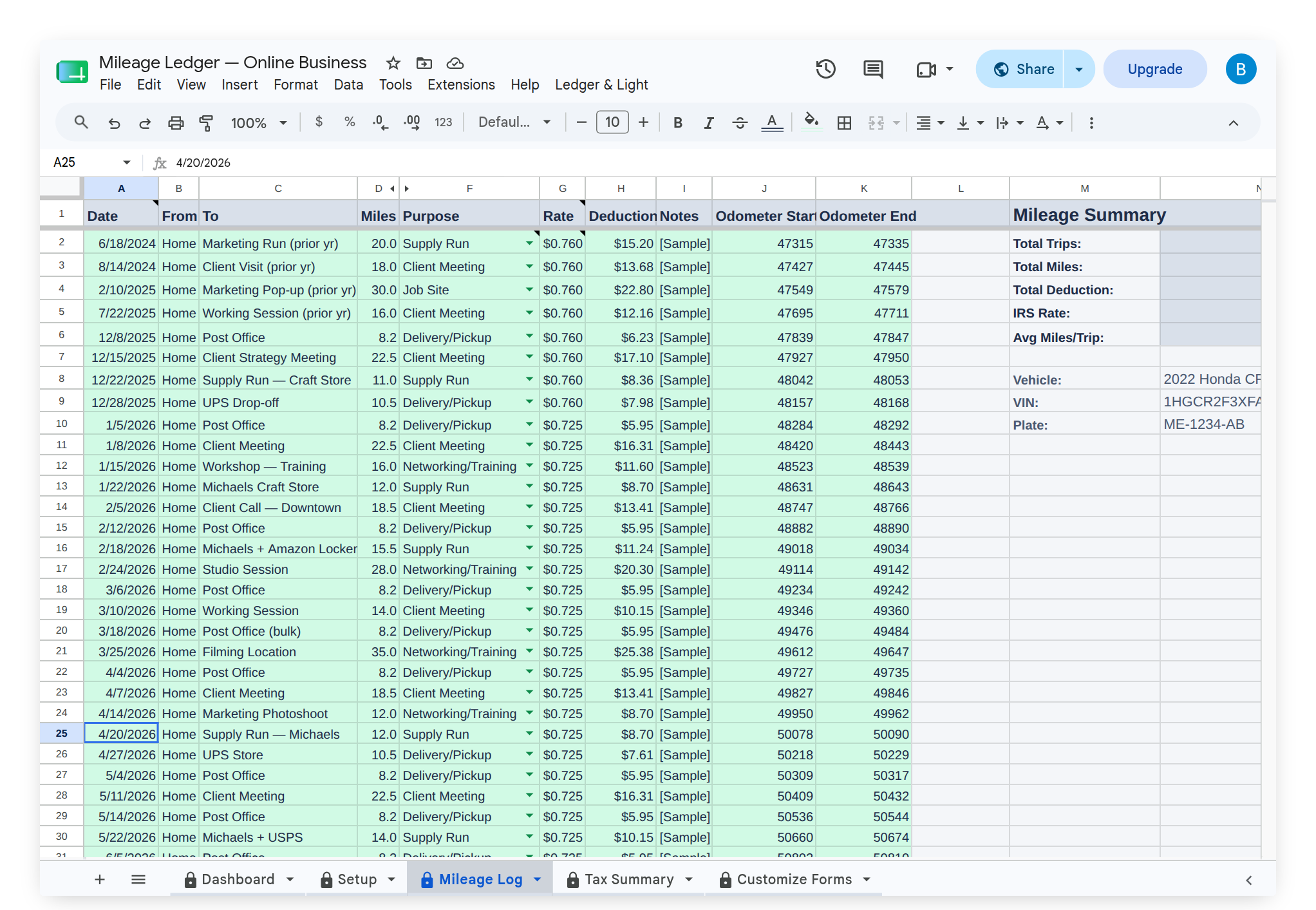
Mileage Ledger keeps the first set of records. The Mileage Form logs one trip per submission, capturing date, start and end points, purpose, and odometer start and end, and the Mileage Log calculates deductible miles and applies the current IRS standard mileage rate to each trip automatically. The Check Tax Info option in the custom Ledger & Light menu confirms the correct rate for the tax year, and the Tax Summary carries the running deduction. Vehicle details such as make, model, year, and plate live on the Setup tab.
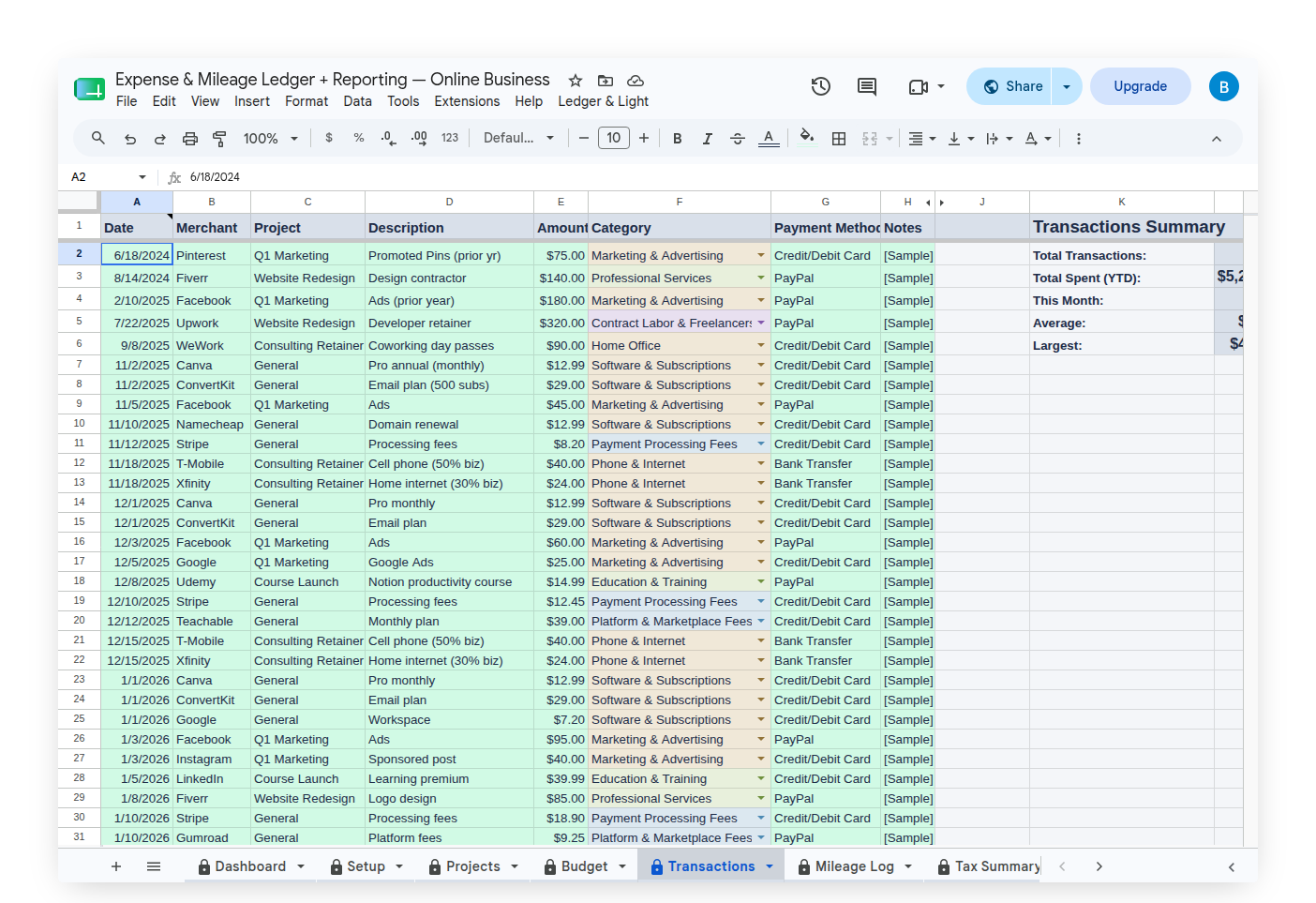
The second set of records, the actual costs, is where Expense & Mileage Ledger + Reporting comes in. Fuel, repairs, insurance, and registration are logged in its Expense Form under the Car & truck category, each entry dated, and the form can attach a photo of the receipt once that upload field is added during setup. At tax time the Tax Summary in Expense & Mileage Ledger + Reporting sets the comparison up directly: its Vehicle Deduction block (Schedule C Line 9) calculates the standard mileage deduction, totals the vehicle operating costs logged against it, and states the business-use percentage — the three figures an accountant needs to settle which method comes out larger.
For handing the year off to an accountant, upgrading to Expense & Mileage Ledger + Reporting adds Email Mileage Log Report, which sends the full mileage log as a formatted PDF, and Tab Export, which saves every tab to Drive organized by tab and year. The record-keeping is the driver's job through the year; the calculation is the accountant's job at filing time, and what they can calculate depends entirely on what was captured.
Both ledgers hold many years of records in a single file, so there is no need to wait for January or start a fresh file to begin. Every trip and every cost is entered with its own date, past dates included, and lands in the correct tax year automatically. Each is a one-time purchase that lives in a personal Google Drive, not a subscription that has to be renewed to keep the records readable.
This article is general information, not tax or legal advice. Confirm the current rate, the method choice, and how either applies to a specific vehicle and business with an accountant.