
A Bird List That Knows What You Have Heard and Seen: How the Birding Ledger Works
A bird list with targets, heard birds, seen birds and last seen dates: how the Birding Ledger logs each species from your phone, form to sheet

A bird list is worth keeping for as long as it can answer three questions: which birds are still to find, which songs are known without a face to match, and when was each one last seen. The Birding Ledger is built around those three questions. It is a Google Sheet with a phone form: each time a species is added, heard or spotted, the entry travels form to sheet and the list updates from it. Logged in-the-moment, the morning the bird is still in the branches, the sheet holds a life list worth coming back to.
The form that writes to the list
The form is called Log Birds, and a link to it sits on the Dashboard under the heading "In-the-moment entry." It asks for the date, which falls back to today when it is left blank; the bird, chosen from a dropdown of every species on the list; a new-bird question for a species that is not on the list yet; what happened, which is Added, Heard or Spotted; How many, for the birds counted; and a note, a good place for where the bird was.
Everything the form collects lands as one row on the Birding Log tab, so the whole history sits in one place, in order.
Three words for three kinds of moment
Added puts a species on the list, one hoped for or one already known. It starts as a Target. Heard is a bird known by its song or call and not yet seen; its Stage becomes Heard and the date goes in its Heard column. Spotted is a bird seen; its Stage becomes Seen and its Last Seen date is the day it was logged.
How many is for the birds counted, and it can be left blank. Spot the same bird again and the Last Seen date moves to the new day.
A new bird, typed on the phone
A bird that turns up at the feeder and is not on the list yet is typed into the new-bird question. It joins the Items tab as a Target, and the entry is logged against it. Typing the same name again, in any capitals, finds the existing row and never makes a twin.
The Items tab is the list
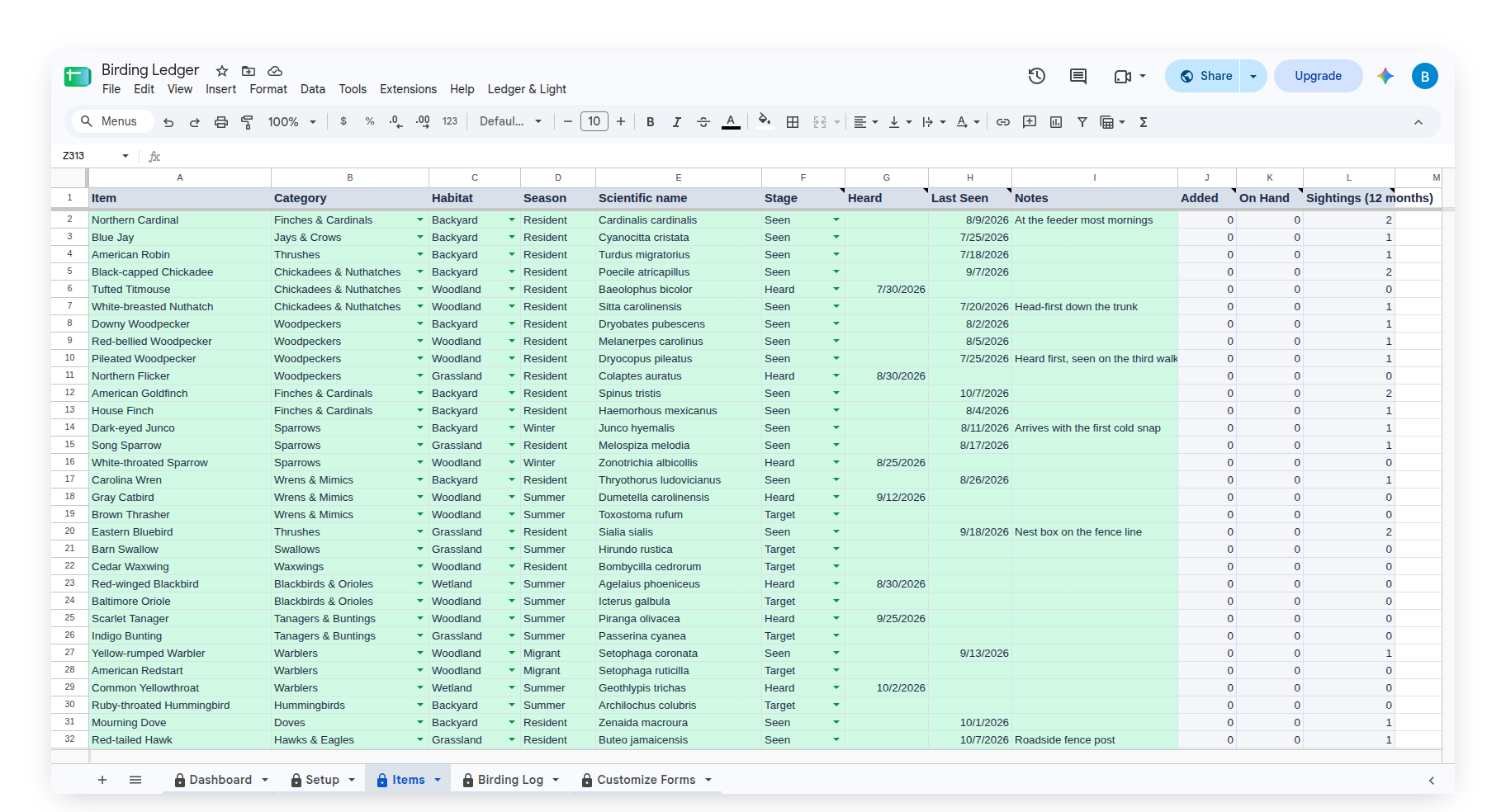
Every species has one row on the Items tab. The owner's columns are Item, Category (the group), Habitat, Season, Scientific name and Notes. The sheet fills in the rest from the log: Stage, Heard, Last Seen, Added, On Hand and Sightings (12 months).
Habitat can be the backyard, woodland, wetland, shoreline, grassland or mountains. Season is the owner's own word, such as Resident, Summer, Winter or Migrant.
Targets, Heard Not Yet Seen and what was seen
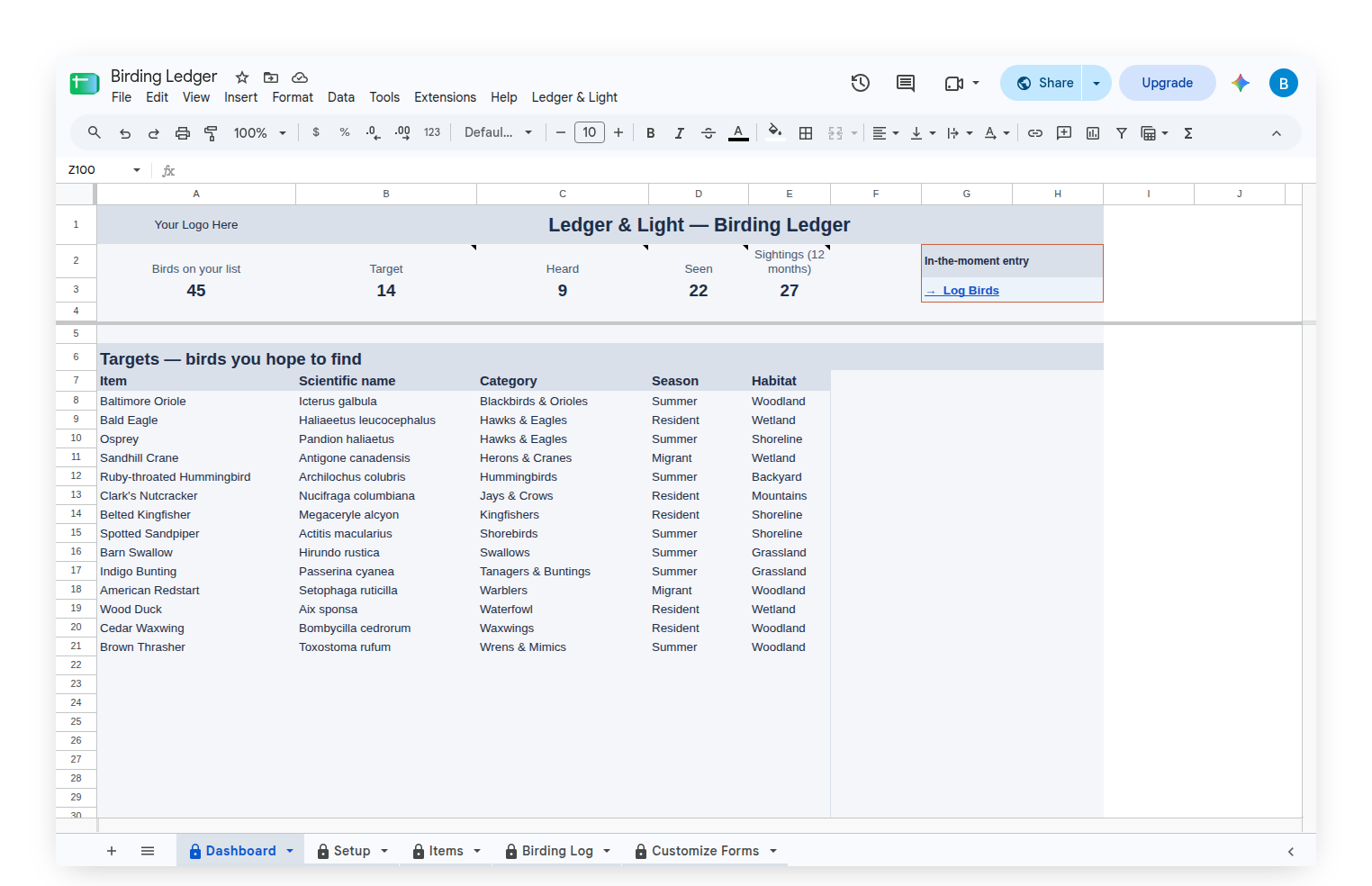
The Dashboard shows a row of counts across the top: birds on the list, and how many sit at Target, Heard and Seen, with a count of the sightings logged in the last 12 months. Below it, Targets lists every species still to find, ordered by group, with its scientific name, season and habitat. With nothing left to find, it says "Your Targets list is empty."
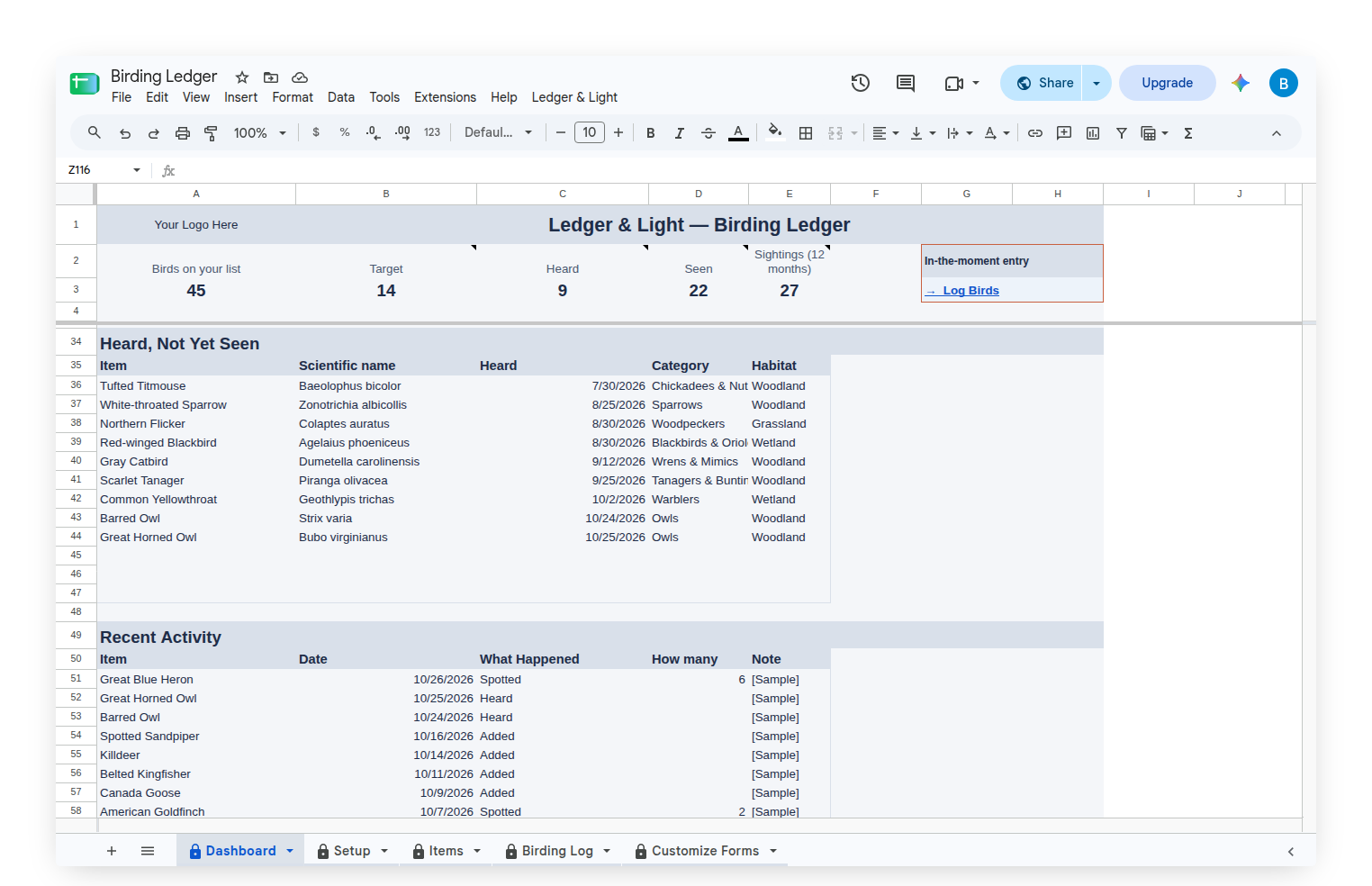
Heard, Not Yet Seen lists every bird known by its call and not yet seen, with the date it was heard. With nothing waiting, it says "No bird is waiting on a good look. Log Heard when you know a song but cannot find the singer." Recent Activity shows the latest entries from the log.
Groups and habitats, in the owner's words
The Customize Forms tab holds two short lists: Habitat and Categories. They start with Backyard, Woodland, Wetland, Shoreline, Grassland and Mountains, and groups from Finches & Cardinals and Jays & Crows to Hawks & Eagles, Owls, Waterfowl and Shorebirds. They fill the dropdowns on the Items tab, and any of them can be renamed, added to or removed, so the sheet describes the owner's own outings rather than a template's.
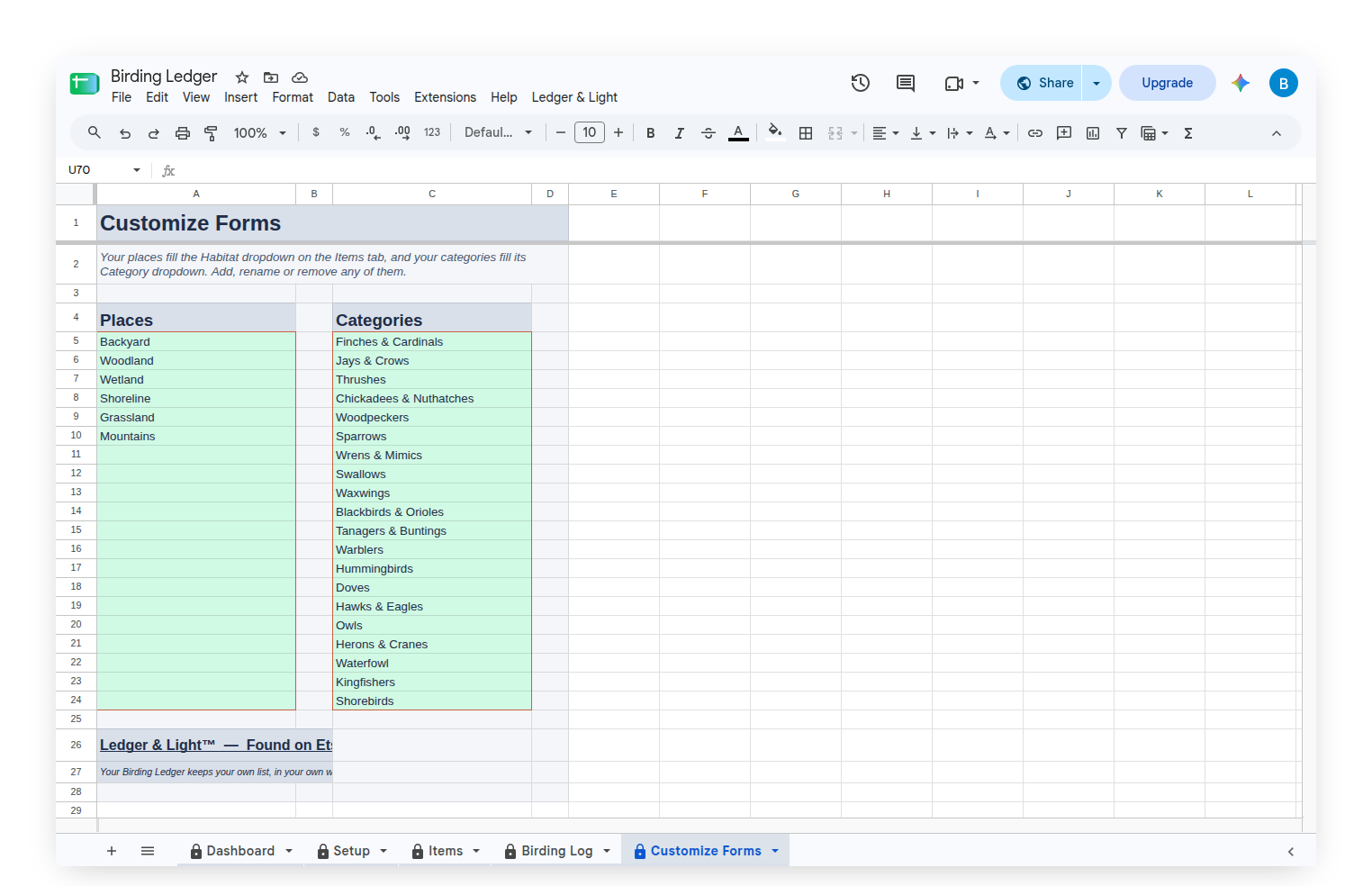
Starting with a sample list, then making it your own
The Birding Ledger arrives filled with a sample list of 45 birds across every stage, group and habitat, with months of log entries, so every list on the Dashboard shows something real. The sightings are invented. Clear Sample Data, on the custom Ledger & Light menu, empties the log and the birds, keeps the groups and habitats, and leaves the Items tab ready for the owner's own list.
Owned, not rented
The Birding Ledger is a Google Sheet bought once and kept, living in the owner's own Google Drive with no subscription to renew. Because the log is a list of rows, a life list that grows simply adds rows to the same sheet, and the history stays in one file.
This article describes how the Birding Ledger works. It keeps the birder's own list, in the birder's own words and sightings.
Common questions
What is the Birding Ledger?
The Birding Ledger is a Google Sheet with a phone form for logging birds. Each time a species is added, heard or spotted, the entry travels form to sheet, and the Items tab and Dashboard update from it.
Can a bird list show which birds are only heard and not yet seen?
Yes. The Dashboard has a Targets list of every species still to find, and a Heard, Not Yet Seen list of every bird known by its call and not yet seen, with the date it was heard.
Does the Birding Ledger record last seen dates?
Yes. A Spotted entry moves the bird to Seen and puts the day's date in its Last Seen column. Spotting the bird again moves the date to the new day.
Can the groups and habitats be changed in the Birding Ledger?
Yes. The Customize Forms tab holds two lists, Habitat and Categories. Either one can be renamed, added to or removed, so the dropdowns describe the birder's own outings.
Does the Birding Ledger come with sample data?
Yes. It arrives with a sample list of 45 invented birds across every stage, group and habitat. Clear Sample Data, on the custom Ledger & Light menu, empties the log and the birds and keeps the groups and habitats.