
A Service Hours Log With the Goal Built In: How the Volunteer Hours Ledger Works
A volunteer hours log with the goal built in: how the Volunteer Hours Ledger logs each shift from your phone, form to sheet, with a verification link


A volunteer hours log is worth keeping for the day someone asks for the total: a school service requirement, a scouting award, a volunteer service award, an application. The Volunteer Hours Ledger is built around that day. It is a Google Sheet with a phone form: each time a shift is finished, the entry travels form to sheet, and the sheet adds it to the running record of a goal. Logged in-the-moment, right after the food pantry closes or the park cleanup ends, the record holds every hour with the proof of it beside it.
See Volunteer Hours Ledger on Etsy ↗
The form that writes to the log
The form is called Log Service Hours, and a link to it sits at the top of the Dashboard, beside the counted hours. It asks for the date, the activity, the organization, the category, the hours and a link to a signed log, a letter or an email that confirms the hours. Hours go in as a decimal: 1.5 is an hour and a half.
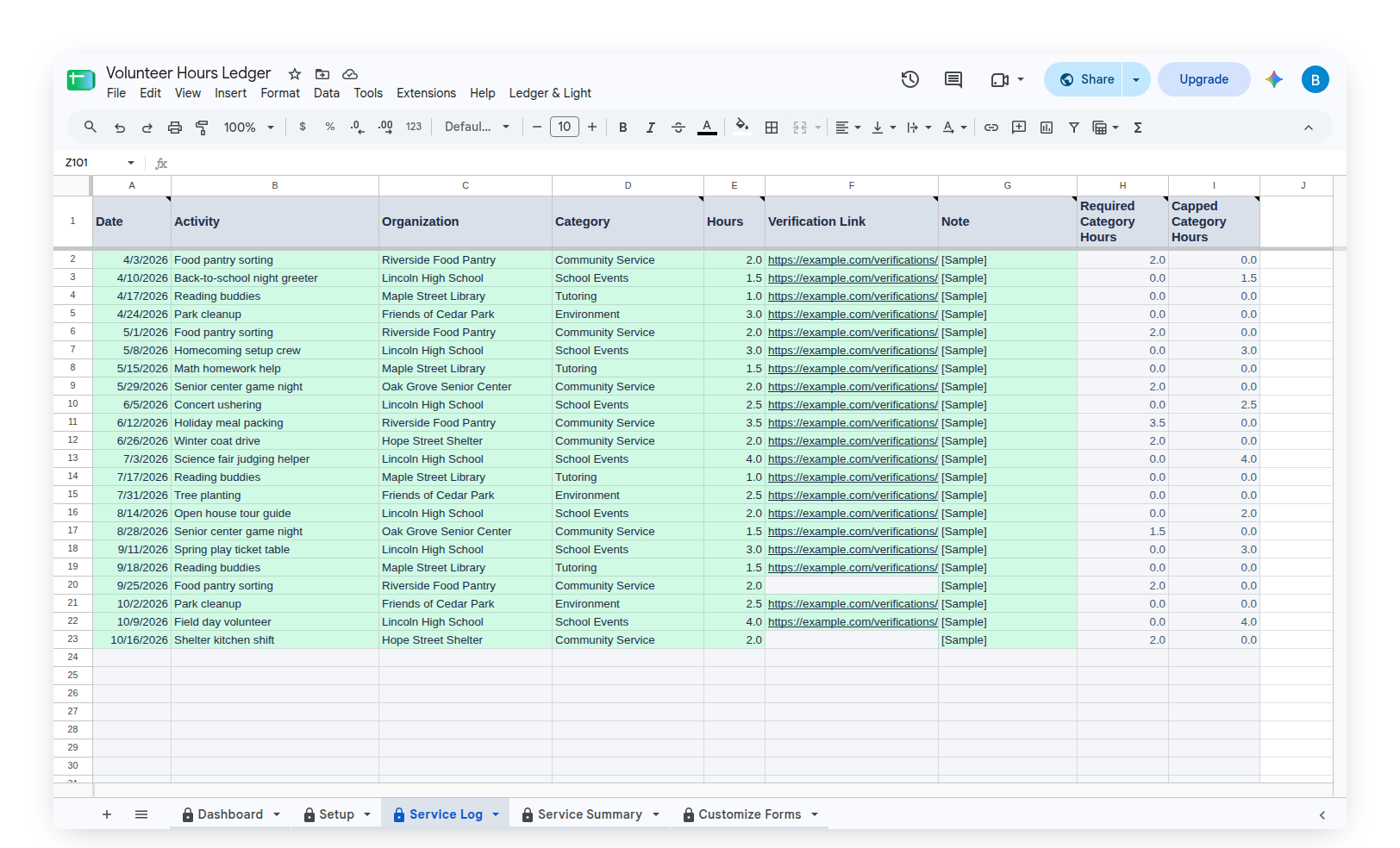
Everything the form collects lands as one row on the Service Log tab, one row per block of service, so the whole history sits in one place, in order.
A goal typed once, on the Setup tab
Under Your Service Goal, the owner types a goal start date and a goal end date, names a required category and a capped category, and types the numbers: the total hours the goal needs, a minimum for the required category, such as Community Service, and a maximum for the capped one, such as School Events. Schools, chapters and programs set these differently and change them, so the sheet carries no program's figures. Every number is a cell the owner types and can change.
The sheet does not decide what counts. It reads the owner's own numbers against the owner's own log.
Your Requirements, on the Dashboard
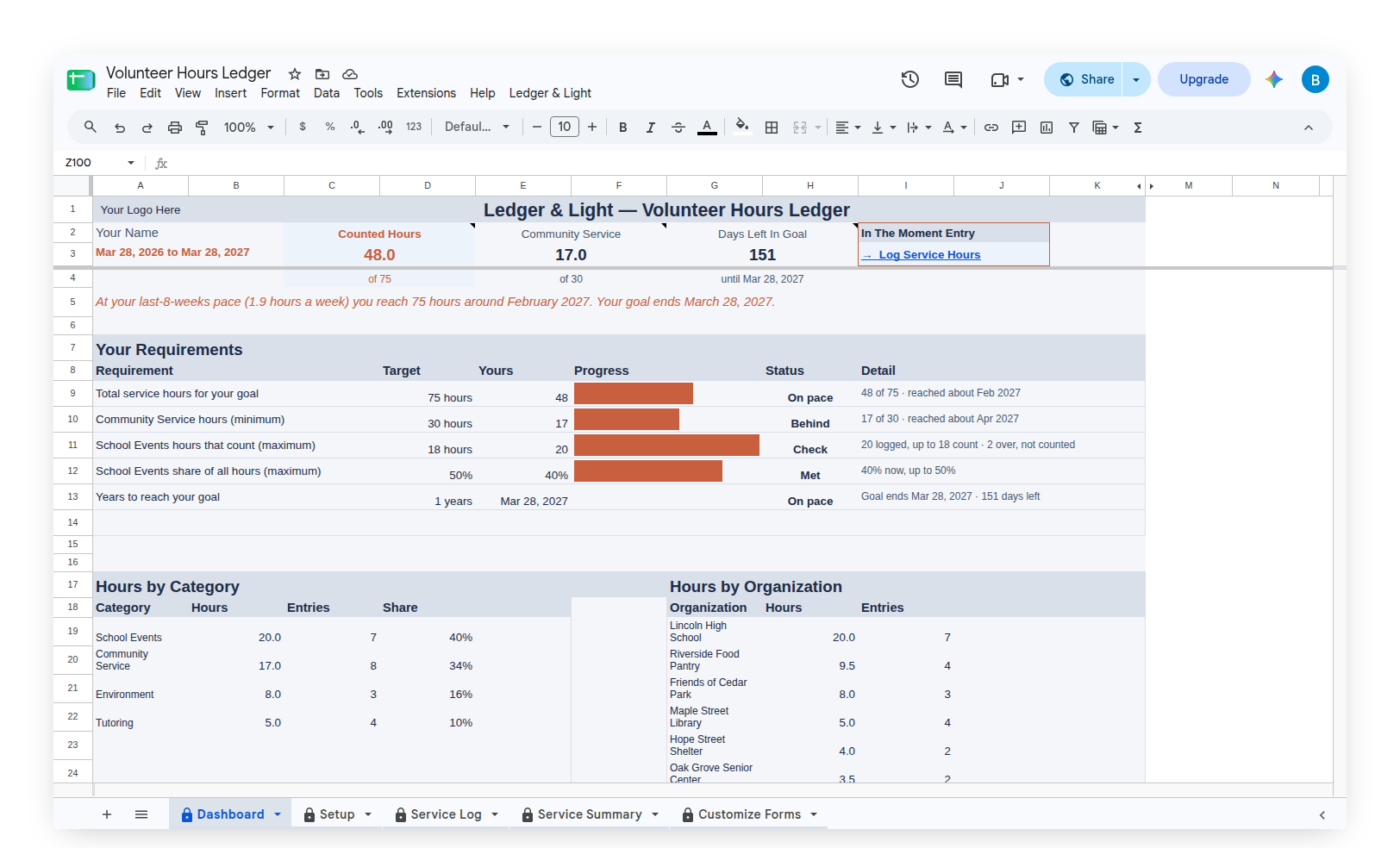
The Dashboard opens with the counted hours, the hours in the required category and the days left until the goal ends. Below that is a ladder called Your Requirements. Each row is one rule, with its target, the owner's figure, a progress bar and a status. There are four status words: Met, On pace, Behind and Check.
A pace line above the ladder reads the recent rate forward: "At your last-8-weeks pace … you reach the total around …", set beside the goal end date.
The capped category works the way a cap does. Hours over the maximum are shown on the ladder and kept out of the counted total, and a share-of-hours limit can hold the capped category to a share of all hours.
Hours by category and by organization
Below the ladder, the Dashboard breaks the hours down two ways: Hours by Category, with each category's hours, entries and share, and Hours by Organization, with the same figures for each place the owner served. A Recent Service list shows the latest entries.
Verification links, counted
Each entry has a Verification Link column. The Dashboard counts the links on file and lists the entries still waiting for one, under Your Verifications. The shift and the proof of it sit in the same row, so the entries that need a signed log or a letter are easy to find before anyone asks.
A summary for any date range
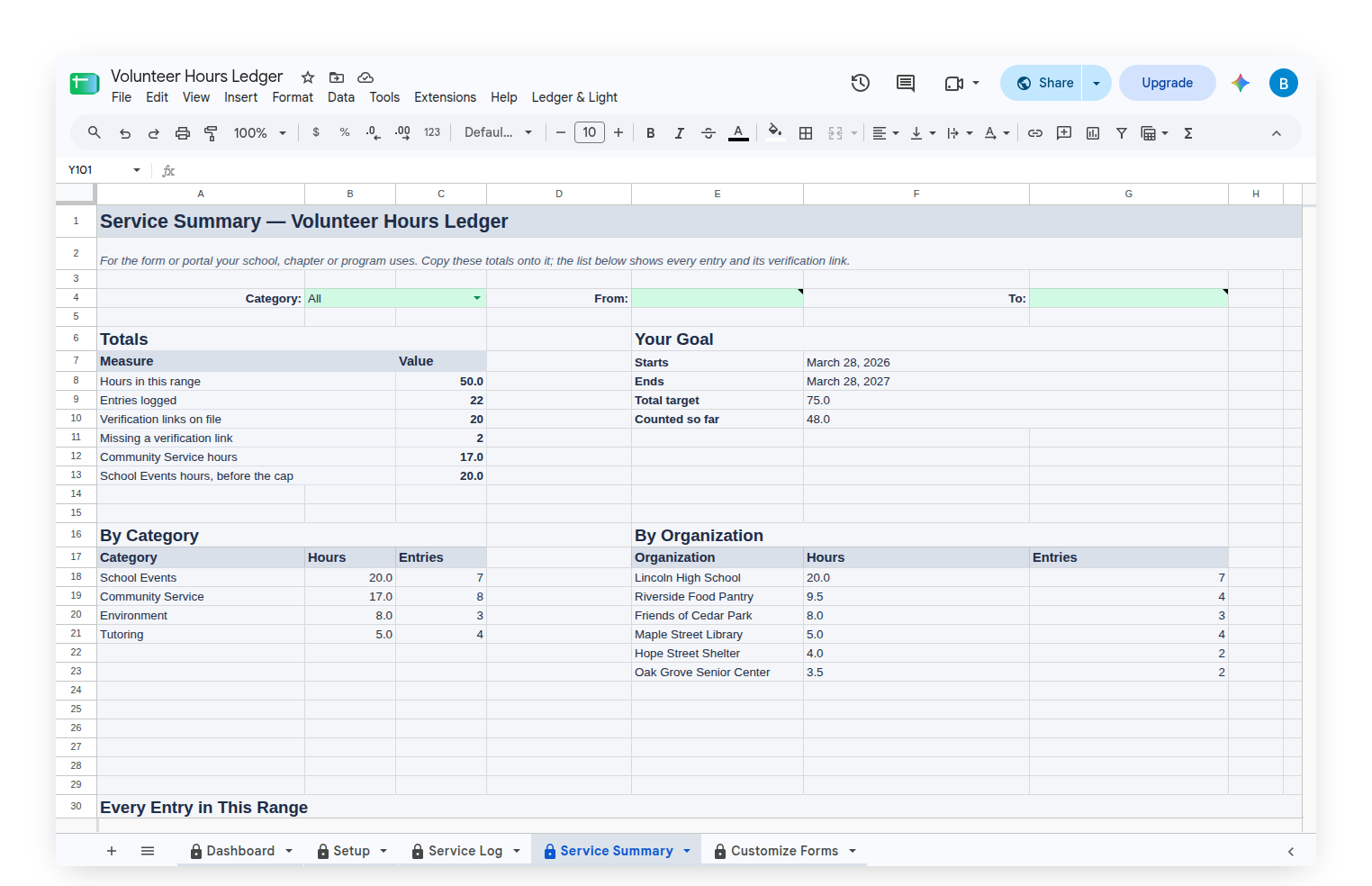
The Service Summary tab gathers a date range into the totals a form or portal asks for: hours in the range, entries logged, verification links on file, hours in the required category, and the capped category's hours before the cap. Below the totals are hours by category and by organization, and every entry in the range with its verification link. The owner copies the totals onto the form the school, chapter or program uses.
Categories in the owner's own words
The Customize Forms tab holds one short list, Categories. It fills the Category dropdown on the form. Any category can be renamed, added to or removed, so the dropdown describes the owner's own service. Past entries keep their original category when one is renamed or deleted; only new form entries use the updated list.
What the Volunteer Hours Ledger does not do
The Volunteer Hours Ledger keeps the owner's own record of the service hours logged. It does not verify, certify or submit hours, and it is not affiliated with any school, honor society, scouting organization, award program or the organizations served. Requirements differ by school, chapter and program and can change, so the school, chapter or program decides what counts.
Starting with a sample, then making it your own
The Volunteer Hours Ledger arrives filled with a sample school year of service entries, so every panel on the Dashboard shows something real. The activities and organizations are invented. Clear Sample Data, on the custom Ledger & Light menu, removes the sample entries and leaves the sheet ready for the owner's own.
Owned, not rented
The Volunteer Hours Ledger is a Google Sheet bought once and kept. It lives in the owner's own Google Drive with no subscription to renew, and because the log is a list of rows, a goal that runs for years simply adds rows to the same file.
Volunteer Hours Ledger on Etsy
Common questions
What is the Volunteer Hours Ledger?
The Volunteer Hours Ledger is a Google Sheet with a phone form for logging service hours. Each shift travels form to sheet as one row on the Service Log, and the Dashboard measures the running total against the numbers the owner typed from their own school, chapter or program.
Does the Volunteer Hours Ledger verify or submit service hours?
No. It keeps the owner's own record. It does not verify, certify or submit hours, and the school, chapter or program decides what counts.
Does the Volunteer Hours Ledger include the requirements for a particular program?
No. Requirements differ by school, chapter and program and can change, so the sheet carries no program's figures. The owner types the total, the category minimum and the category maximum from their own program, and every number can be edited.
Can a signed log or letter be attached to an entry?
Each entry has a Verification Link column for a link to a signed log, a letter or an email that confirms the hours. The Dashboard counts the links on file and lists the entries still waiting for one.
Can the categories be changed in the Volunteer Hours Ledger?
Yes. The Customize Forms tab holds the Categories list that fills the form's dropdown. Categories can be renamed, added to or removed, and past entries keep the category they were logged with.