
A Tip Log Kept Shift by Shift: How the Tip Ledger Works
A tip log kept shift by shift: how the Tip Ledger logs cash tips, card tips and tip-outs from your phone, and keeps the record the tips deduction relies on


A tip log is the record a tipped worker keeps for themselves: what each shift paid, what went to the rest of the team, and what reached the employer's books. The Tip Ledger is built around that record. It is a Google Sheet with a phone form. Each shift is logged in-the-moment, at the end of the night while the numbers are still in the apron, and the entry travels form to sheet. The sheet works out net tips, dollars per hour and the cash that was never reported, shift by shift.
It comes in three editions on one engine. The Bartender and Server editions log cash tips, card tips and tip-outs, and include a Pay Stub Check. The Cash Tip Ledger is for any tipped worker paid in cash: stylists, barbers, valets, housekeepers, baristas, movers.
The form that logs a shift
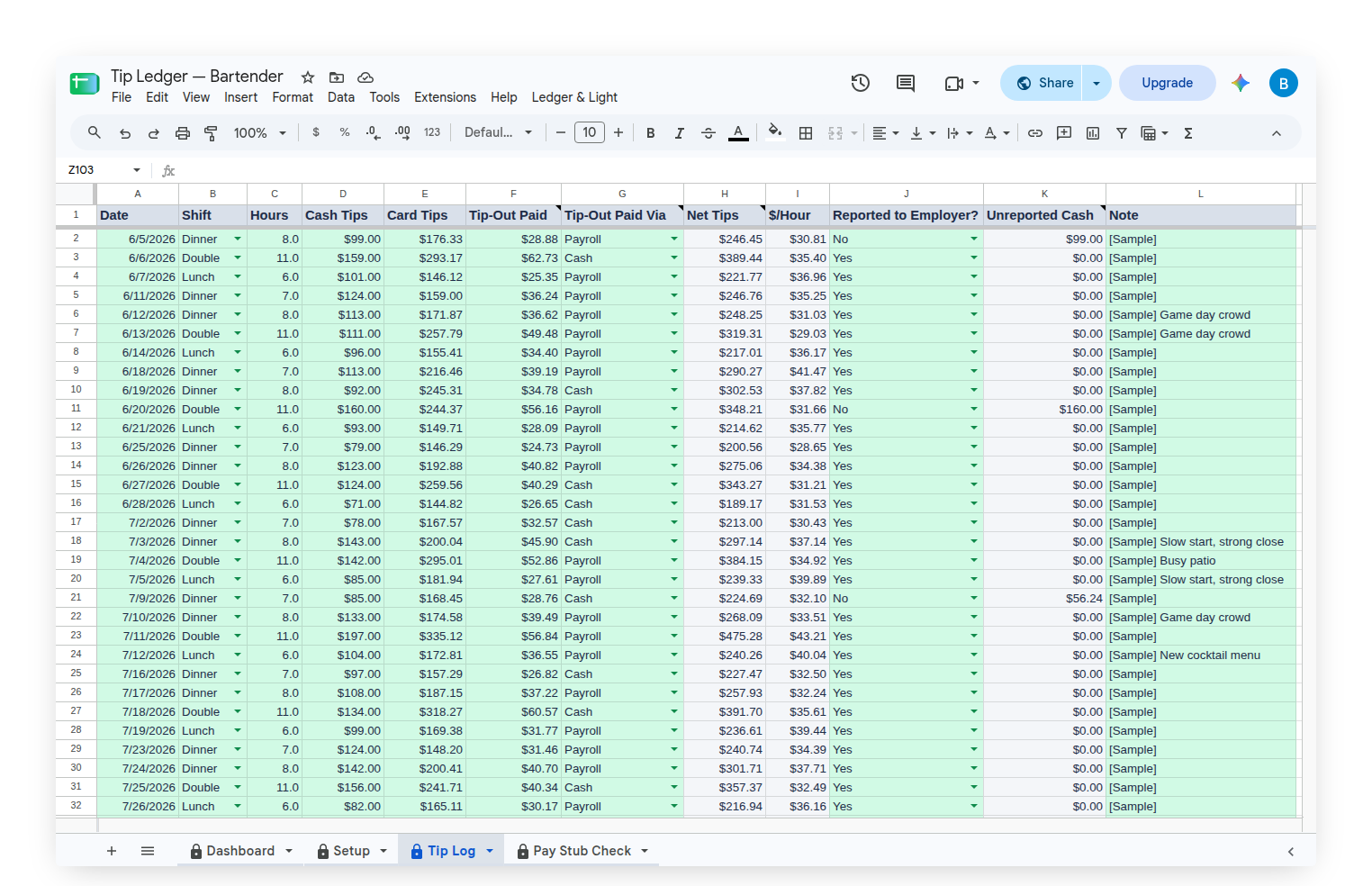
The form is called Log a Shift. It asks for the date, the shift (Lunch, Dinner, Double or Other), the hours worked, the cash tips, the card tips, the tip-out paid to others, how the tip-out was paid (in cash or through payroll), whether the tips were reported to the employer, and a note. The Cash Tip Ledger asks the same questions without the card tips and the payroll choice, and its shifts are Day, Evening, Double or Other.
Each shift lands as one row on the Tip Log tab.
What the sheet works out from each shift
Net Tips is cash plus card tips, minus the tip-out. Dollars per hour is net tips divided by the hours. Unreported Cash fills in only on a shift marked No under Reported to Employer: it is the cash taken home that shift, less any tip-out paid in cash. A tip-out paid through payroll already came out of the card tips, so it is never taken off twice. At year end, the Unreported Cash total is the figure Form 4137 asks for.
The Pay Stub Check, for card tips
The Bartender and Server editions include a Pay Stub Check tab. On payday, type the pay period's dates and the card tips printed on the stub. The sheet adds up the card tips logged in that period, takes off the tip-outs marked as paid through payroll, and compares. A period within a dollar reads Matches. Anything further apart reads Check this period.
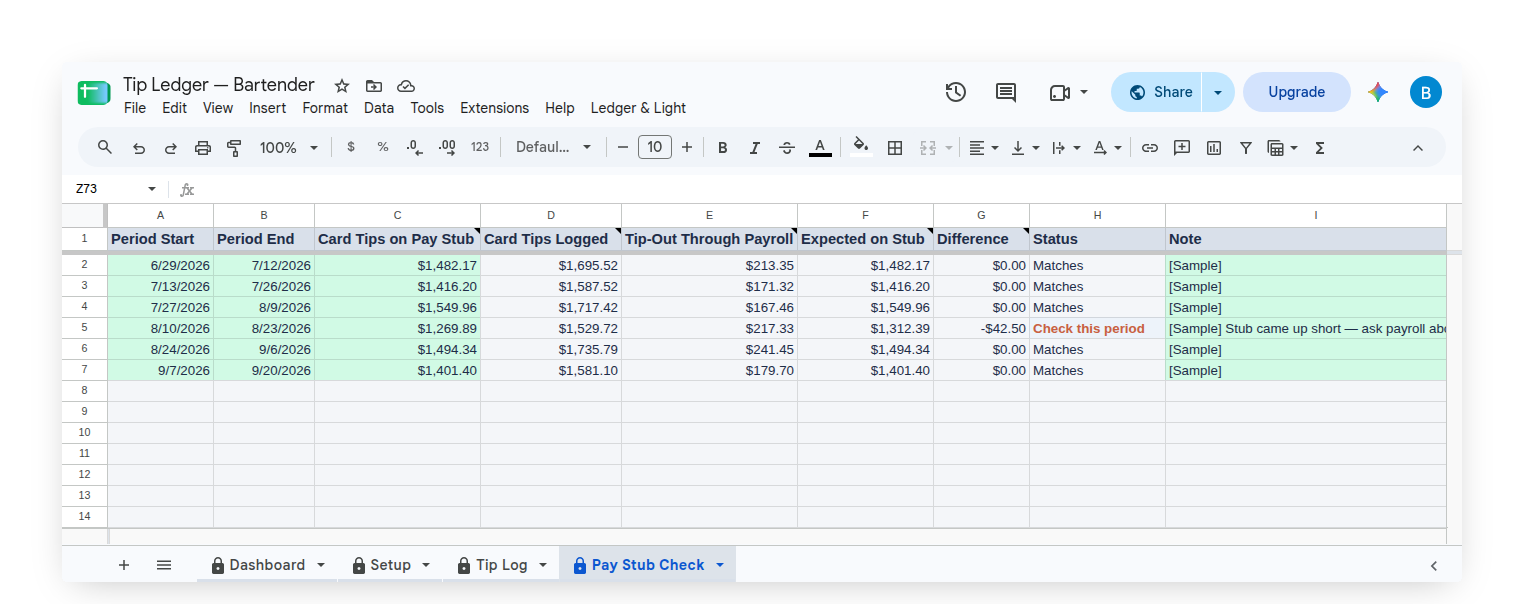
It checks card tips only. A flag is a question to take to a manager or payroll, not an answer.
The Dashboard: the year so far
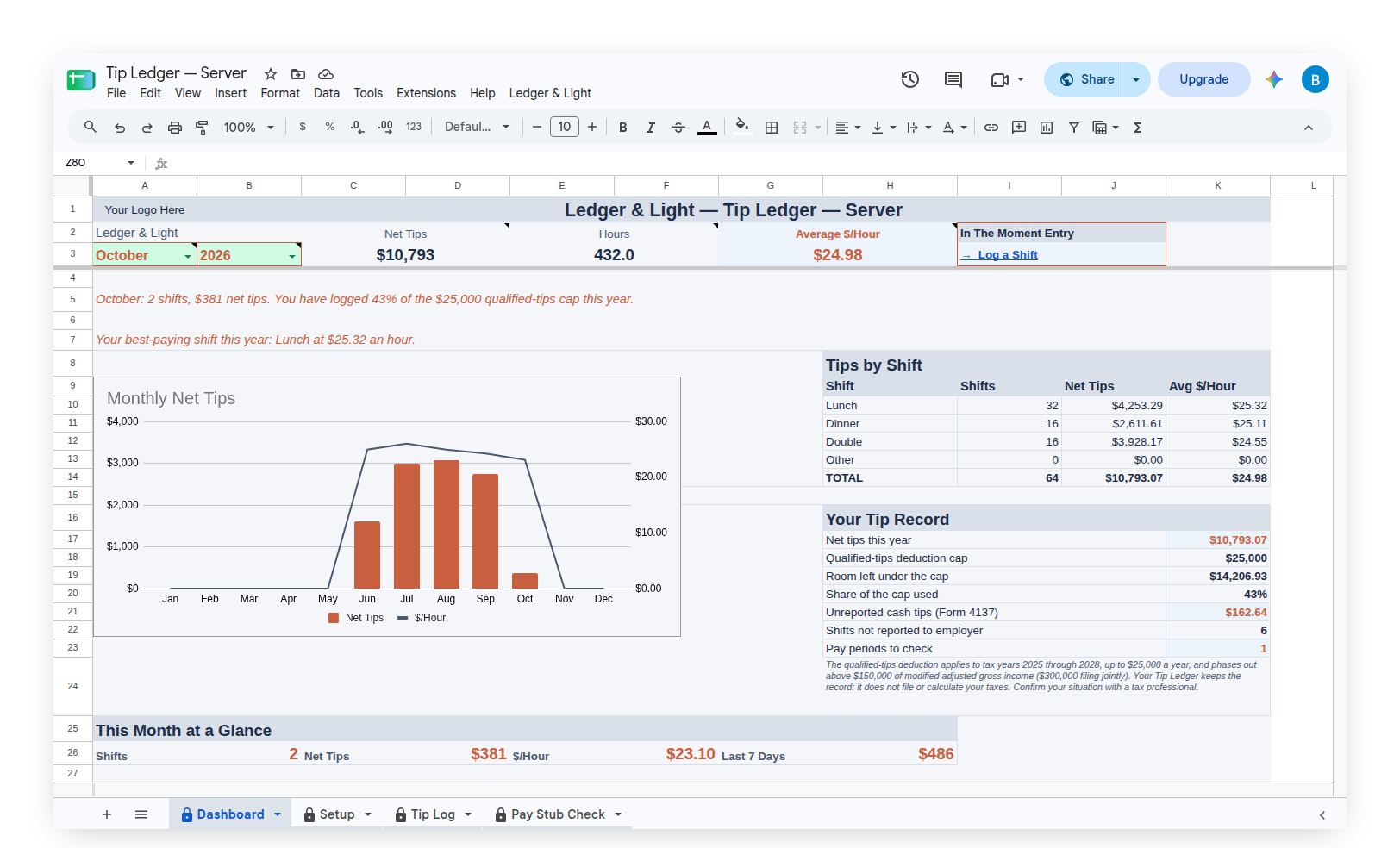
Across the top sit Net Tips, Hours and Average $/Hour for the chosen month and year, with a Log a Shift link beside them. A line names the best-paying shift of the year. Below are a Monthly Net Tips chart, Tips by Shift, a monthly summary, and This Month at a Glance.
The Your Tip Record panel holds the numbers that matter at tax time: net tips this year, how much of the qualified-tips deduction cap that total represents, unreported cash tips (Form 4137), shifts not reported to the employer and, in the full editions, pay periods to check.
The record the deduction relies on
The qualified-tips deduction applies to tax years 2025 through 2028, up to $25,000 a year, for tips received in an occupation on the IRS list of tipped occupations. It phases out above $150,000 of modified adjusted gross income ($300,000 filing jointly). Only tips reported on a W-2, a 1099 or Form 4137 count.
The Tip Ledger keeps the record that deduction relies on: a contemporaneous log, kept shift by shift. It does not file, claim or calculate taxes, and the share-of-cap figure is a share of logged net tips, not a deduction amount. A tax professional confirms what applies.
Starting with sample shifts, then making it your own
Each edition arrives with months of sample shifts, and the full editions with sample pay periods, one of them flagged. Clear Sample Data, on the custom Ledger & Light menu, removes every sample row and keeps any shift already logged for real.
Owned, not rented
The Tip Ledger is a Google Sheet bought once and kept. It lives in the owner's own Google Drive, with no subscription to renew, and the Tip Log holds thousands of shifts, so years of tips stay in one file.
Common questions
What is the Tip Ledger?
The Tip Ledger is a Google Sheet with a phone form for logging tips. Each shift travels form to sheet, and the sheet works out net tips, dollars per hour and unreported cash, shift by shift and for the year.
Does the Tip Ledger claim the qualified-tips deduction?
No. It keeps the record the deduction relies on. It does not file, claim or calculate taxes. The taxpayer or their tax preparer claims the deduction, and a tax professional confirms what applies.
How does a tip log handle tip-outs?
The Tip Ledger asks for the tip-out paid each shift and how it was paid. Net tips are cash plus card tips minus the tip-out, and a tip-out paid through payroll is never taken off twice.
Which number does Form 4137 need from a tip log?
The Unreported Cash total. The Tip Ledger fills in Unreported Cash on every shift marked No under Reported to Employer, and the year's total is the figure Form 4137 asks for.
Can the Tip Ledger check card tips against a pay stub?
Yes, in the Bartender and Server editions. The Pay Stub Check compares the card tips on each stub with the card tips logged for that period, net of payroll tip-outs, and flags any period that does not match.