
A Watchlist That Knows What You Are Watching: How the Movie Ledger Works
A movie and show watchlist with stages, started and watched dates and ratings: how the Movie Ledger logs each title from your phone, form to sheet


A movie watchlist is worth keeping for as long as it can answer three questions: what is next, what is open right now, and what did I think of the last one. The Movie Ledger is built around those three questions. It is a Google Sheet with a phone form: each time a title is added, started or watched, the entry travels form to sheet and the list updates from it. Logged in-the-moment, the night the credits roll and the ending is still fresh, the sheet holds a movie life worth coming back to.
The form that writes to the list
The form is called Log Movies, and a link to it sits on the Dashboard under the heading "In-the-moment entry." It asks for the date, which falls back to today when it is left blank; the movie or show, chosen from a dropdown of every title on the list; a new-title question for a title that is not on the list yet; what happened, which is Added, Started or Watched; a rating from 1 to 5, meant for a Watched entry; and a note.
Everything the form collects lands as one row on the Movie Log tab, so the whole history sits in one place, in order.
Three words for three kinds of moment
Added puts a title on the list: from a recommendation, a trailer or a friend. It starts on the Watchlist. Started is the day a series gets its first episode; its Stage becomes Watching and the date goes in its Started column. Watched is the night the credits roll; its Stage becomes Watched, the date goes in its Watched column and the rating is copied onto the title.
A rating is optional. A Watched entry with no rating is fine, and the title is still Watched. The latest rating logged is the one the title keeps, so a second viewing can earn a new one.
A new title, typed on the phone
A film mentioned at dinner or a series a friend swears by is not on the list yet. The new-title question takes its name, the title joins the Items tab on the Watchlist, and the entry is logged against it. Typing the same title again, in any capitals, finds the existing row and never makes a twin.
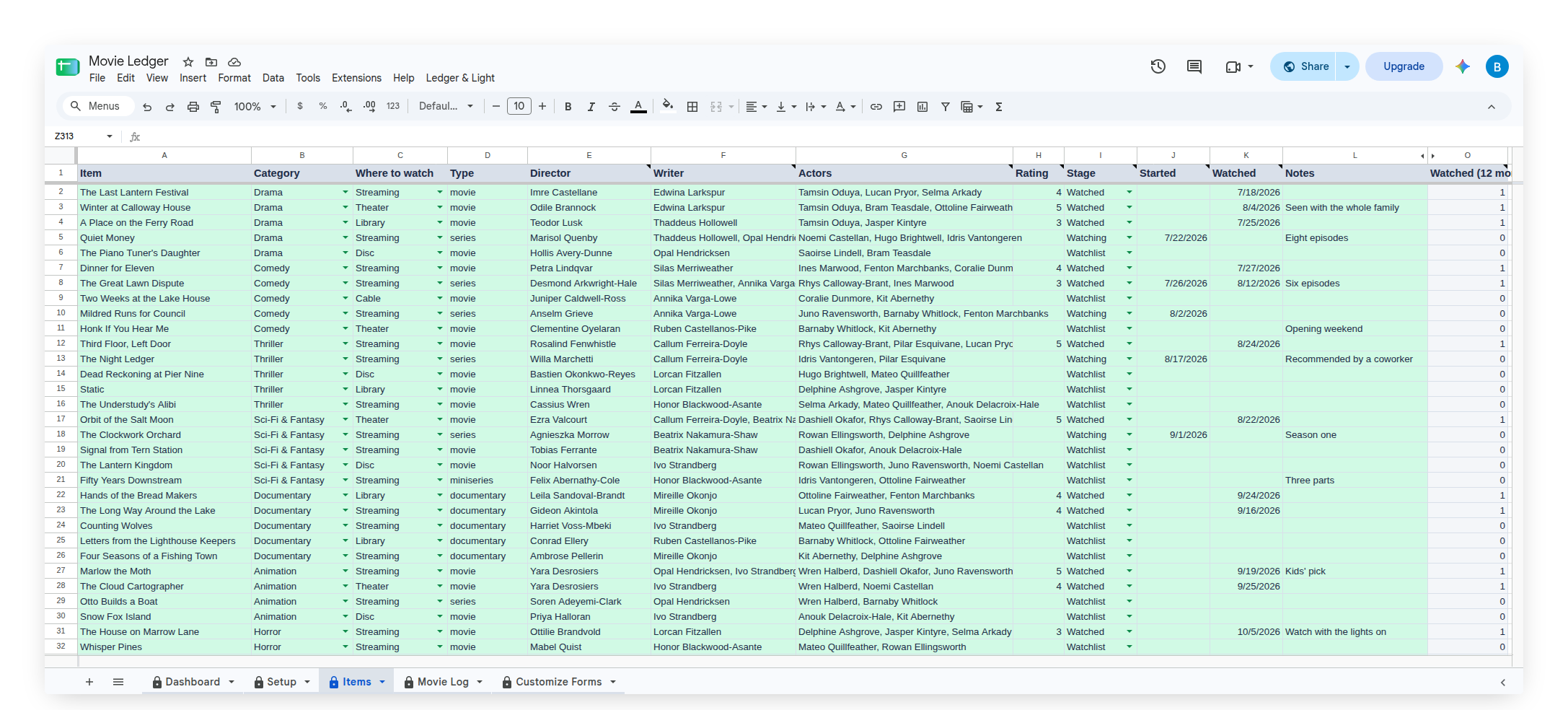
The Items tab is the list
Every title has one row on the Items tab. The owner's columns are Item, Category (the genre), Where to watch, Type, Director, Writer, Actors and Notes. The sheet fills in the rest from the log: Rating, Stage, Started, Watched and Watched (12 months).
Where to watch can be a streaming service, the library, a theater, a disc or cable. Type is the owner's own word: movie, series, miniseries or documentary. Director, Writer and Actors each take one name or several, with a comma between them, so a whole cast fits in one cell.
Up Next, Watching Now and what was watched
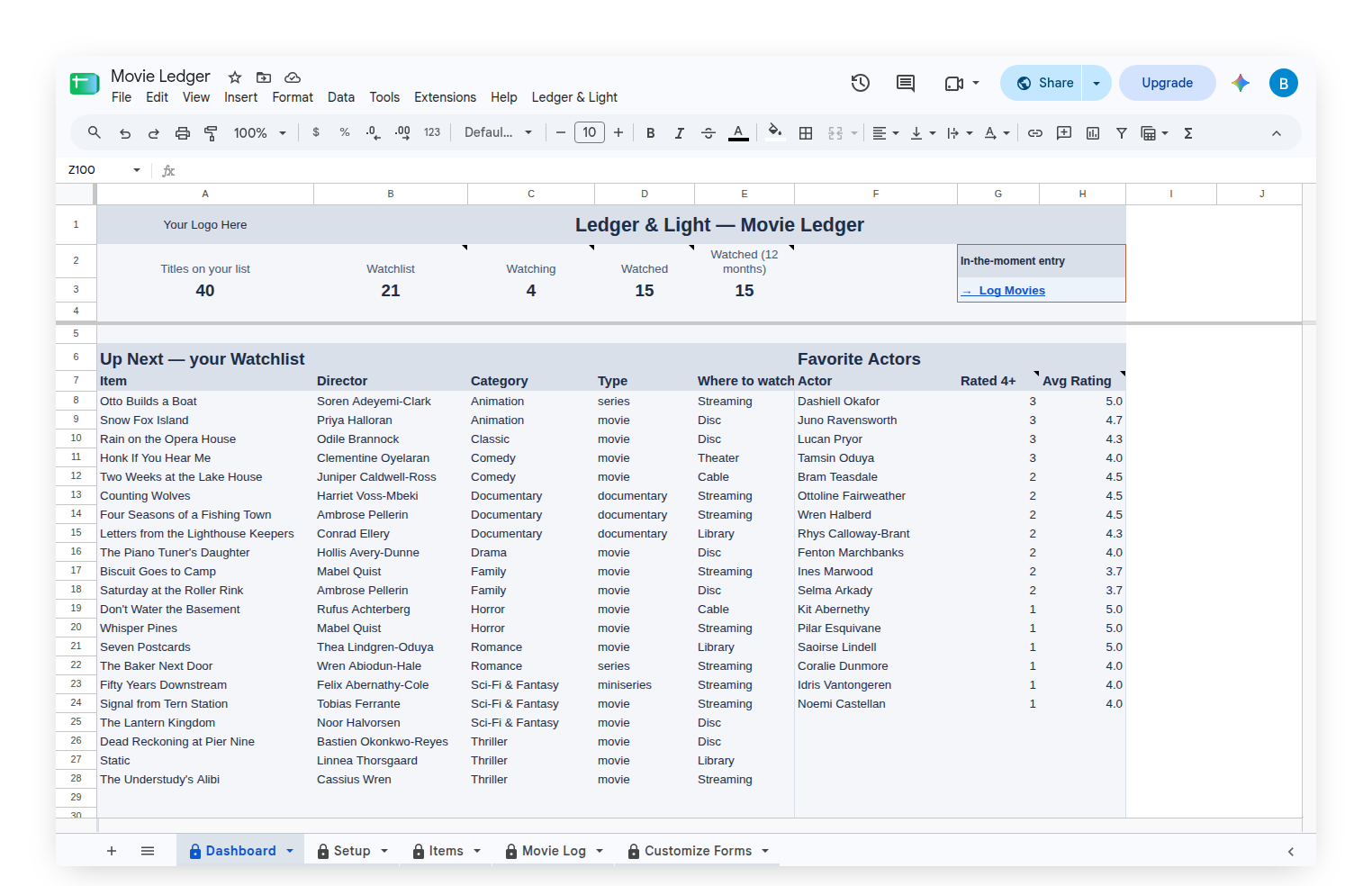
The Dashboard shows a row of counts across the top: titles on the list, and how many sit at Watchlist, Watching and Watched, with a count of the titles watched in the last 12 months. Below it, Up Next lists every title still on the Watchlist, ordered by genre, with its director, type and where to watch. With nothing left to see, it says "Your Watchlist is empty."
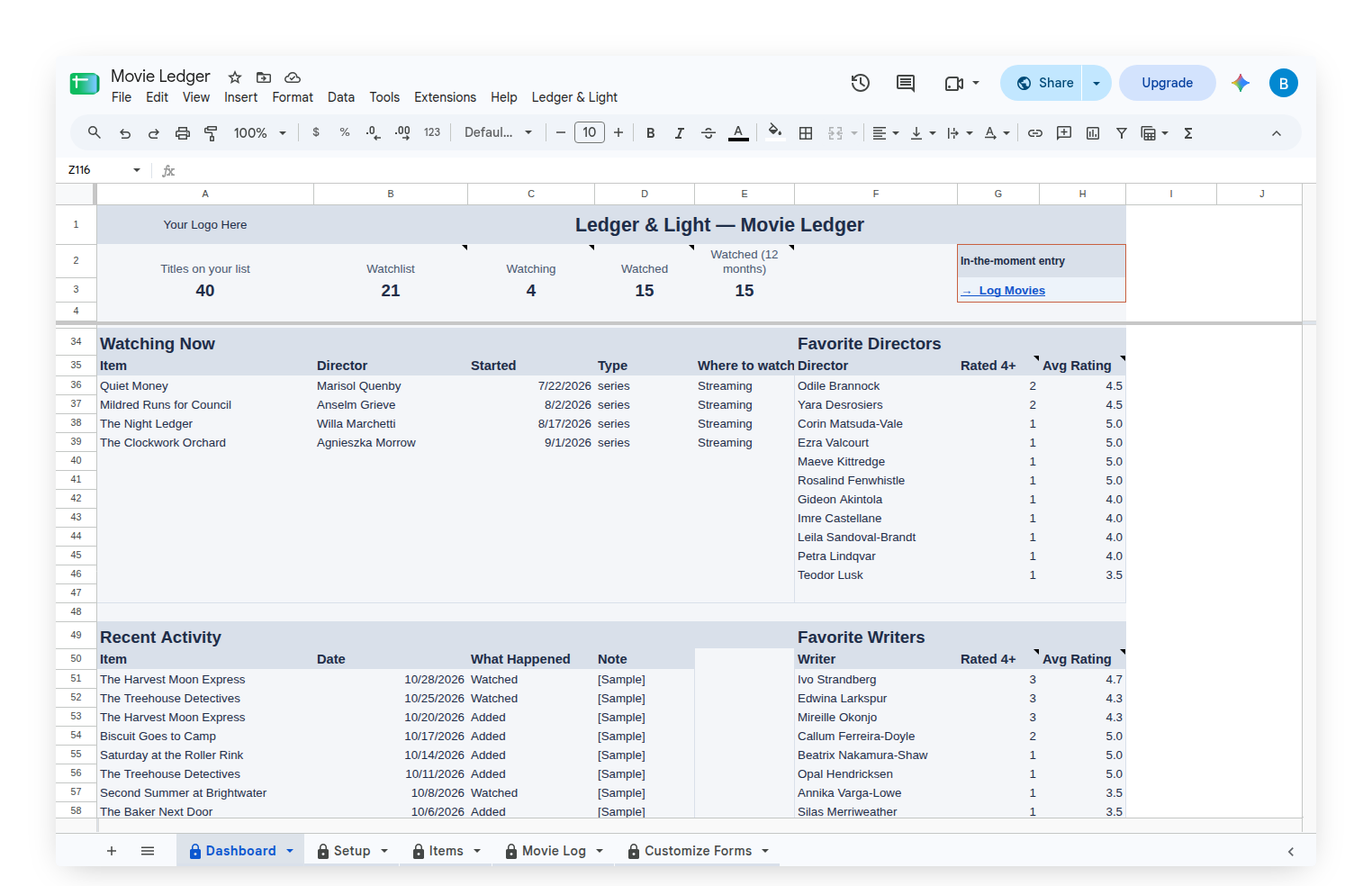
Watching Now lists every series that has been started and not finished, with the date it was started. With nothing open, it says "Nothing open right now. Log Started from your phone when you press play on a series." Recent Activity shows the latest entries from the log.
Beside those three lists sit three favorites lists: Favorite Actors next to Up Next, Favorite Directors next to Watching Now and Favorite Writers next to Recent Activity. Each one lists every name on a title rated 4 or 5, most loved first, with how many of their titles earned that rating and the average of every rating their titles carry. A title with three actors counts once for each of them.
Genres and places, in the owner's words
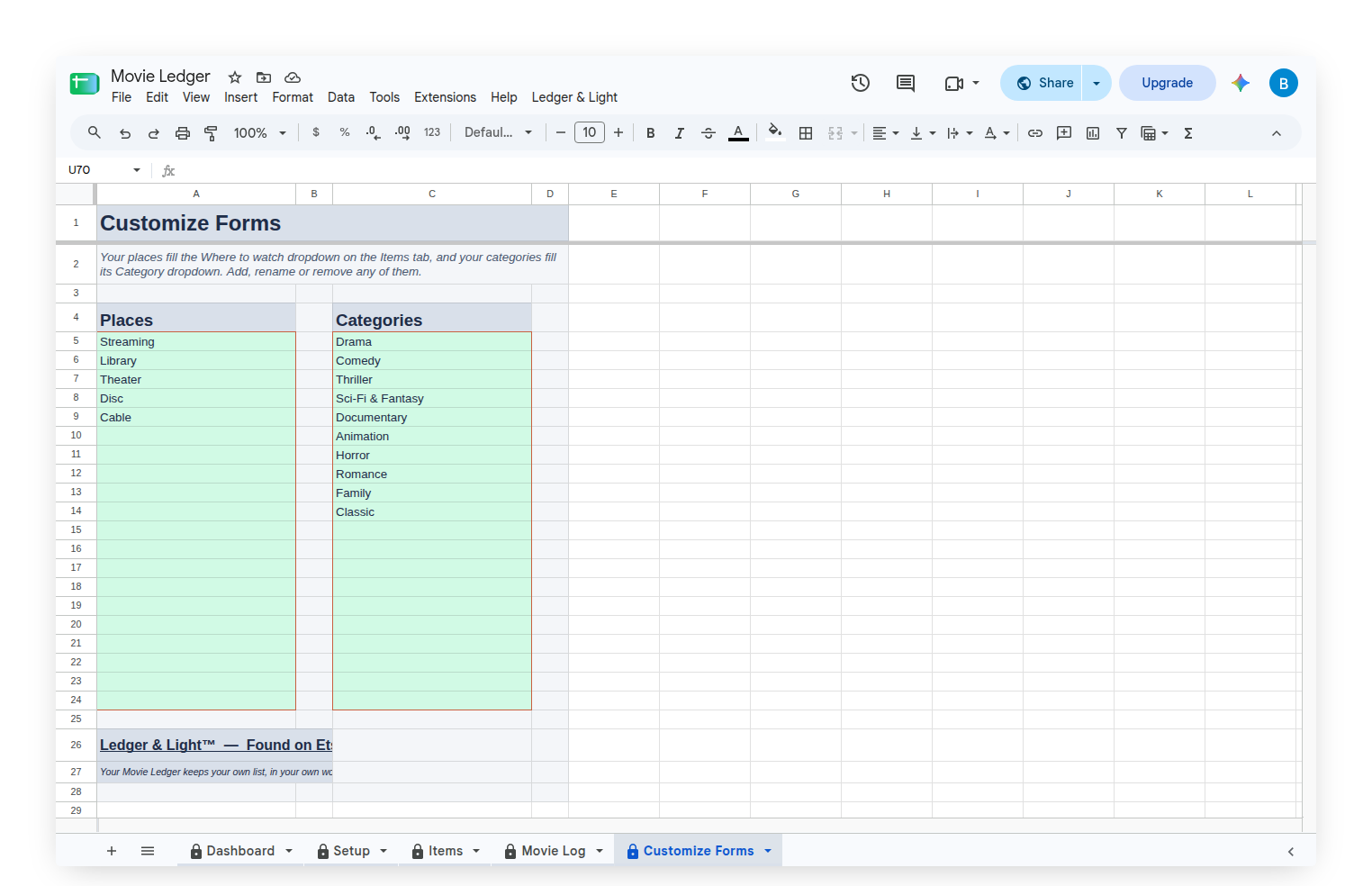
The Customize Forms tab holds two short lists: Where to watch and Categories. They start with Streaming, Library, Theater, Disc and Cable, and Drama, Comedy, Thriller, Sci-Fi & Fantasy, Documentary, Animation, Horror, Romance, Family and Classic. They fill the dropdowns on the Items tab, and any of them can be renamed, added to or removed, so the sheet describes the owner's own movie nights rather than a template's.
Starting with a sample list, then making it your own
The Movie Ledger arrives filled with a sample list of 40 movies and shows across every stage, genre and place, with a few months of log entries, so every list on the Dashboard shows something real. The titles, directors, writers and actors are invented. Clear Sample Data, on the custom Ledger & Light menu, empties the log and the titles, keeps the genres and places, and leaves the Items tab ready for the owner's own list.
Owned, not rented
The Movie Ledger is a Google Sheet bought once and kept, living in the owner's own Google Drive with no subscription to renew. Because the log is a list of rows, a movie life that grows simply adds rows to the same sheet, and the history stays in one file.
This article describes how the Movie Ledger works. It keeps the viewer's own list, in the viewer's own words and ratings.
Common questions
What is the Movie Ledger?
The Movie Ledger is a Google Sheet with a phone form for logging movies and shows. Each time a title is added, started or watched, the entry travels form to sheet, and the Items tab and Dashboard update from it.
Can a watchlist show what to see next and what is open right now?
Yes. The Dashboard has an Up Next list of every title still on the Watchlist, ordered by genre, and a Watching Now list of every series that has been started and not finished, with the date it was started.
Can the Movie Ledger show favorite actors, directors and writers?
Yes. The Dashboard has Favorite Actors, Favorite Directors and Favorite Writers. Each lists everyone on a title rated 4 or 5, most loved first, with how many of their titles were rated that high and their average rating.
Does the Movie Ledger record ratings and watched dates?
Yes. A Watched entry puts the day's date in the title's Watched column and copies the 1 to 5 rating onto the title. A rating is optional, and the latest one logged is the one the title keeps.
Can the genres and places be changed in the Movie Ledger?
Yes. The Customize Forms tab holds two lists, Where to watch and Categories. Either one can be renamed, added to or removed, so the dropdowns describe the viewer's own movie nights.
Does the Movie Ledger come with sample data?
Yes. It arrives with a sample list of 40 invented movies and shows across every stage, genre and place. Clear Sample Data, on the custom Ledger & Light menu, empties the log and the titles and keeps the genres and places.