
A Work Hours Log Priced From Your Own Rates: How the Work Hours Ledger Works
A work hours log priced from your own rates: how the Work Hours Ledger logs each job from your phone and totals hours and amounts by client and project


A work hours log earns its keep on billing day. Everything worked since the last invoice should be there, already priced, already sorted by client. The Work Hours Ledger is built around that day. It is a Google Sheet with a phone form: each block of work is logged in-the-moment, at the end of the job or before leaving the site, and the entry travels form to sheet. The sheet prices it from the owner's own rates and adds it to the client's running total.
It comes in four editions with the same engine and different starting rules: Freelancer, Contractor, Photographer and Caretaker Work Hours Ledger. Each one also comes as a Work Hours Ledger + Reporting edition.
See Work Hours Ledger on Etsy ↗
The form that writes the log
The form is called Log Work. It asks five things: the date, the project, the work type, the hours and a note. Hours can be typed as 1.5 or as 1:30. The project comes from a dropdown of active projects, and the client comes with it, so the form never asks who the work was for. The note is optional, and it can print on the Invoice Summary.
Each entry lands as one row on the Work Log tab, with its billable hours, rate and amount filled in.
Rates are set once, and an entry keeps the rate it was logged with
The Setup tab holds three billing settings: a default hourly rate, billable rounding (none, 6, 15 or 30 minutes) and the payment instructions that print on the Invoice Summary. A project can carry its own rate. A work type can carry its own rate too, and it wins on every project. A work type can also be charged per hour or as a flat amount per entry, and it can be marked not billable, so admin time is logged without being charged.
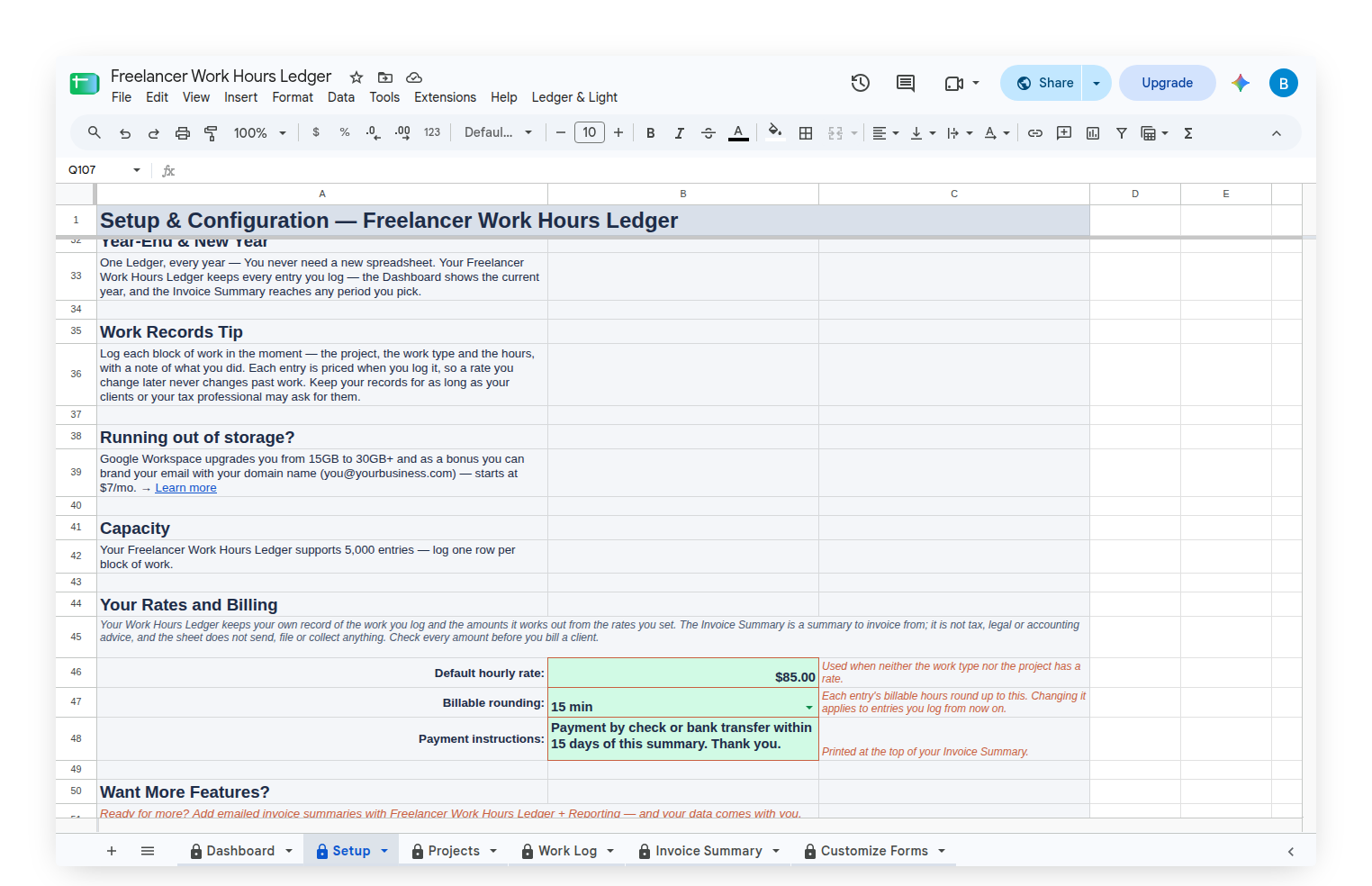
The rate and amount are stamped onto the entry when it is logged. Raising a rate next month changes next month's work. Entries already logged keep the rate and amount they were logged with.
Projects, budgets and fixed fees
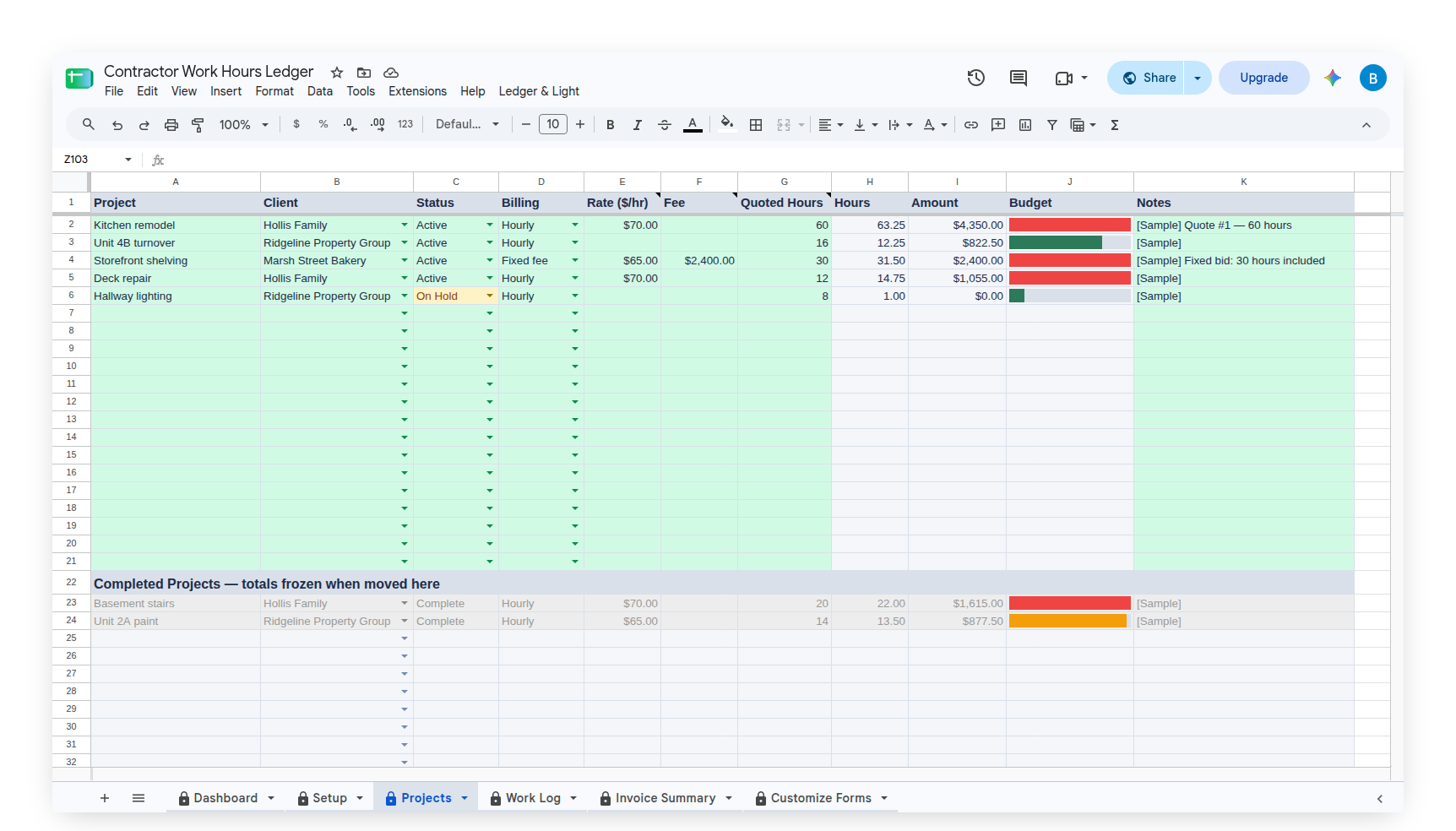
Every job is a row on the Projects tab: the project, the client, its status, hourly or fixed-fee billing, its rate, and an hours budget. Each edition names that budget for its own kind of work. Freelancer calls it Hours Budget. Contractor calls it Quoted Hours. Photographer calls it Package Hours. Caretaker calls it Monthly Hours, and its budget starts over each month.
A bar beside each project fills as hours are logged and turns red when the job runs over. On a fixed-fee project the fee counts once, the hours inside the package add nothing, and only the hours past the package are priced. Finished jobs move to a Completed Projects block with their totals frozen.
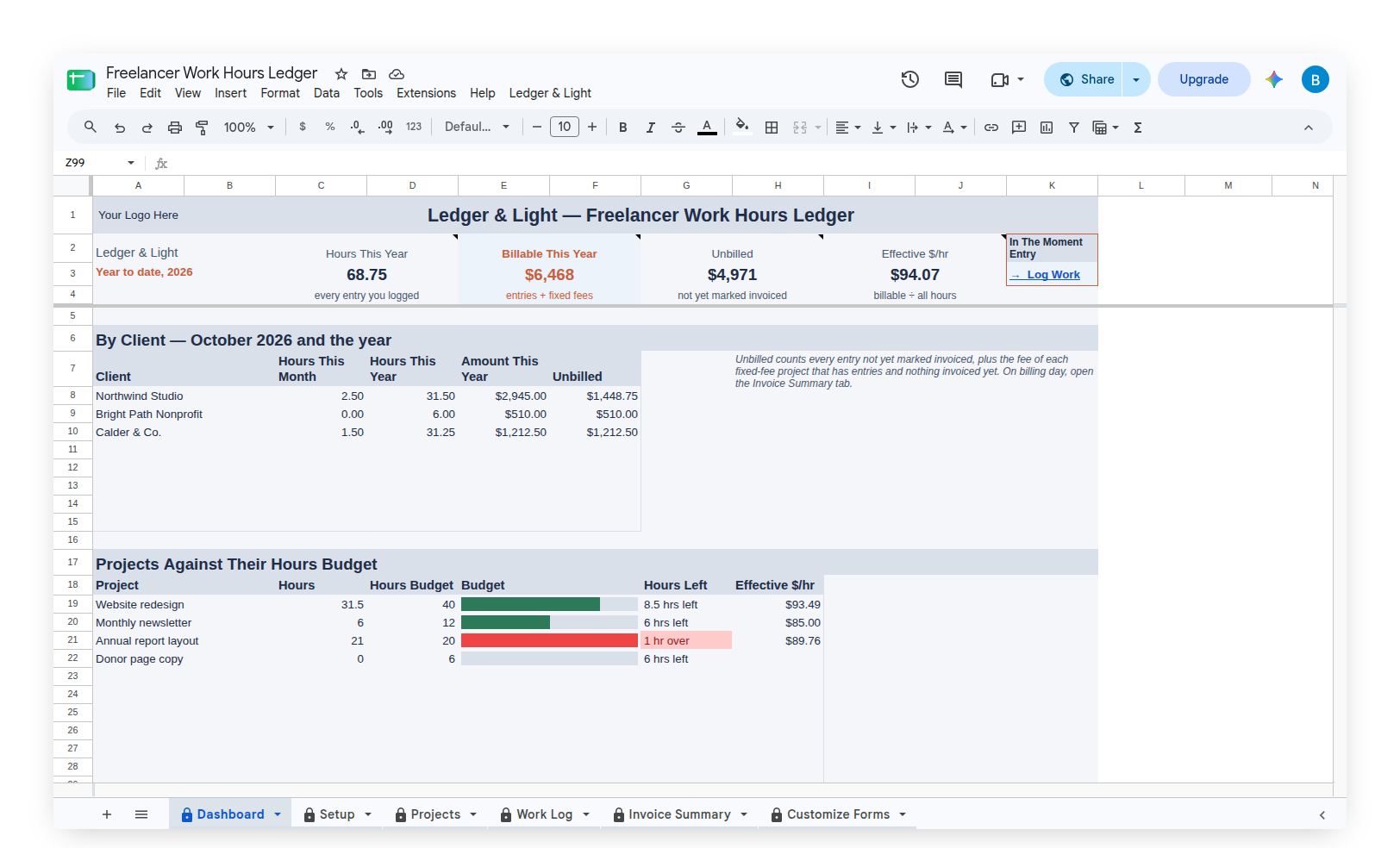
The Dashboard answers "where do things stand?"
Four figures sit across the top: Hours This Year, Billable This Year, Unbilled (work not yet marked invoiced) and Effective $/hr (billable amount divided by all hours, including the hours that were not billed). Below them, By Client shows each client's hours this month, hours and amount this year, and what is still unbilled. Projects Against Their budget shows hours left or hours over on every job, and Hours by Work Type shows where the year's time went.
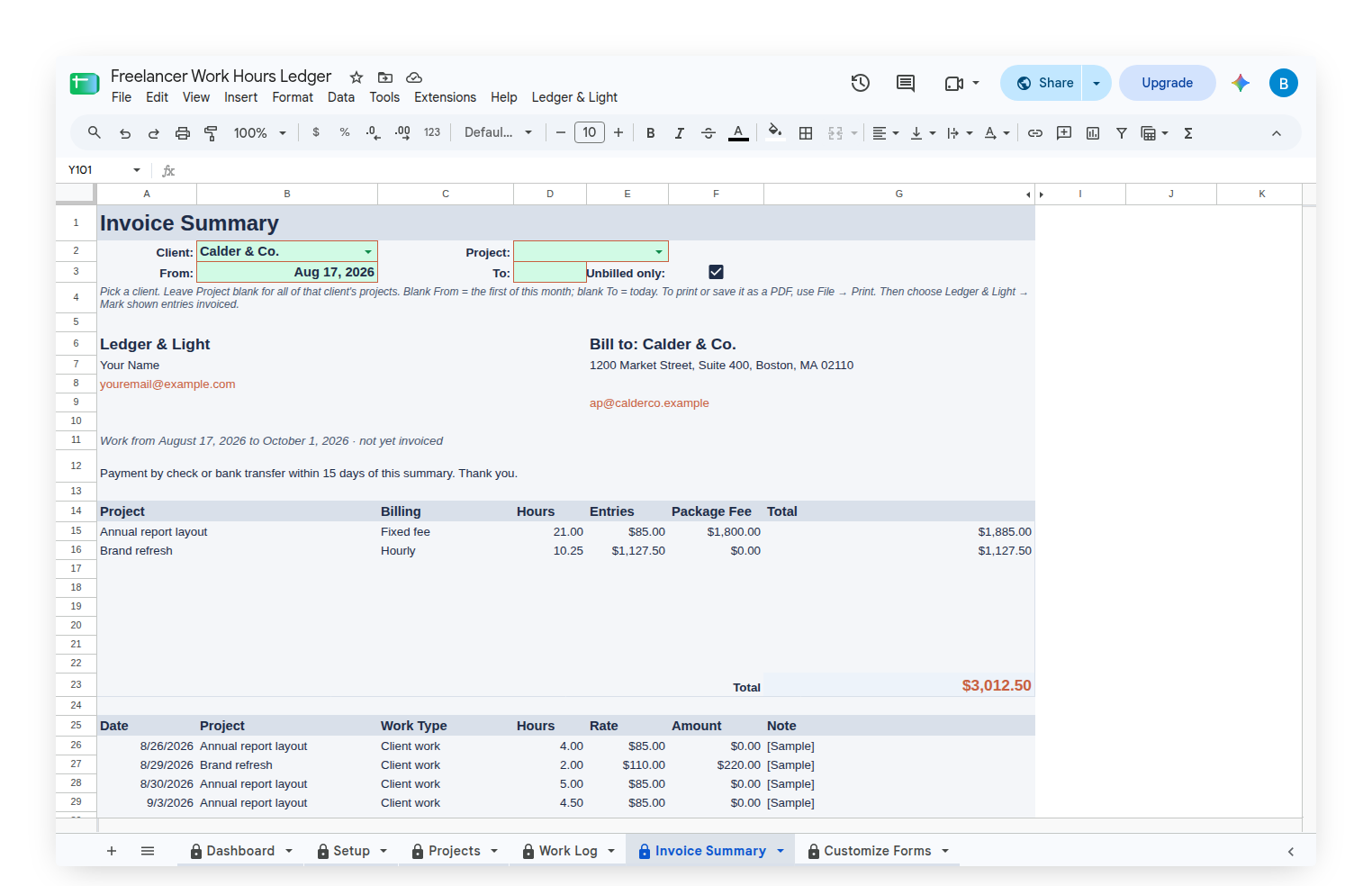
The Invoice Summary is a summary to invoice from
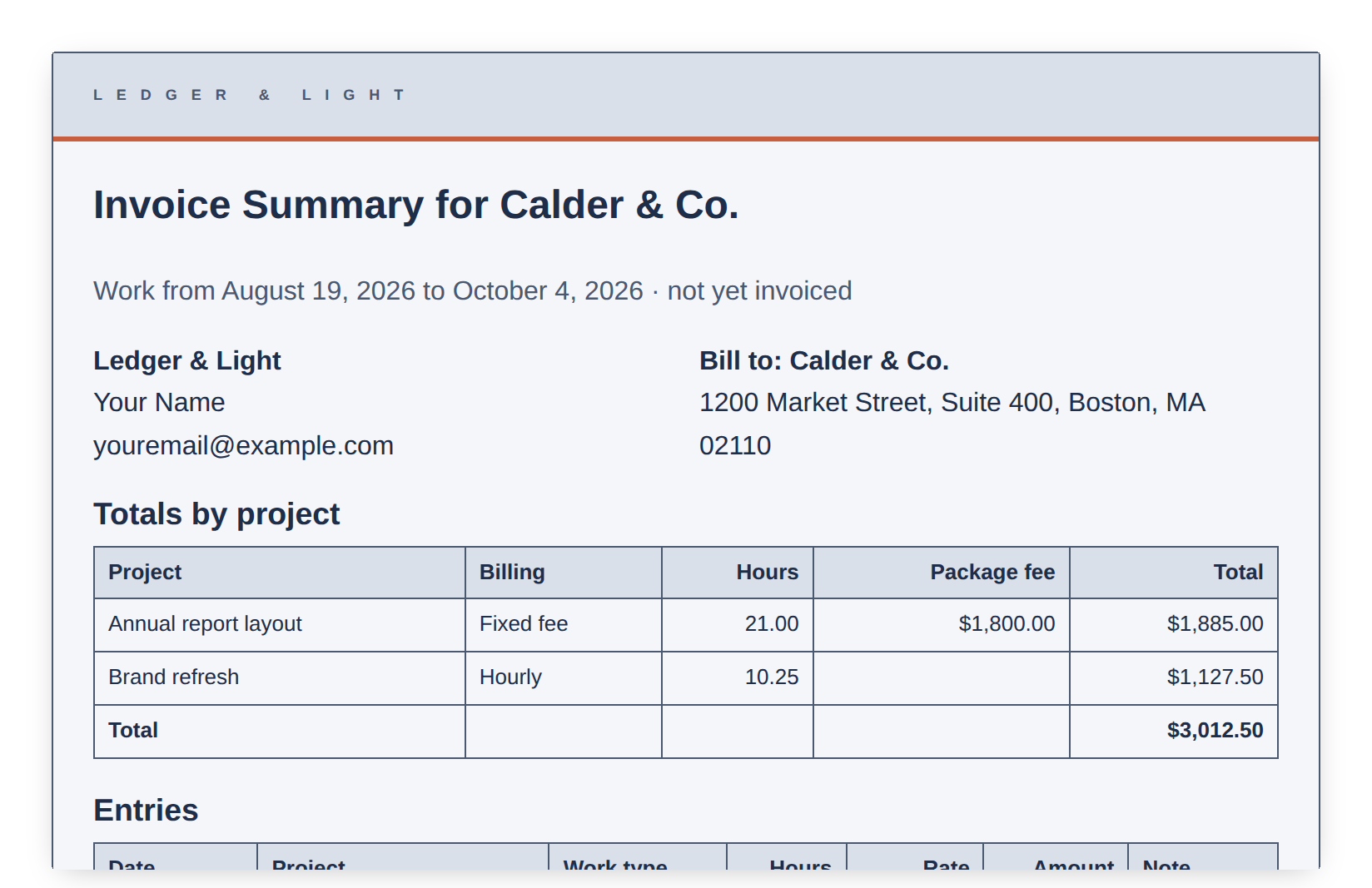
On billing day, the Invoice Summary tab gathers one client's unbilled work. It shows the owner's name and email, a Bill to block from the client list, the payment instructions, a total for each project and the line items under it. Pick a client, and a date range if needed. Then print it or save it as a PDF through File, Print. The custom Ledger & Light menu then marks exactly the entries shown as invoiced, so they leave the Unbilled figure and stay in the log.
It is a summary, not an invoice system. There are no invoice numbers, sales tax or payment links. The Work Hours Ledger sends, files and collects nothing.
The + Reporting edition emails the summary
The Work Hours Ledger + Reporting adds one thing to the menu: Email Invoice Summary to the client. It sends the summary as a PDF to the client's email from the client list, with a copy to the owner. A confirmation names the period and the recipient before anything goes. Afterwards it offers to mark those entries invoiced. Nothing is sent unless the owner chooses to send it.
Starting with sample work, then making it your own
Each edition arrives with sample clients, projects and about six weeks of logged work, so every panel shows something real. Clear Sample Data, on the custom Ledger & Light menu, removes the sample entries, projects and clients and keeps the work types, rates and rounding as starting rules.
Owned, not rented
The Work Hours Ledger is a Google Sheet bought once and kept. It lives in the owner's own Google Drive, with no subscription to renew. The log holds thousands of entries, so years of work stay in one file.
Common questions
What is the Work Hours Ledger?
The Work Hours Ledger is a Google Sheet with a phone form for logging work. Each entry travels form to sheet, is priced from the owner's own rates, and is totaled by client and project on the Dashboard.
Does the Work Hours Ledger change past entries when a rate goes up?
No. The rate and amount are stamped onto each entry when it is logged. A new rate applies to work logged after the change, and entries already logged keep the rate and amount they were logged with.
Can the Work Hours Ledger handle fixed-fee projects and packages?
Yes. A project can be billed as a fixed fee with included hours. The fee counts once, the hours inside the package add nothing, and only the hours past the package are priced at the rate.
Does the Work Hours Ledger send invoices?
No. The Invoice Summary tab is a summary to invoice from, printed or saved as a PDF. The Work Hours Ledger + Reporting can email that summary to a client, but only when the owner chooses to send it.
Which editions of the Work Hours Ledger are there?
There are four: Freelancer, Contractor, Photographer and Caretaker Work Hours Ledger. Each has its own starting work types and budget label, and each comes as a + Reporting edition that emails the Invoice Summary.