
Expense Tracker Apps vs. a Google Sheet: What Actually Works for Freelancers
Expense tracker apps are built for 200+ monthly transactions. For 10–40 per month, a linked Google Sheet is faster, cheaper, and just as accurate


Most freelancers doing a handful of client projects have a simple expense picture: a dozen transactions a week at most, a consistent set of vendors, the same few categories showing up month after month.
The app recommendations don't reflect that reality. Search for "expense tracking for freelancers" and you'll find QuickBooks Solopreneur, Wave, FreshBooks, Expensify, Hurdlr: the same names on every list. They all offer bank import, automated categorization, and subscription pricing. They're also built for a level of transaction volume and financial complexity that most freelancers don't have.
What apps offer
These tools are built around automation. Connect your bank account and credit card and transactions pull in automatically. AI categorizes them. Dashboards update in real time. Quarterly tax estimates calculate from your current numbers.
For a freelancer billing 30 clients and processing 200 or more transactions per month, that automation earns its cost. The manual alternative would be hours of monthly data entry.
What most freelancers actually have
Most self-employed people doing fewer than 50 transactions per month (a consultant taking client calls, a designer on 3–4 projects, a dog walker with a regular client list) have a transaction volume where manual entry is 5–10 minutes per week. The automation doesn't remove three hours of work. It removes 10 minutes of it and adds a monthly subscription charge.
What apps get wrong for small-volume users
Bank import sounds valuable until you see it in practice. Transactions pull in from all accounts, and personal and business charges arrive together. You still have to review each one, mark it as business or personal, and confirm the category. For a freelancer with one business card and a consistent set of vendors, this "automation" adds a review step rather than removing one.
AI categorization has the same problem. Automated categories require verification. A freelancer who logs eight expenses per week and knows exactly what each one was doesn't need AI to guess the category, and has to correct the wrong guesses when they come.
What a form-to-sheet approach actually offers
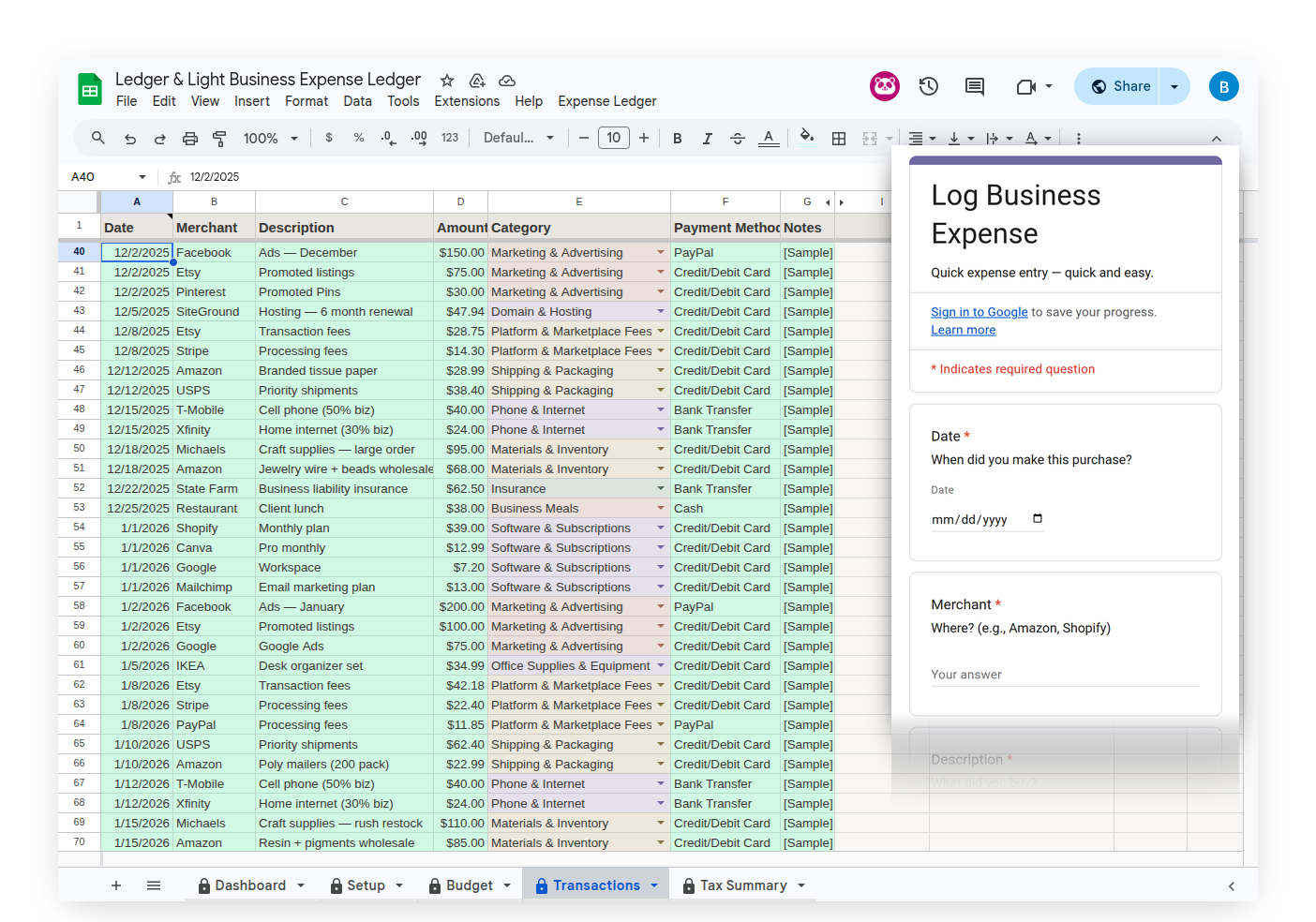
Expense Ledger is an Expense Form linked to a Google Sheet. The form opens on your phone — amount, vendor, category, payment method, receipt photo upload, submit. The entry lands in the Transactions tab, organized across the Schedule C expense categories that apply to most solo freelancers and self-employed business owners.
No account to log into. No app to download. The Expense Form is a Google Form that opens in any mobile browser. A home screen shortcut gets you to the submit screen.
Your data lives in your Google Drive. Not on Intuit's servers. Not on FreshBooks' infrastructure. In a file in your account that belongs to you, whether you use the product for a year or a decade. No subscription dependency.
What it doesn't do
No automatic bank import. No GPS mileage tracking. No AI categorization. No quarterly tax estimate calculation. If you need those features specifically, an app built around them is the right choice. This is worth stating plainly, because the right tool depends on the actual shape of your business.
The decision
For freelancers doing fewer than 50 transactions per month who already work in Google's tools: the form-to-sheet approach costs significantly less and requires no new software to learn. For freelancers with high transaction volume who want automation over manual entry: an accounting app earns its subscription.
The right tool is the one that matches the actual volume and complexity of the business you're running, not the one marketed toward what you might eventually become.