
Google Hasn't Verified This App: What It Actually Means
The 'Google hasn't verified this app' warning is a verification status, not a safety verdict. Here's what it means and why it's safe to proceed with setup

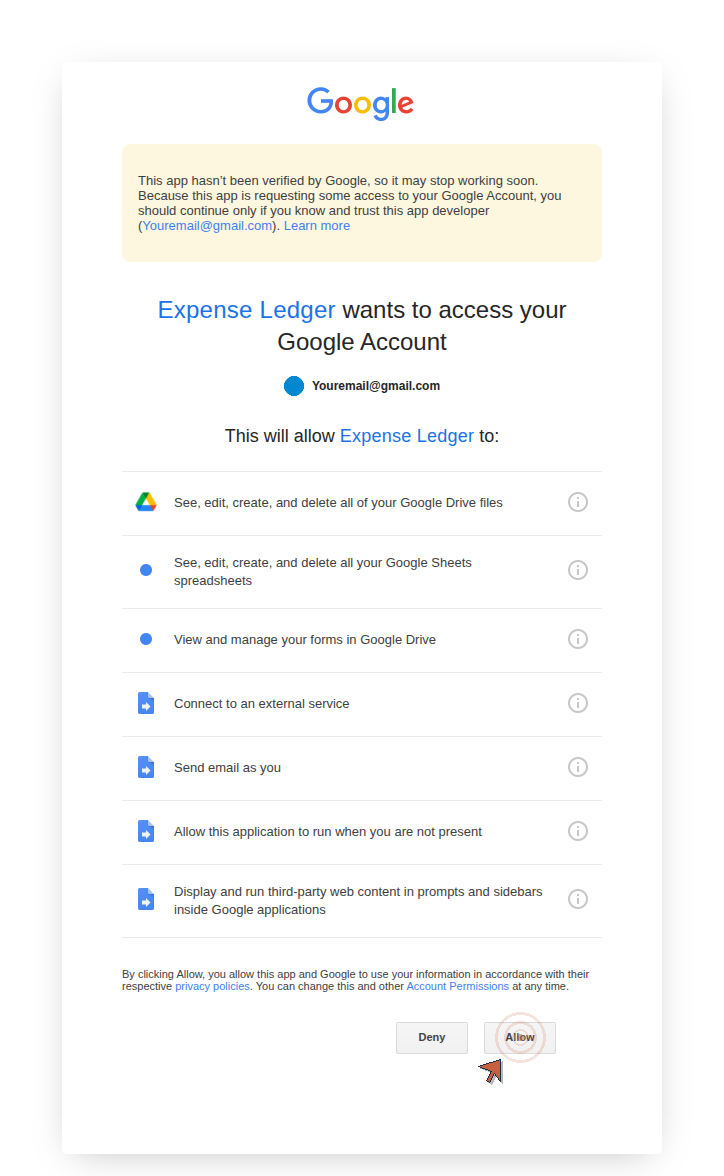
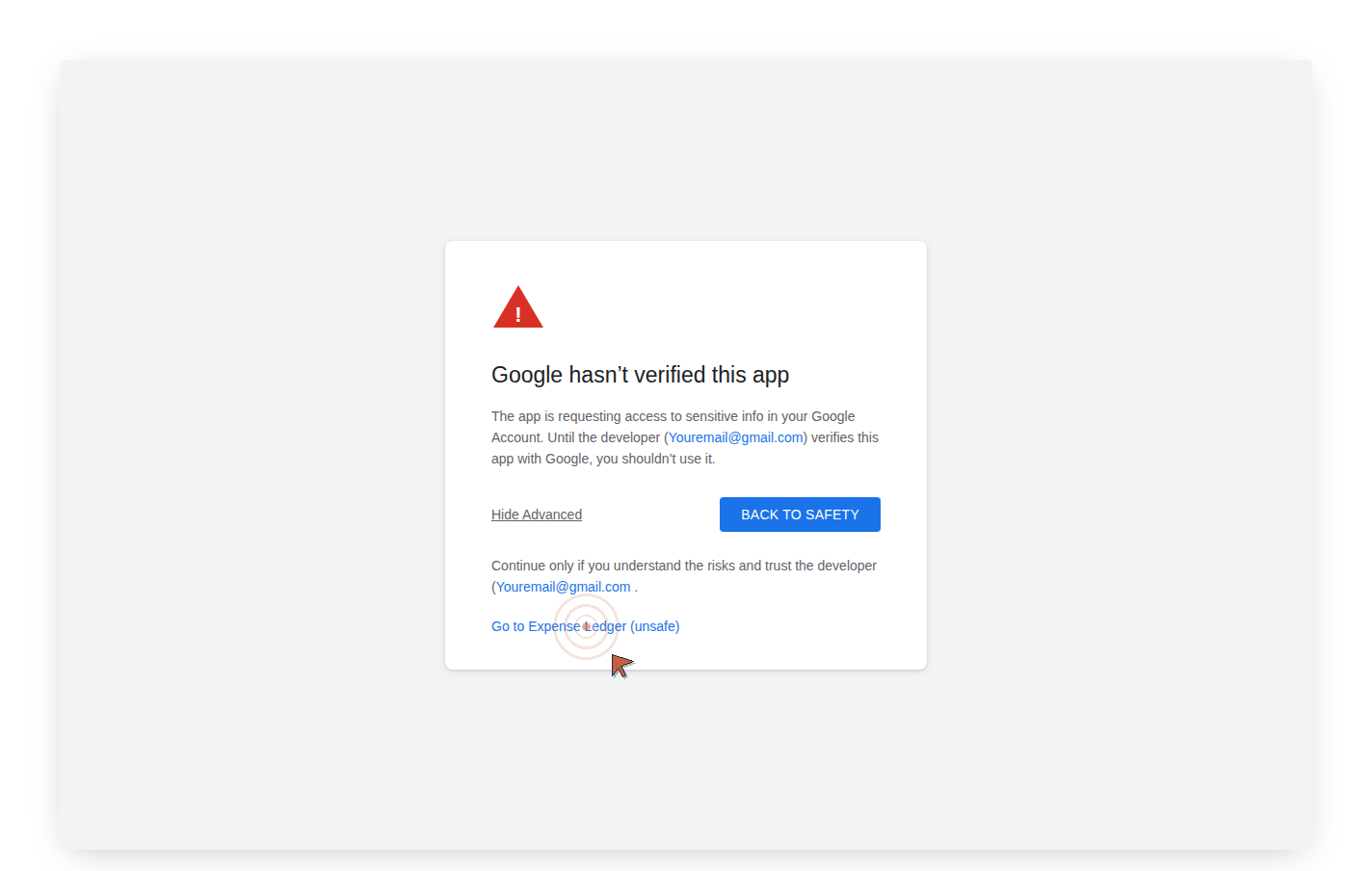
Google's unverified-app notice appears the first time you open your custom product menu to begin setup on a Ledger & Light product. On a fresh copy today it's a note at the top of Google's permission page: "This app hasn't been verified by Google." Some accounts still get the older full-screen version, "Google hasn't verified this app," whose link says "unsafe." Either way, it's designed to make you pause.
It isn't a reason to. The warning is a verification status, not a safety verdict. The reasoning behind why it exists is the reason you can trust what you just bought.
What "unverified" means
Google's OAuth system manages access between apps and your Google account: Drive, Sheets, Gmail, and other services. Developers who want a clean authorization experience submit their app through a formal review: security assessment, scope justification, policy compliance. Apps that pass get a standard prompt. Apps that haven't been submitted get the warning screen.
"Unverified" means one thing: not submitted for review. It is not a code audit. The note, and the older screen's "unsafe" link, are Google's default labels for every unreviewed application, regardless of what it actually does. Google isn't saying the code is dangerous. It's saying it hasn't checked.
Why the warning exists
In 2017, a phishing campaign exploited Google Apps Script to create OAuth apps that impersonated legitimate tools: apps named "Google Docs" that tricked users into granting account access to malicious code. The attack spread by email and harvested credentials at scale.
Google's response was mandatory: a warning screen for any script that hasn't completed verification, designed to slow down authorization from unknown sources. The screen appears when a script requests sensitive OAuth scopes (Drive, Gmail, Sheets, Forms, or combinations of these) and hasn't been submitted for review. Authorization is per-user: one person authorizing a script doesn't authorize it for anyone else. If new scopes are added later, the warning reappears.
What you'll see and what to do
Here's the authorization flow on a fresh copy:
- "Authorization Required": the script needs permission to run. Click OK.
- If you're signed in to more than one Google account, pick the one that holds your sheet.
- Google's permission page: "[App Name] wants to access your Google Account," with the unverified note at the top and the complete list of permissions below it. Review the list, then click Allow.
If Google instead shows the older "Google hasn't verified this app" screen, click Advanced, then "Go to [App Name] (unsafe)." On the next screen, "Select what [App Name] can access," check Select all, then click Continue.
The permission list is worth reading. Sheets (to build the sheet), Forms (to create and link your logging form), Drive (to configure your file's sharing settings), Gmail (to send one email with your form links after setup completes). No credentials are transmitted. The code runs inside your Google account, on Google's servers, touching only what's listed.
After you authorize, Google sends a Security Alert email confirming access was granted. This is expected. It means setup completed correctly.
Why the warning is still there
Google's verification review is built for commercial applications serving large user bases: security assessment, scope justification, policy compliance, one to two weeks minimum. Brand verification takes two to three business days; apps requesting sensitive scopes like Drive and Gmail require a second review stage of another three to five.
Your sheet runs inside your own Google Drive, not on a third-party server, not touching any other account. It isn't what Google designed that pipeline for. Ledger & Light hasn't submitted.
The question the warning is actually asking
The warning system was built for a specific threat: a link in an email, a tool from a stranger, a script from an unknown site. The implicit question is: do you know where this came from?
You do. You bought it from an Etsy shop with public reviews. The script runs inside a file in your own Google Drive, not on a third-party server. And if you want to verify exactly what it does before clicking Allow: Extensions > Apps Script in your sheet. Every function is there. Every line is readable.
You're not being asked to trust a black box. You're being asked to click past a system designed for situations where you can't answer the source question.
You can.