
Google Sheets for Small Business Expense Tracking: How the Platform Works
Google Sheets for small business expense tracking uses Forms for phone entry, Drive for file ownership, and Gmail for reports. One-time purchase, your file


Google Sheets for small business expense tracking works better than most people expect, and more practically than subscription tools that cost more per month than the tax deductions they help capture. The platform provides the grid, the formulas, and the cross-device access. What it doesn't provide is the decision layer: which expense categories map to which IRS Schedule C lines, how the form links to the sheet, how the dashboard reads.
That gap (the configuration and the workflow) is what you're buying when you purchase a Sheets-based expense ledger.
The platform
Sheets-based expense tracking uses four parts of Google's platform together.
Sheets handles calculations. Expense categories live here, totals update here, the Tax Summary runs here.
Forms handles data entry. A Google Form links directly to a Sheets file. Submit an entry on your phone and it appears in the right row automatically.
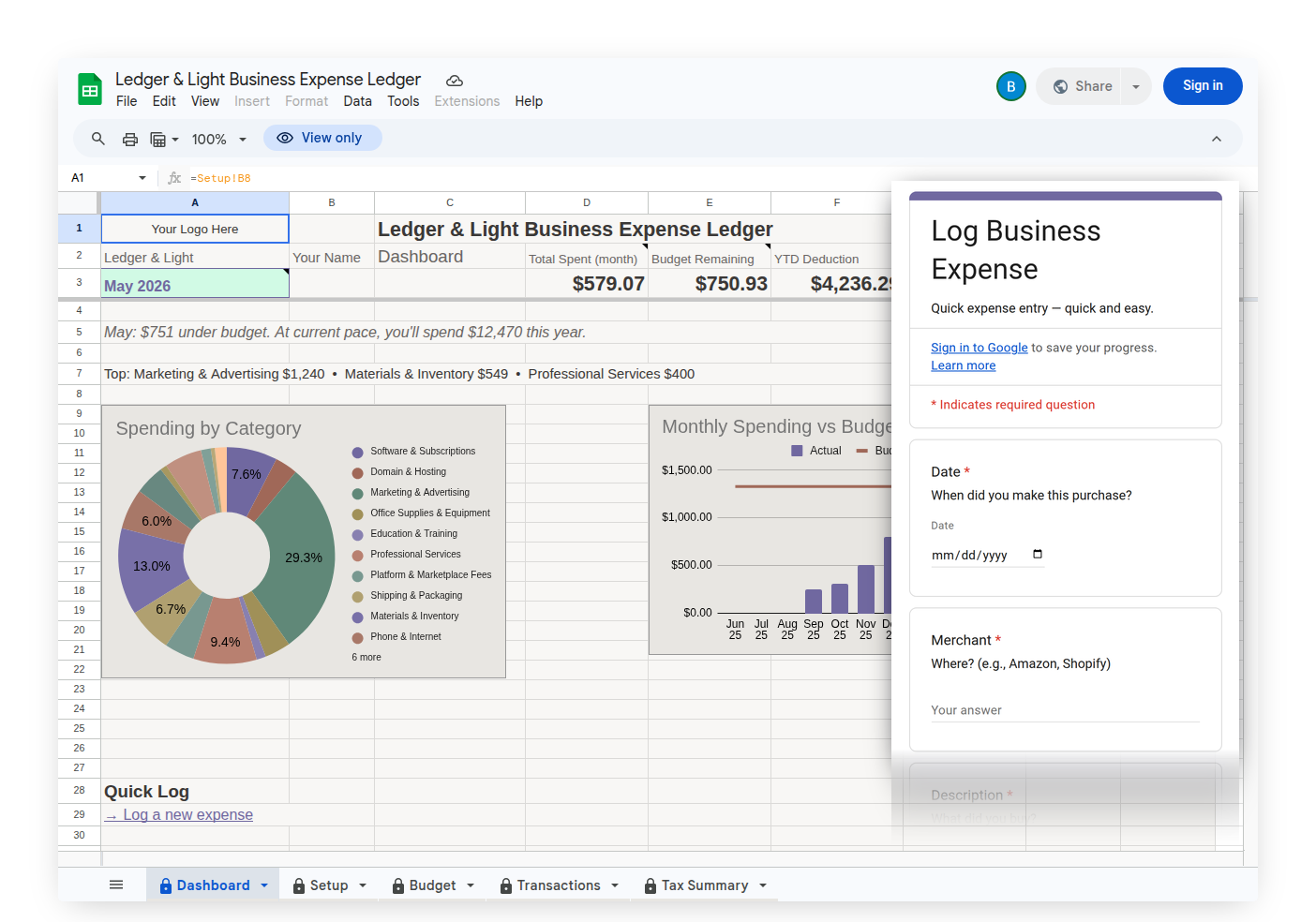
Drive handles storage. The file lives in your Drive, not on a vendor's server. You own it. It doesn't expire with a subscription.
Gmail handles reporting. Tax summaries route through Gmail: to your own inbox, or directly to your accountant.
All four are free with any Google account. The platform is the foundation. What you're buying is everything already configured on top of it.
The ledger layer
Building a Sheets expense ledger from scratch isn't technically difficult. The difficulty is the decisions: which expense categories belong in a small business ledger, which ones map to which IRS Schedule C lines, how the Tax Summary should format so an accountant can use it without rebuilding it, how the form should be structured so phone logging is a handful of fields in the right order, not a scavenger hunt.
Those decisions are already made in Expense Ledger and Mileage Ledger. The expense categories in Expense Ledger each correspond to a Schedule C line. The Tax Summary formats the way an accountant reads it: category names, line totals, full-year view. The Expense Form is already linked to the Transactions tab, and adding a receipt photo field takes one quick step from your setup instructions — once it's on the form, every photo you attach saves to a "File uploads" folder in your Drive.
You're not buying the platform. You're buying the configuration decisions that make the platform useful for this specific job.
The process
A configured file still needs a routine. Expense Ledger ships with a setup guide that walks you through the first session: enter your business name, link your form, step through each tab. 127 sample rows load before you clear them so Transactions, Dashboard, and Tax Summary are already familiar before your own data is in them.
The day-to-day process is the Expense Form. Log a receipt on your phone at the point of purchase. The entry lands in Transactions automatically. The Dashboard reflects it. At year-end, the Tax Summary is already structured for Schedule C: every category mapped to its line, full-year totals, formatted the way an accountant reads it.
The file is configured. The process is documented. Setup takes one session. After that, the form does the work.
One-time purchase, your file
Because the ledger logic is a file, not a hosted service or an account in a vendor's database, there's no recurring cost. Google runs the infrastructure. You pay once for the file.
The file you set up today works the same in year five. Your data stays in your Drive. If you ever need to hand off records to an accountant, the Tax Summary is already in a format they recognize.
Three products, one purchase each
All three are one-time purchases. Setup runs once: your business name carries into the Tax Summary header, your form is linked, 127 sample rows load so you can see how it works before you clear them.
| Feature | Expense Ledger $12.99 | Expense & Mileage Ledger $17.99 | Expense & Mileage Ledger + Reporting $24.99 |
|---|---|---|---|
| Expense Form | ✓ | ✓ | ✓ |
| Schedule C categories | ✓ | ✓ | ✓ |
| Tax Summary | ✓ | ✓ | ✓ |
| Dashboard | ✓ | ✓ | ✓ |
| Mileage Log + Mileage Form | ✓ | ✓ | |
| Customize Forms: Trip Purposes | ✓ | ✓ | |
| Projects | ✓ | ||
| Customize Forms: Payment Methods | ✓ | ||
| Email Dashboard Report | ✓ | ||
| Email Tax Report to accountant | ✓ | ||
| Email Mileage Log Report | ✓ | ||
| Email Expense Report | ✓ | ||
| Tab Export to Drive | ✓ |
Expense Ledger ($12.99) — for freelancers who log business expenses and don't drive for work. Expense Form, Schedule C categories, Dashboard, and Tax Summary.
Expense & Mileage Ledger ($17.99) — for freelancers who drive for work. Everything in Expense Ledger, plus a Mileage Form, Mileage Log with IRS deduction per trip, and Customize Forms: Trip Purposes.
Expense & Mileage Ledger + Reporting ($24.99) — for freelancers who want to hand off records to their accountant without back-and-forth. Everything in Expense & Mileage Ledger, plus Projects, Customize Forms: Payment Methods, all email reports (Tax Summary, Mileage Log, Expense Report, Dashboard), and Tab Export to Drive.