
Home Bakery Inventory That Matches the Shelf: How the Bakery Inventory Ledger Works
A home bakery inventory that matches the shelf: how the Bakery Inventory Ledger logs Made, Added, Sold, Used and Counted, with use-by dates, from a phone

A home bakery inventory is worth keeping for exactly as long as its numbers match the shelf, and the Bakery Inventory Ledger is built around that one idea. It is a Google Sheet with a phone form: each time a batch comes out of the oven, a delivery arrives, a sale is made, supplies go into a bake or a shelf is counted, the entry travels form to sheet and the counts update from it. Logged in-the-moment, at the cooling rack or the market table, the sheet holds a count worth trusting before the next bake.
The form that writes to the list
The form is called Log Bakery, and a link to it sits on the Dashboard under the heading "In-the-moment entry." It asks for six things. Date, which falls back to today when it is left blank. The Bakery item, chosen from a dropdown of every item on the list, A to Z. What happened: Made, Added, Sold, Used or Counted. Amount, a number in the item's own unit. Use by, the date set for a batch or a delivery. And a Note.
Everything the form collects lands as one row on the Bakery Log tab, so the whole history of the shelf sits in one place, in order. The log holds up to 10,000 entries, and a bakery that reaches the limit is told on the Dashboard from 90 percent full, rather than having entries quietly dropped.
Five words for five kinds of moment
Made raises the number: a batch was baked. Added raises it too: a delivery arrived, a sack of flour or a case of butter. Sold lowers it: the item went to a customer. Used lowers it as well: flour that went into a bake, a loaf given away, a tray past its date. Counted records what is really on the shelf.
Keeping Made apart from Added shows what was baked and what was bought. Keeping Sold apart from Used is what makes the Sold figure honest: a dozen cookies sold at the market table counts as a sale, and a loaf given away does not. The Items tab keeps a separate column for each, and its Sold (30 days) column reads only from Sold.
The Items tab is the list
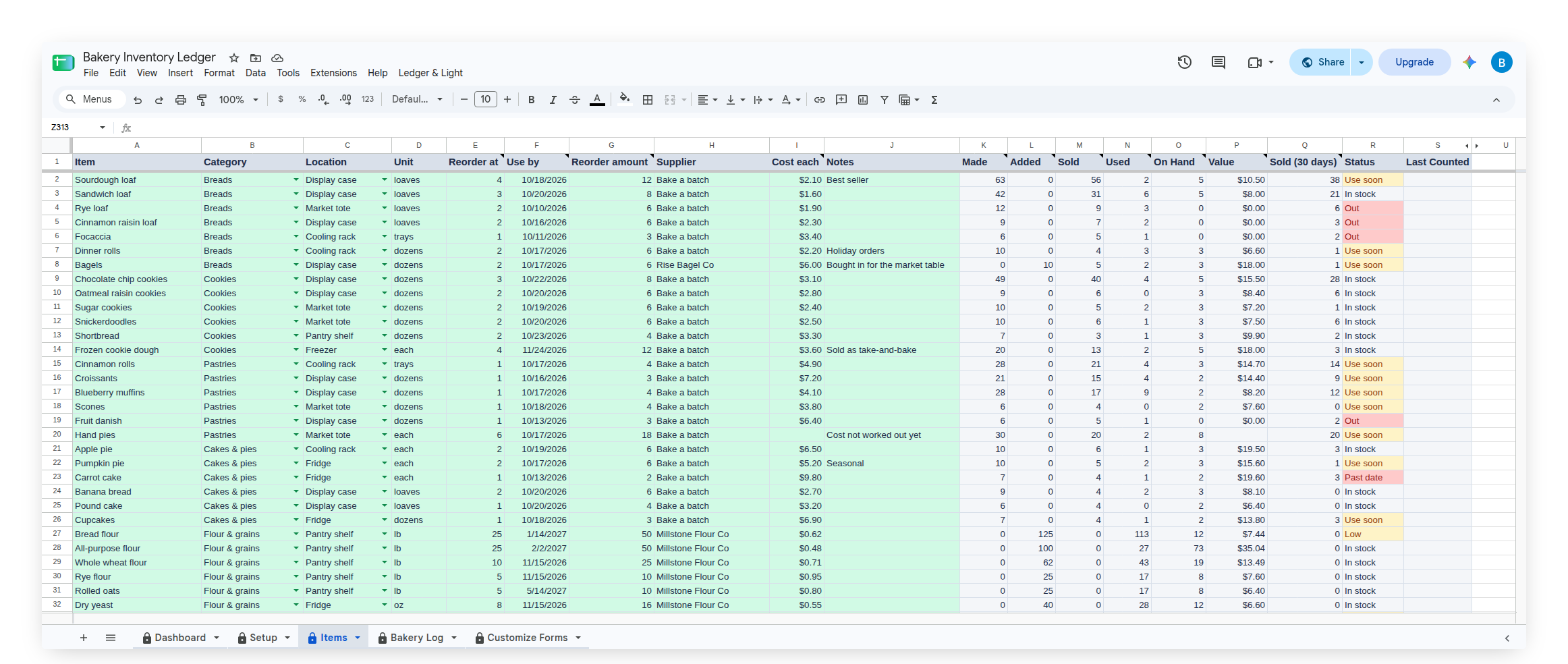
Every item has one row on the Items tab, with room for 250 of them. The owner's columns are Item, Category, Location, Unit, Reorder at, Use by, Reorder amount, Supplier, Cost each and Notes. The sheet fills in the rest: Made, Added, Sold, Used, On Hand, Value, Sold in the last 30 days, Status and Last Counted.
An item is added on the Items tab, not on the form, which keeps the form to one dropdown. As a name goes into the Item column, it appears in the form's Bakery item choices. Each item carries one unit, in the owner's own word: loaves, dozens, trays, flats of eggs, pounds of flour. The sheet never converts between units, so a number always means what the unit beside it says. Baked goods and supplies share the list, one row each.
How the On Hand number is worked out
On Hand is the most recent Counted amount, plus everything Made and Added since that count, minus everything Sold and Used since it. An item that has never been counted uses the whole log. It is a live formula over the log, so correcting a log row corrects the number.
That makes Counted the action that keeps the list honest. A busy market morning can leave a sale unlogged. Counting the shelf and logging the result sets On Hand to what is physically there, and the Last Counted column shows the date.
A use-by date for every batch
Each Made or Added entry can carry a use-by date, the one the owner sets for that batch or that delivery. The Items tab keeps one Use by date per item: when the shelf was empty, a new batch brings its own date; when some of an earlier batch is still there, the earlier date stays, so the oldest batch is the one the sheet points to. The date can be changed on the Items tab at any time.
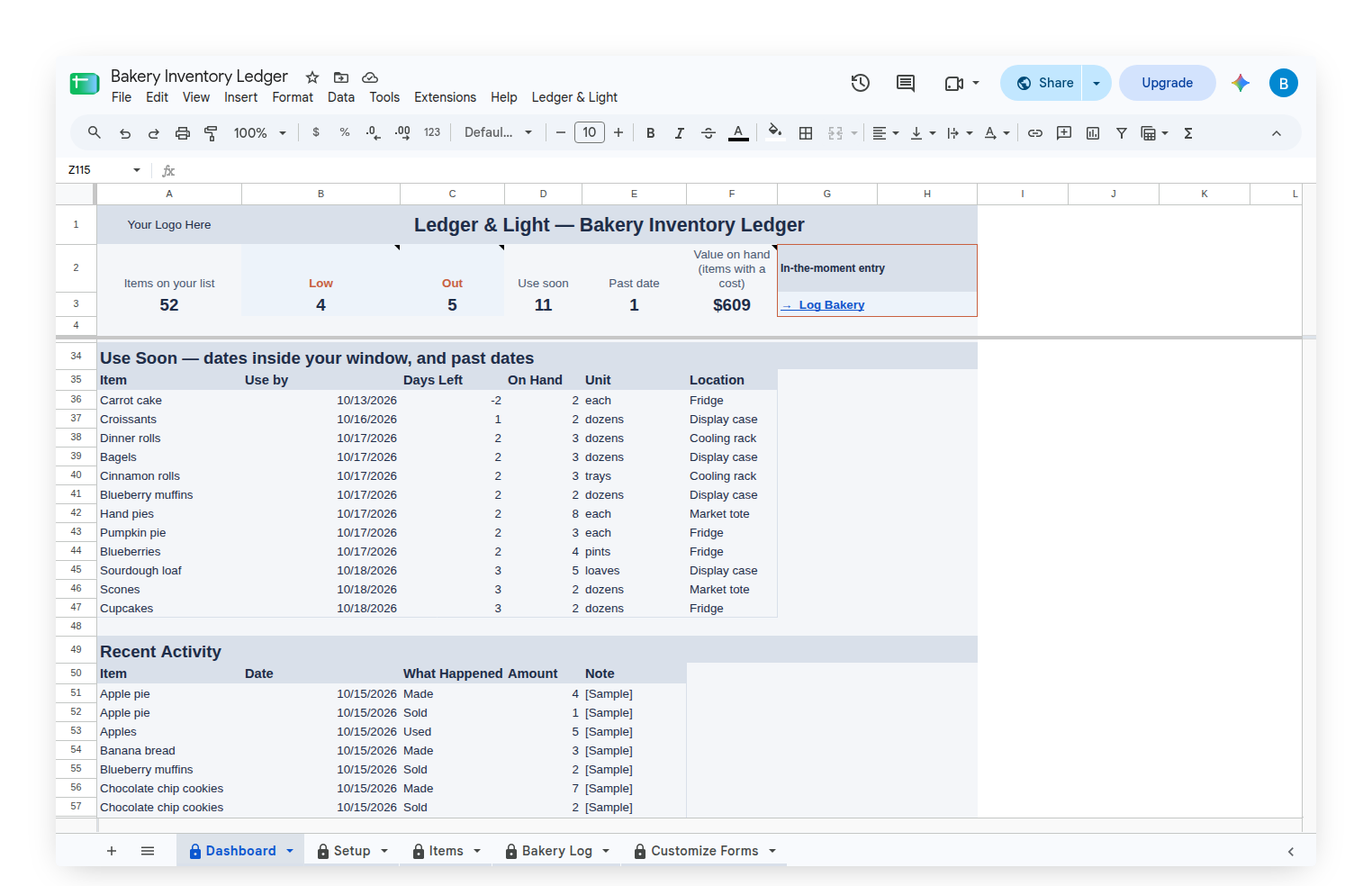
Below the Reorder List on the Dashboard sits Use Soon: every item still on hand whose use-by date falls inside a window set on the Setup tab, and any item already past its date, with the date, the days left, how many are on hand and where it is kept. It is the list of what to sell or use first. With nothing due, it reads "Nothing due inside your window."
Reorder at, and the Reorder List
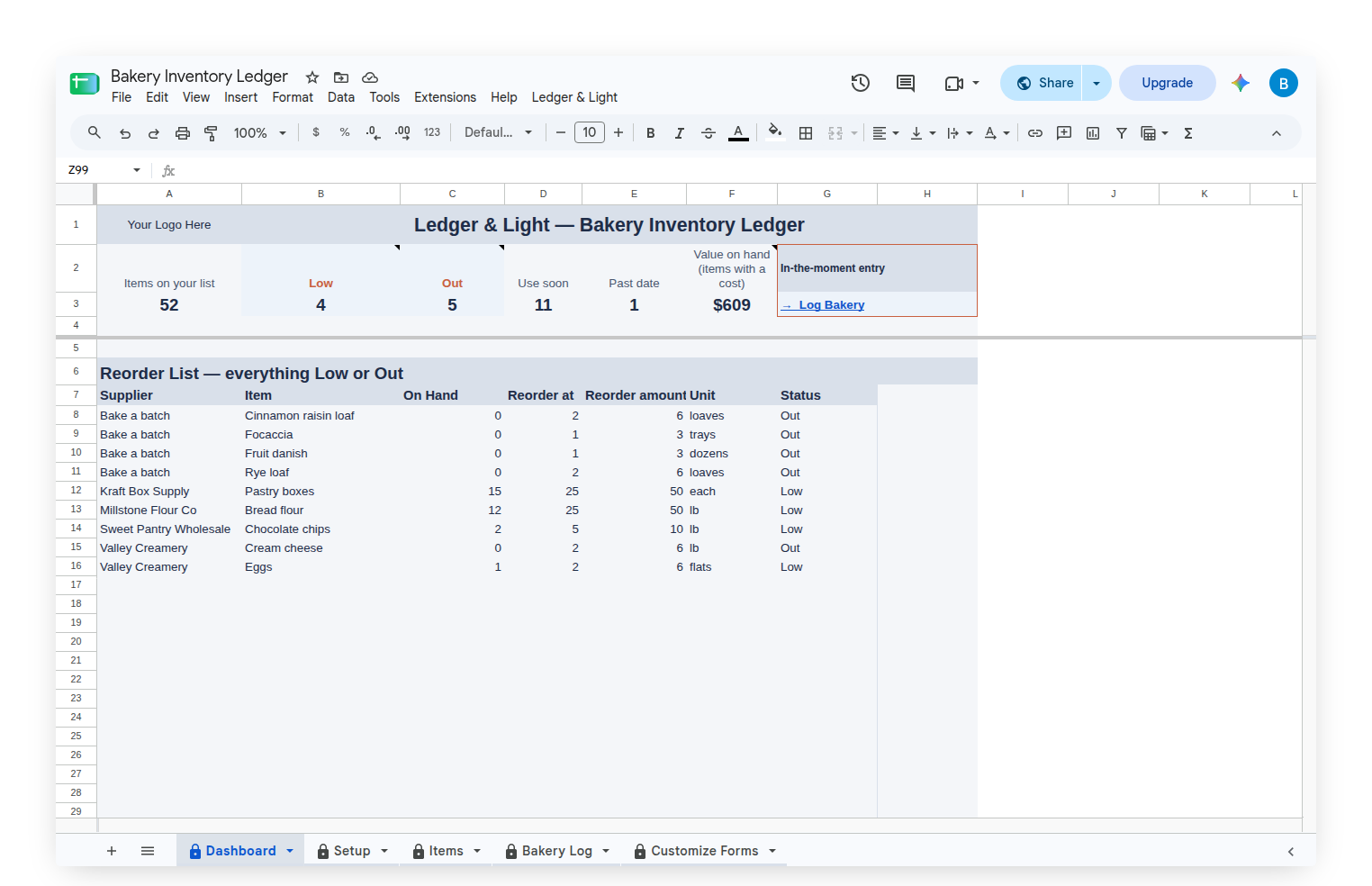
Each item has a Reorder at number: the amount at which it is time to bake or buy more, and a Reorder amount for how many at a time. Status reads Out at zero, Past date after the use-by date, Use soon inside the window, Low at or below the Reorder at number, and In stock otherwise. Every Low or Out item feeds the Reorder List on the Dashboard, grouped by supplier and then by name, with its On Hand, its Reorder at, its Reorder amount and its unit. One supplier is one order, and a supplier named for baking turns the same list into a bake list.
The row of counts across the top shows the whole bakery at once: items on the list, Low, Out, Use soon, Past date, and the value on hand. Value is the owner's own Cost each times what is on the shelf, added up for every item that has a cost. Items with no cost are left out, and the heading says so.
Locations and categories, in the owner's words
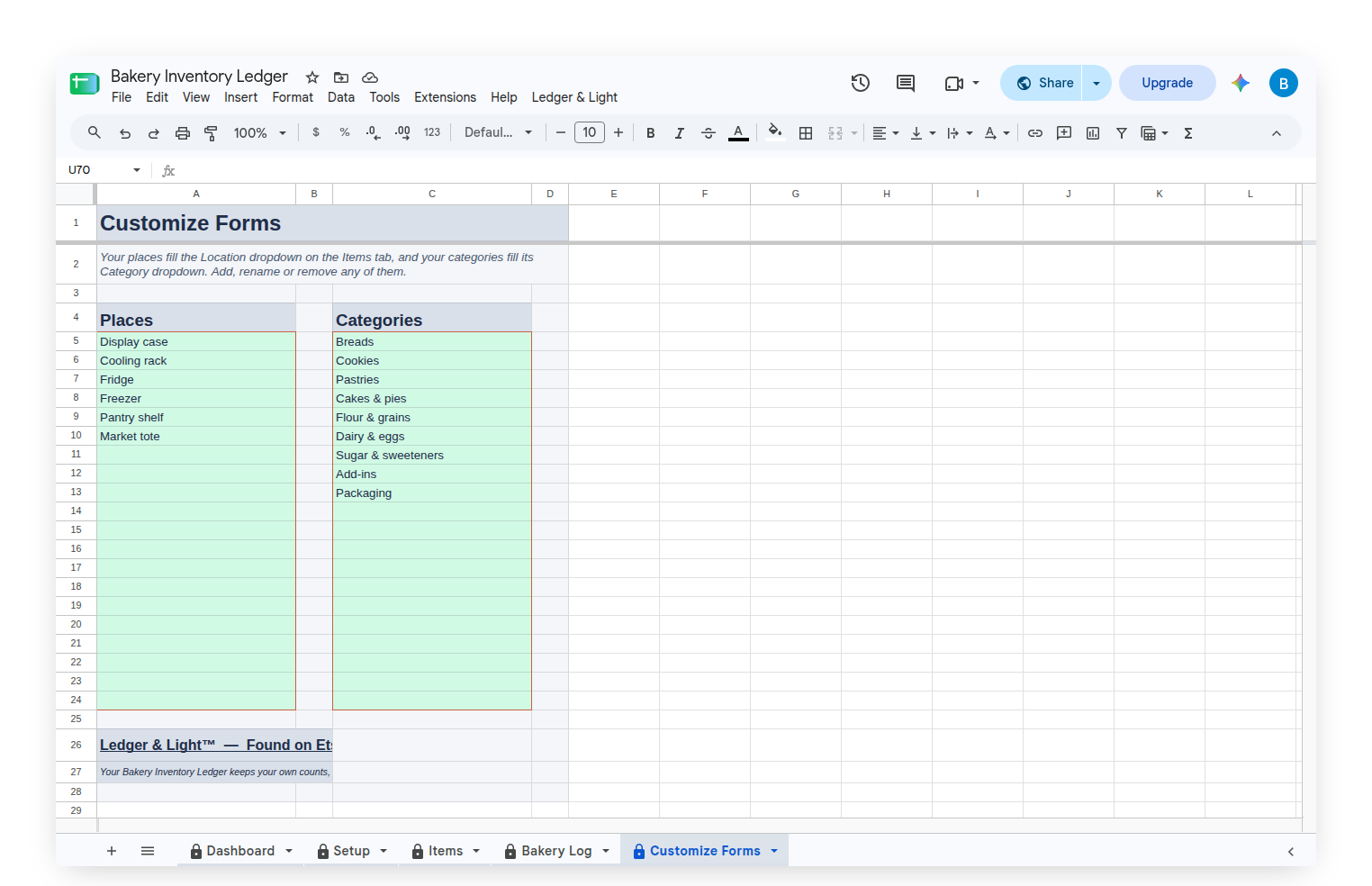
The Customize Forms tab holds two short lists: Locations and Categories. They start with Display case, Cooling rack, Fridge, Freezer, Pantry shelf and Market tote, and Breads, Cookies, Pastries, Cakes & pies, Flour & grains, Dairy & eggs, Sugar & sweeteners, Add-ins and Packaging. They fill the dropdowns on the Items tab, and any of them can be renamed, added to or removed, so the sheet describes the owner's own kitchen rather than a template's.
Starting with a sample bakery, then making it your own
The Bakery Inventory Ledger arrives filled with a sample home bakery: 52 items across six locations and nine categories, with about three months of log entries, so every status and both lists on the Dashboard show something real. Clear Sample Data, on the custom Ledger & Light menu, empties the log and the items, keeps the locations and categories, and leaves the Items tab ready for the owner's own list. Entering that list is real work, done once. After that, each entry is a short form on a phone, and the sheet does the totalling, the sorting and the dating.
The menu also carries "Show my Log Bakery form link," so the form's address is always on the menu when it needs to be bookmarked on a phone.
Owned, not rented
The Bakery Inventory Ledger is a Google Sheet bought once and kept, living in the owner's own Google Drive with no subscription to renew. Because the log is a list of rows, a bakery that grows its menu simply adds rows to the same sheet, and the history stays in one file.
This article describes how the Bakery Inventory Ledger works. It keeps the owner's own counts, the owner's own costs and the use-by dates the owner sets. It is not food-safety advice.