
How Much to Set Aside for Taxes When You Work for Yourself
See how much to set aside for taxes each quarter, how the self-employment math works, and how the Tax Estimator builds the number from income you log


The quarterly tax number is knowable, and the arithmetic behind it is public. How much to set aside for taxes comes down to one chain: what you earned, what you deducted, what self-employment tax takes off the top, where the federal brackets land, and what your state adds. The Tax Estimator runs that chain on the income you log and puts the answer at the top of the sheet as one line: pay this much, by this date. Estimate it there, confirm it with an accountant, then log the confirmed number.
See Self-Employed Tax Estimator on Etsy ↗
The one line at the top
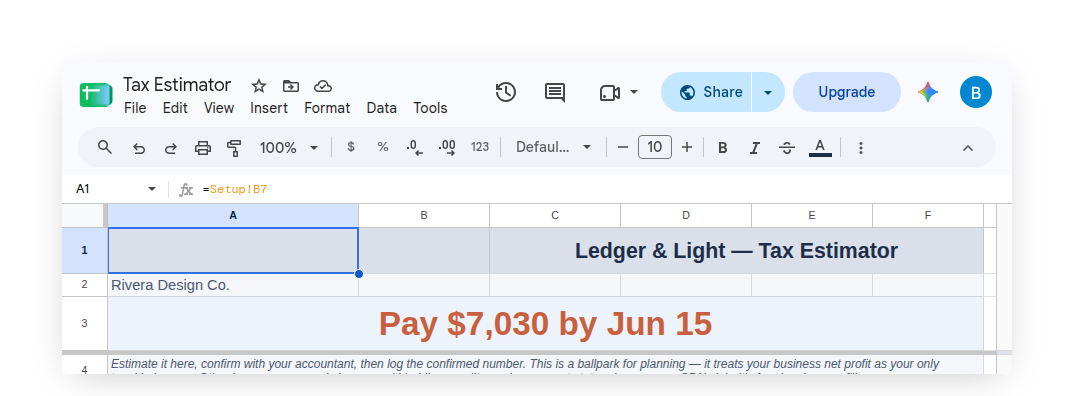
The Estimate tab leads with the answer rather than the working. The headline names the quarter that is next due, its date, and the amount, and it moves the moment an input changes. Directly beneath it sits the frame that governs the whole product, stated plainly rather than buried in fine print: this is a ballpark for planning, it treats business net profit as the only taxable income, and other income, a spouse's earnings, withholding, credits and exact state rules belong to an accountant.
The full working is still on the tab, lower down and deliberately quiet: net profit, self-employment tax, taxable income, federal income tax, state income tax, and the year's total. Most weeks nobody needs to read it. It is there for the week someone asks.
How much to set aside, quarter by quarter
Self-employment tax is 15.3 percent, and it applies to 92.35 percent of net profit rather than all of it. The Social Security portion stops at the annual wage base; the Medicare portion keeps going. Half of the self-employment tax then comes back off before income tax is figured, the standard deduction for the filing status comes off as well, and what remains is taxed in bands rather than at one flat rate. The Tax Estimator carries the brackets, the standard deduction amounts and the wage base as system-managed values, updated once a year in the shared script, so a live sheet stays current without the owner editing a constant.
One federal deduction sits deliberately outside that chain, and the Tax Estimator names it rather than folding it in. The qualified business income deduction, IRC 199A, is worth up to 20 percent of the profit from a business its owner runs, capped at 20 percent of taxable income, and it comes off before income tax is figured. Whether it applies to a particular business is a question with real facts behind it, so the headline quarterly figure is worked out without it and a second, quieter line underneath shows what the same quarter could look like once an accountant confirms it. Above the 199A threshold for a filing status the deduction starts to be limited by the W-2 wages the business pays and by whether it counts as a specified service trade or business, and there the sheet shows no figure at all and says why instead. The headline is always the larger of the two numbers, which is the direction that leaves nobody short at a deadline. The Info tab carries the longer explanation, and the sheet's own framing line names the deduction among the things to confirm with an accountant.
Filing status is a one-time choice on the Setup tab: single, married filing jointly, or head of household. Deductions arrive one of two ways, described below. Income is the interesting one.
Income projects from a real record, and sharpens each year
An estimate is only as good as the annual income figure behind it, and mid-year that figure has to be projected. The Tax Estimator projects it from entries rather than from a guess. Income is logged through one form, filled from a phone, and each entry lands in its calendar quarter. Quarters that have fully elapsed use their actuals. The current and future quarters are projected from those actuals.
The projection basis is what makes the number improve over time. With a full prior year of logged income in the sheet, each quarter is projected using that year's own seasonal shares, so a business whose fourth quarter carries the year no longer projects a lean first quarter across twelve months. With less than a year of history the shares are even, which is a straight run-rate on the completed quarters. Very early in the year, before any quarter has closed, the sheet holds the multiplier down and labels the result an early-year estimate, so a single January invoice cannot project itself into a year's income.
Judgment gets a seat too. Each future quarter takes a plus or minus percentage nudge, for the things history cannot know: three jobs booked for the autumn, a client winding down. Negatives count the same as positives. Past and current quarters ignore the nudge and use their actuals. And for anyone who already knows their year, an expected annual income field overrides the projection outright.

Deductions come from the ledger already being kept
Deductions are the other half of net profit, and the Tax Estimator does not log them. That is a ledger's job, and duplicating it here would blur two products. There are two honest routes instead. Type the deduction total straight in, which suits anyone who already has the figure. Or paste an existing Ledger & Light ledger's link into the Setup tab and run Import Deduction Total from the custom Ledger & Light menu, which reads the total business deductions from that ledger's Tax Summary and drops it in.
That second route is the point of pairing the two. Expense Ledger organizes spending into the Schedule C categories a return is built from and totals them on the Tax Summary; the Tax Estimator reads that one figure and turns it into a quarterly number. When the year is handed over, the Expense & Mileage Ledger + Reporting adds the reporting layer for the handoff itself: Email Tax Report sends the Tax Summary, expenses and mileage log as PDFs in a single email, and Tab Export saves any tab to Drive by year.
A state figure, at the point of decision
A federal-only estimate reads low in the forty-one states that levy income tax, and reading low is the direction that hurts. So the Tax Estimator carries a state figure, handled the same way the IRS mileage rate is handled everywhere else in the catalog: as a system-managed value inside the sheet rather than a link in a document that can never be corrected once downloaded.
Check State Rate, on the Ledger & Light menu, fills in the current approximate rate for the chosen state. The word approximate is doing real work there and the product says so: most states tax in brackets, so no single percentage is exactly right for everyone, and the field is a plain, editable Setup cell precisely so an exact rate, or the figure an accountant supplies, can be typed straight over it. The helper text beside it names the source and repeats the instruction to confirm with an accountant. It is an estimate the owner is told to check, offered at the moment the decision is being made.
The four quarters in one view
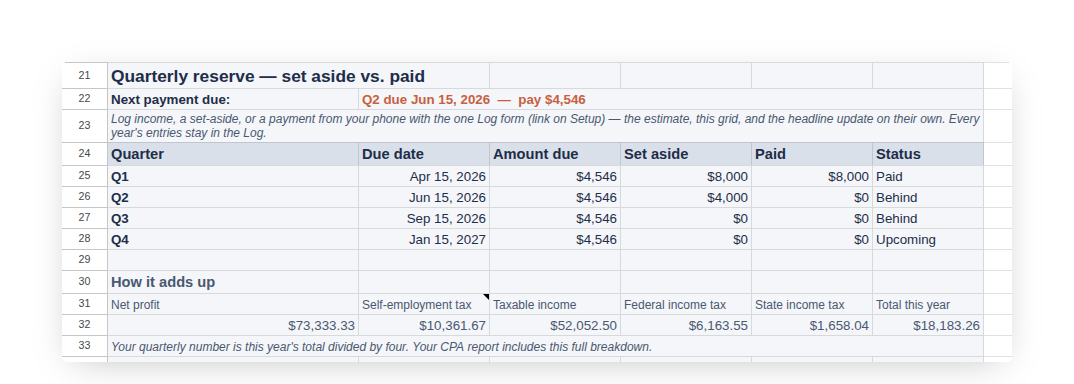
The federal deadlines are April 15, June 15, September 15 and January 15 of the following year, shifting to the next business day when one falls on a weekend or holiday. Those four dates are the shape of the product, so the Estimate tab carries a four-row grid: quarter, due date, amount due, amount set aside, amount paid, and status. The next payment due, date and amount, sits above it as the live headline.
The grid fills from the same phone form as income. One entry logs money reserved; another logs a payment sent to the IRS. Both roll into the right quarter on their own, and the headline moves with them. Every year's entries stay in the Log rather than being cleared each January, which is what lets last year's seasonal pattern sharpen this year's projection.
Built to be handed to an accountant
The whole product points at a conversation with a professional, so it packages one. Email Estimate to your CPA sends a formatted summary from the owner's own account to an accountant's address held on the Setup tab: projected annual income and how it was derived, deductions, net profit, self-employment tax, federal income tax, state, the total, the per-quarter income breakdown, the quarterly reserve status, and the confirm-with-an-accountant framing carried through. Export Estimate (PDF) renders the Estimate tab to a one-page PDF for anyone who would rather forward it themselves.
An Info tab inside the sheet covers the rest: how self-employment tax arrives at its number, the four federal deadlines, and the four ways to pay the IRS, with IRS Direct Pay named as the free option that needs no enrollment.
The Tax Estimator is a Google Sheet, bought once and owned, living in a personal Drive with no subscription to renew and no login to keep alive. Setting it up is real work, done once: the filing status, the state, the deduction figure or the import link, and then the habit of logging income and set-asides as they happen. What runs on its own after that is the arithmetic, every time an entry lands.
This article is general information, not tax or legal advice. Confirm the figures, the deadlines and the state rules that apply to a specific business with a qualified accountant before filing or paying.
Common questions
How much should a self-employed person set aside for taxes?
The Tax Estimator runs the full chain on the income logged: net profit, self-employment tax, taxable income, federal income tax and the state figure. It shows one line at the top naming the next quarter due, its date and the amount. It is a ballpark for planning, to confirm with an accountant.
How is self-employment tax figured?
Self-employment tax is 15.3 percent, applied to 92.35 percent of net profit. The Social Security portion stops at the annual wage base and the Medicare portion keeps going. Half of the tax then comes back off before income tax is figured.
What are the quarterly estimated tax due dates?
April 15, June 15, September 15 and January 15 of the following year. A date that falls on a weekend or holiday shifts to the next business day. The Estimate tab carries a four-row grid with each quarter's due date, amount due, amount set aside, amount paid and status.
Does the Tax Estimator include a state tax figure?
Yes. Check State Rate, on the custom Ledger & Light menu, fills in an approximate rate for the chosen state. Most states tax in brackets, so the field is an editable Setup cell where an exact rate or an accountant's figure can be typed over it.
Does the Tax Estimator include the qualified business income deduction?
No. The qualified business income deduction, IRC 199A, sits outside the headline figure, which is why the sheet says to take the estimate to an accountant. If the deduction applies to a business, the real tax is lower than the figure shown.