
S-Corp Estimated Taxes: What to Set Aside on Your Distributions
How s-corp estimated taxes work after the election, why the quarterly set-aside is the income tax on distributions, and where that figure comes from


Electing S-corp taxation changes which part of the profit needs a quarterly payment, and working out which part is the first thing a new S-corp owner has to do for themselves. S-corp estimated taxes are no longer one number worked out on the whole profit. The salary side is handled by payroll as it is paid. What is left, the distributions, arrives with nothing withheld against it, and that is the piece the quarterly payments are for. The S-Corp Tax Estimator works out that number, puts it at the top of the sheet, and names the quarter it is due. Estimate it there, confirm it with an accountant, then log the confirmed number.
See S-Corp Tax Estimator on Etsy ↗
What the quarterly number covers
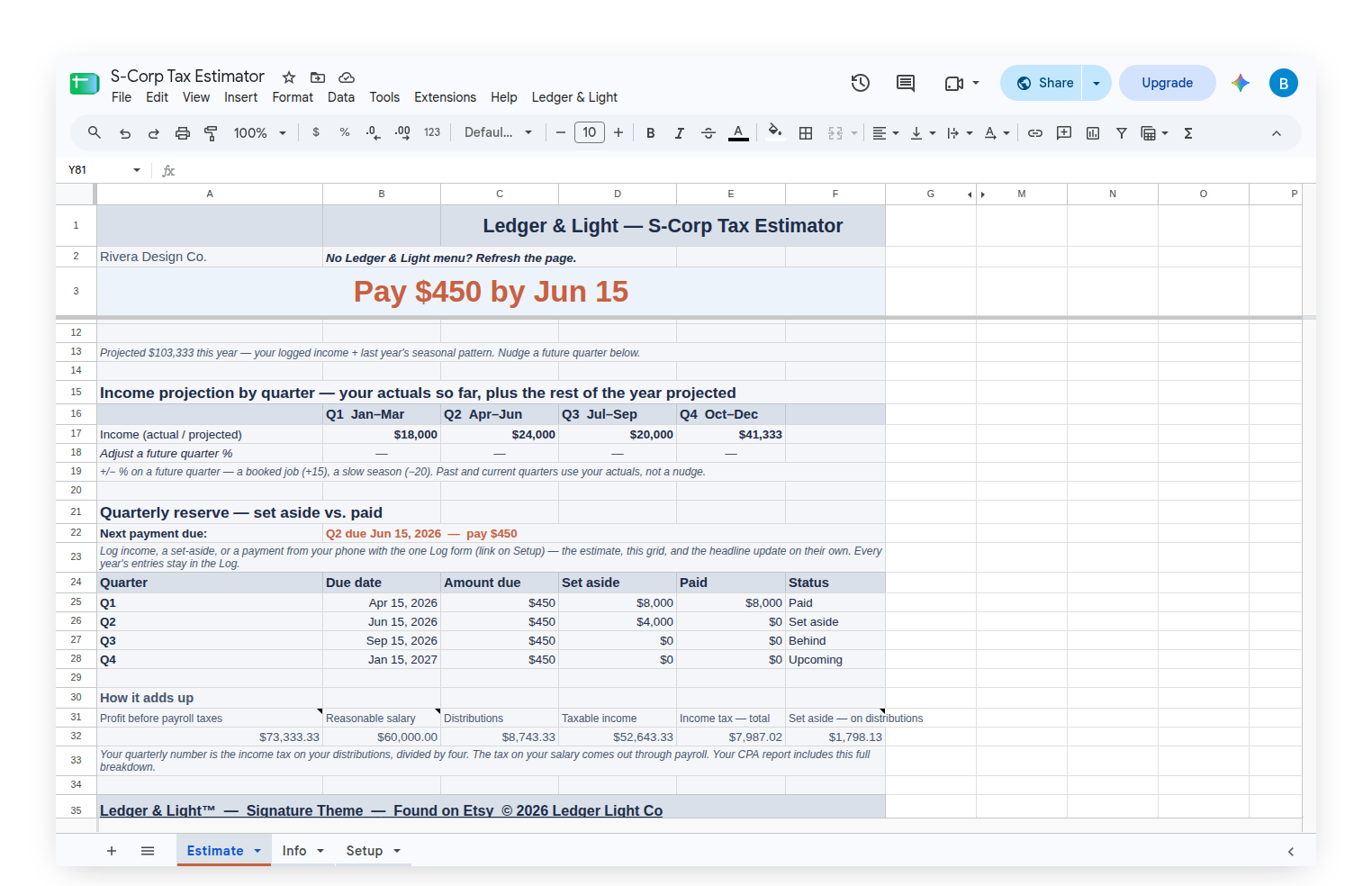
The headline on the Estimate tab is the income tax on distributions, federal and state together, divided into four. That scope is stated on the tab rather than left to be inferred, because the other half of the picture is being handled somewhere else: payroll withholds income tax on the salary as it goes out. The estimate assumes that withholding is correct. If it is not, the owner owes more than the headline says, and the sheet says so under the headline rather than in fine print.
Directly underneath sits the frame that governs the whole product. This is a ballpark for planning. It treats distributions as the only untaxed income, and other income, a spouse's earnings, credits and exact state rules belong to an accountant.
Where distributions come from, and the one figure to get right
Distributions are what remains of the profit after the salary and after the cost of paying that salary. The sheet works them out as projected profit, less the salary, less the employer share of the payroll tax on that salary. The result is floored at zero, because a salary larger than the profit behind it means there is nothing to distribute rather than a negative figure.
The phrase carrying the weight there is projected profit, and specifically what it is measured before. It is profit before payroll taxes. That boundary is the most expensive thing to get wrong in this whole calculation, and it is a bookkeeping question rather than a tax one. If the deductions being logged already net out payroll taxes, and the sheet then subtracts the employer share again, the same cost is counted twice. Distributions come out too small, and the estimate comes out low. Low is the direction that produces a bill in April. The helper text beside the Distributions figure says exactly this, in the place where someone reading the number will see it.
The employer share itself is half of the payroll tax on the salary: Social Security at 12.4 percent up to the annual wage base, plus Medicare at 2.9 percent with no cap, halved. Below the wage base, halving that is the same as taking a flat percentage of the salary. Above it the Social Security half stops while Medicare keeps going, so the employer share is smaller than a flat rate would suggest. The sheet takes half of the capped figure, which keeps distributions, and therefore the set-aside, on the conservative side. The wage base itself is a system-managed value inside the sheet, updated once a year in the shared script, so a live sheet stays current without anyone editing a constant.
There is no self-employment tax here, and that is the point
A sole proprietor pays self-employment tax at 15.3 percent on their profit, and an estimator built for Schedule C has to carry it all the way through. An S-corp owner does not pay it. Payroll tax on the salary takes its place, the payroll service remits it, and distributions do not carry it at all. So it appears nowhere in this estimate. Its absence is the product rather than an omission.
The full payroll tax on the salary is still reported further down the Estimate tab, so the 15.3 percent can be seen going where it goes, but it is never part of the number to set aside. The same is true of the Additional Medicare Tax on wages above the statutory threshold: payroll withholds it on the salary, which is the piece this product deliberately does not reserve for, so the Info tab names it instead of folding it into a figure an owner has been told not to set aside.
Reasonable salary is the owner's call
Everything above turns on the salary figure, and that figure is a judgment the IRS looks at closely. It is expected to reflect the work the owner personally does. It belongs to the owner, their accountant and their payroll service.
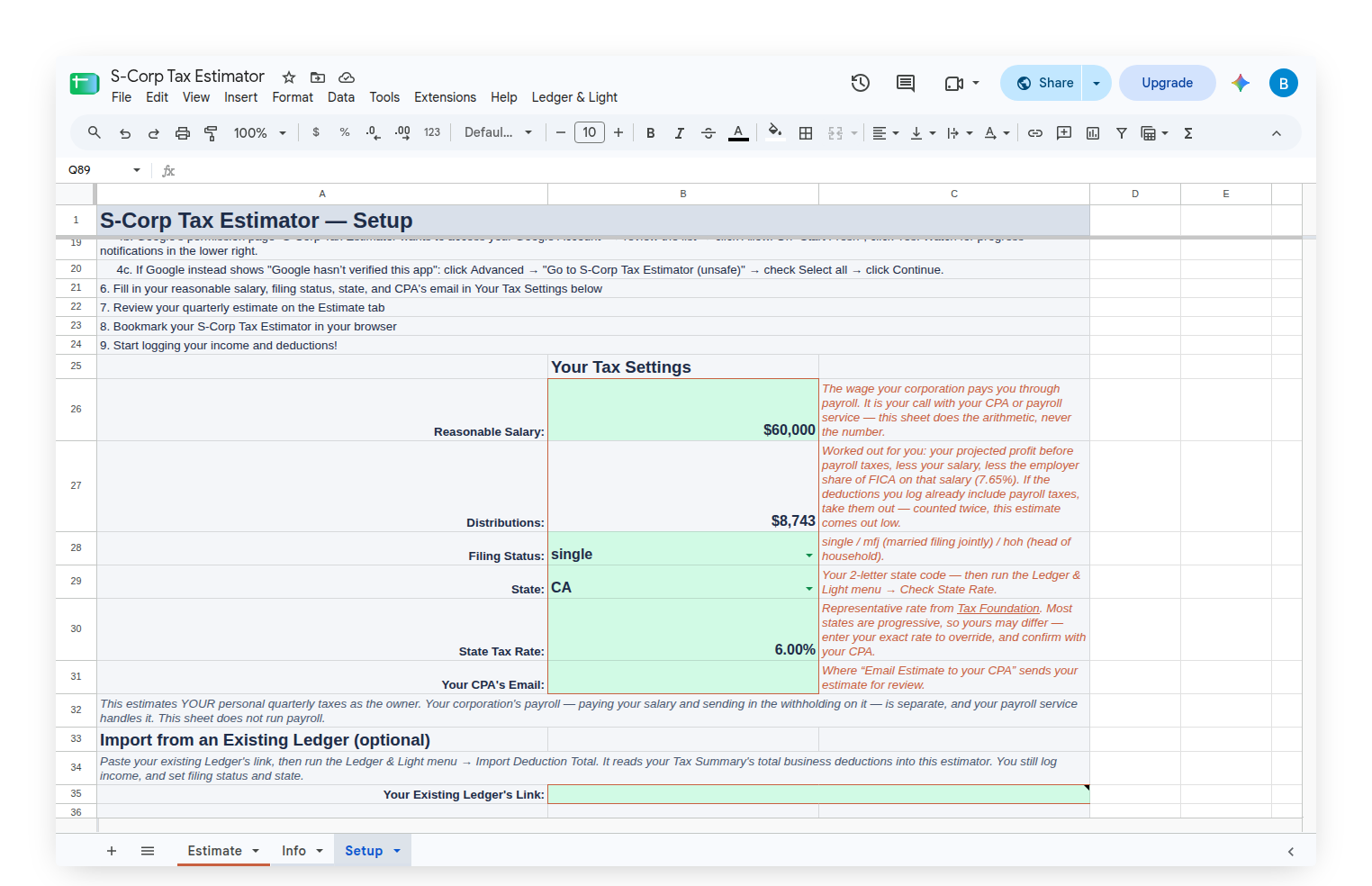
The S-Corp Tax Estimator does the arithmetic on whatever figure is entered and never suggests one. It does not derive a salary from profit, and it offers no formula for one. The Reasonable Salary field is a plain Setup cell with that framing written beside it, in the same spirit as the state rate field further down: the product supplies the working, never the number.
What the estimate leaves out on purpose
The qualified business income deduction, IRC 199A, is not in this calculation. Whether it applies to a particular business, and how much of it applies, rests on facts the sheet does not hold, and for an S-corp one of those facts loops back on itself: the W-2 wages the business pays include the owner's own salary.
Leaving the deduction out makes the estimate run high, which means setting aside more than is needed rather than less. So the sheet says it plainly, right under the headline: if an accountant confirms the deduction applies, the real tax is lower than the figure on screen, and the estimate should be taken to them. That is the posture of the whole product. Where it has a choice, it errs toward over-reserving, and it names each place it did so.
Where the profit figure itself comes from
An estimate is only as good as the annual profit behind it, and mid-year that has to be projected. Income is logged through one form, filled from a phone, and each entry lands in its calendar quarter. Elapsed quarters use their actuals; the rest are projected from them. With a full prior year in the sheet the projection uses that year's own seasonal shares, so a business whose autumn carries the year no longer projects a lean spring across twelve months. With less history the shares are even. Very early in the year the sheet holds the multiplier down and labels the result an early-year estimate. Each future quarter also takes a plus or minus percentage nudge for what history cannot know, and an expected annual income field overrides the projection outright.
Deductions are the other half, and this estimator does not log them. That is a ledger's job. Type the total straight in, or paste an existing Ledger & Light ledger's link into the Setup tab and run Import Deduction Total from the custom Ledger & Light menu, which reads the total business deductions from that ledger's Tax Summary. Either way, the double-count warning above is what to hold in mind: the figure that arrives has to leave profit measured before payroll taxes.
The state side is handled as a system-managed value rather than a link in a document that can never be corrected once it has been downloaded. Check State Rate, on the Ledger & Light menu, fills in the current representative rate for the chosen state. Most states are progressive, so no single percentage is exactly right for everyone, and the field is a plain, editable Setup cell so an exact rate, or the figure an accountant supplies, can be typed straight over it.
The four quarters in one view
The federal deadlines are April 15, June 15, September 15 and January 15 of the following year, shifting to the next business day when one falls on a weekend or a holiday. Those four dates are the shape of the product, so the Estimate tab carries a four-row grid: quarter, due date, amount due, amount set aside, amount paid, and status. The next payment due, its date and its amount, sits above the grid as the live headline.
The grid fills from the same phone form as income. One entry logs money reserved. Another logs a payment sent to the IRS. Both roll into the right quarter on their own, and the headline moves with them. Every year's entries stay in the Log rather than being cleared each January, which is what lets last year's seasonal pattern sharpen this year's projection.
Payroll stays where it is
The corporation's payroll is a separate thing, run by a payroll service: paying the salary, and sending in the withholding on it. This sheet estimates the owner's personal quarterly taxes. It does not run payroll, and the Setup tab says that in as many words, so nobody arrives expecting it to.
Built to be handed to an accountant
The whole product points at a conversation with a professional, so it packages one. Email Estimate to your CPA sends a formatted summary from the owner's own account to an accountant's address held on the Setup tab: profit before payroll taxes, the salary, the distributions, taxable income, how the income tax divides between the salary and the distributions, the quarterly reserve status, and the confirm-with-an-accountant framing carried through. Export Estimate (PDF) renders the Estimate tab to a one-page PDF for anyone who would rather forward it themselves.
An Info tab inside the sheet carries the longer explanation: how the profit splits in two, why there is no self-employment tax, what the employer half of the payroll tax is and why it comes off before distributions, whose call a reasonable salary is, the four federal deadlines, and the four ways to pay the IRS, with IRS Direct Pay named as the free option that needs no enrollment.
When the year is handed over rather than estimated, the Expense & Mileage Ledger + Reporting adds the reporting layer for the handoff itself. Email Tax Report sends the Tax Summary, expenses and mileage log as PDFs in a single email, and Tab Export saves any tab to Drive by year.
Owned, not rented
The S-Corp Tax Estimator is a Google Sheet, bought once and owned, living in a personal Drive with no subscription to renew and no login to keep alive. Setting it up is real work, done once: the salary figure, the filing status, the state, and the deduction total or the import link. What runs on its own after that is the arithmetic, every time an entry lands. And because every year's entries stay in the Log rather than being cleared, a sheet started in the middle of a year is one that sharpens each January instead of starting over.
Estimate it here, confirm it with an accountant, then log the confirmed number. That line opens the framing note on the Setup tab, sits directly under the headline on the Estimate tab, and closes the Info tab, because it is the product's whole posture rather than a disclaimer bolted on at the end.
This article is general information, not tax or legal advice. Confirm the figures, the deadlines and the rules that apply to a specific corporation with a qualified accountant before filing or paying.
Common questions
How do S-corp estimated taxes work?
Payroll handles the tax on the salary as it is paid. The distributions arrive with nothing withheld, and the quarterly payments are for the income tax on that piece. The S-Corp Tax Estimator works out that number, divides it into four, and names the quarter it is due.
Is there self-employment tax on S-corp distributions?
No. Payroll tax on the salary takes its place, the payroll service remits it, and distributions do not carry it. The full payroll tax is shown lower on the Estimate tab, but it is never part of the number to set aside.
Does the S-Corp Tax Estimator choose a reasonable salary?
No. Reasonable salary is the owner's call, made with an accountant and a payroll service. The sheet does the arithmetic on whatever figure is entered and never suggests one.
Why is the profit measured before payroll taxes?
Distributions are projected profit, less the salary, less the employer share of the payroll tax on that salary. If the logged deductions already net out payroll taxes, the same cost is counted twice and the estimate comes out low.
What are the federal due dates for quarterly estimated taxes?
April 15, June 15, September 15 and January 15 of the following year. A date that falls on a weekend or a holiday shifts to the next business day. The Estimate tab shows all four in one grid.