The Receipt Problem: How to Stop Losing Business Expense Records
Receipt records disappear when a gap opens between the purchase and the entry. Same-moment mobile logging, with a photo attached as you log, closes it


Self-employed people lose receipt records in predictable ways. The physical slip gets thrown out with the receipt bag. The phone photo sits in the camera roll for months. The charge you were going to expense later disappears into a statement you'll sort through eventually. By tax time, eventually has passed.
The underlying problem isn't organization. It's timing. Receipt documentation systems fail not because people lack the intent to keep records, but because a gap opens between the moment of the expense and the moment of the record, and the longer that gap, the less likely the record is to survive.
What the IRS requires
For business expense deductions, the IRS expects documentation that identifies the amount, date, place, and business purpose of each expense. For business meals, you also need the business relationship of the people present. This doesn't require a physical receipt for every charge. A bank statement entry combined with a written note explaining the business purpose meets the standard for most expenses.
What the IRS doesn't accept is reconstruction from memory alone. "I spent about $400 on supplies" without a supporting record is not a deductible expense. The documentation has to exist. It doesn't have to be the original slip.
Why paper receipts fail
Paper receipts are designed to last until you leave the store. Thermal paper fades in 6–12 months under normal conditions, in many cases before the tax year is over. Exposure to heat accelerates fading. The physical receipt, even when kept, often isn't readable when someone needs it.
The accumulation approach (collecting receipts in an envelope or folder) works if the logging happens frequently. For most self-employed people, it doesn't. The pile grows until it's a problem, and the problem gets addressed under time pressure, with incomplete records.
Closing the gap at the point of purchase
The most reliable record is one created immediately. A charge logged at the moment it happens contains accurate details (exact amount, correct vendor, remembered business purpose) and doesn't depend on your memory days or weeks later.
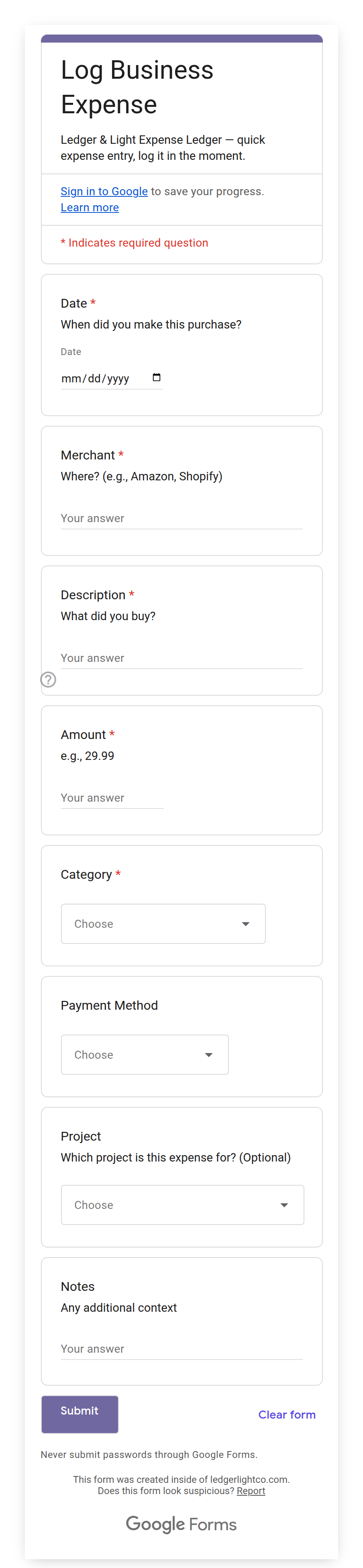
Mobile-first expense logging is designed for this. Open a form on your phone, fill in the expense details while you're still at the vendor, submit. The entry exists before you've put your phone away.
Expense Ledger's Expense Form is a Google Form that opens in any mobile browser — no app download required. Submit a business expense on the spot and it lands immediately in your Transactions tab, organized into the Schedule C expense categories that apply to most solo freelancers and self-employed business owners. A photo upload field is optional, and it is the one question you add to the form yourself, because Google gives the setup script no way to create it; your setup instructions walk through it. With it in place, attach a receipt image at submission and it goes directly to a Google Drive folder automatically. No pile. No separate filing step.
Handling the backlog
If you have months of unrecorded expenses, work through your bank and credit card statements to identify business charges. Most banks let you filter by merchant or date range, and most allow CSV export for larger date ranges.
For anything you can't locate a receipt for: apply the IRS "ordinary and necessary" standard. If you're confident the expense was business-related and you have a bank statement showing the charge, write a contemporaneous note explaining the business purpose and keep it with your records. An underdocumented deduction backed by a bank entry is better than a missing one.
Building a system that holds
The systems that work aren't the ones requiring perfect discipline. They're the ones where the correct action is easier than the incorrect one.
The Expense Form can be added as a home screen shortcut — it's a URL, treated like any browser bookmark. One tap from any screen gets to the submit form. That single step transforms receipt capture from a scheduled monthly task into a 60-second action at the point of purchase.
The timing difference is what receipt piles cost. Thirty seconds at the point of purchase produces a more accurate record than an hour of year-end reconstruction, and the record exists, which is what the IRS requires.