
How to Keep Short-Term Rental Expenses Separate by Property
Why Schedule E wants short-term rental expenses kept separate by property, and a simple way to log each cost against the right home from your phone


If you host more than one place, keeping short-term rental expenses by property is the quiet habit that makes everything downstream easier — and it is exactly the way Schedule E already thinks. The form gives each rental property its own column: its own income, its own list of expenses, its own bottom line. When your records match that shape all year, filing is a matter of reading totals that are already sorted. When they don't, April becomes an exercise in untangling one bank statement into two or three properties from memory.
Even with a single property, logging by property is worth the small discipline. It sets up the habit before you add a second place, and it keeps your rental numbers cleanly apart from everything else in your financial life.
Why per-property matters for the tax return
On Schedule E, each property stands on its own. A repair on the lake house is a deduction against the lake house's income; the cleaner who services the downtown condo belongs to the condo. Blend them, and the per-property picture the return is built on gets fuzzy — you can still file, but you lose the clarity that tells you which property is actually earning and which is quietly eating its income in upkeep. Kept separate, each property's real deduction total is visible any time you want it, not just in April.
The simplest way to keep the line clean
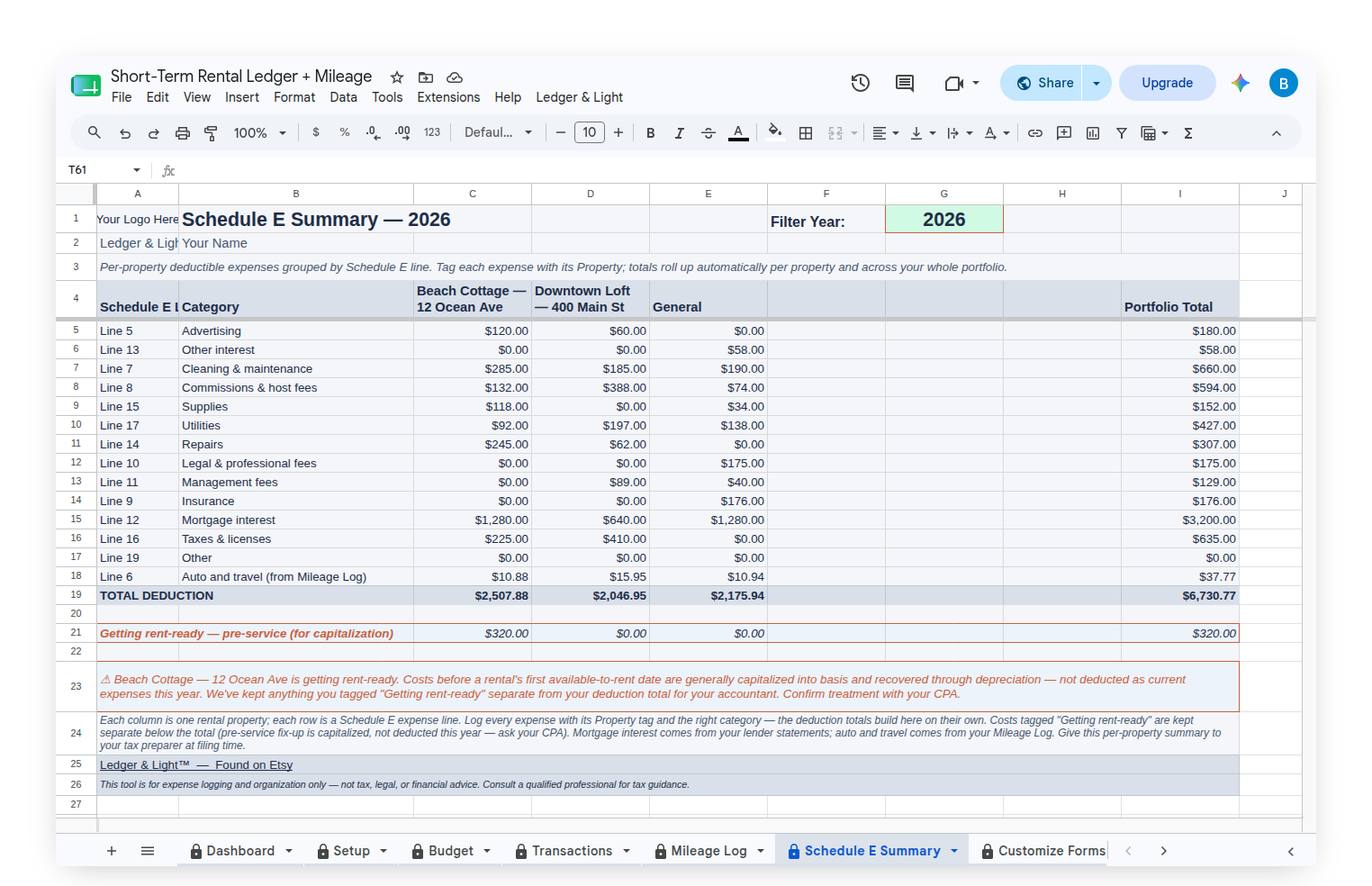
The Short-Term Rental Ledger is built around this one idea. Every entry is logged against a property. You open a mobile Expense Form, fill in the merchant, amount, category, and a quick note, choose which property the cost belongs to, and submit. The entry lands in your sheet on its own, sorted by property and mapped to its Schedule E line. A receipt photo field goes onto that form by hand, because Google gives the setup script no way to create one, and the setup instructions walk through adding it. From then on you can snap a photo of the receipt and attach it in the same step. Logging a cost takes a minute or two at the moment it happens, straight from the phone browser. One purchase, yours to keep; there is no subscription.
From there, each property gets its own Schedule E Summary: its categories, its per-line totals, its deduction total, standing apart from every other property. You are never adding columns by hand or filtering a giant list — the separation is built in.
Miles belong to a property too
Rental driving is easy to lose because it happens in small trips: the turnover run, the dash to the hardware store, the drive out to meet a cleaner, the hop between two of your places in one afternoon. Those miles are deductible under Auto and travel (Line 6) at the IRS standard mileage rate. The Short-Term Rental Ledger + Mileage adds a Mileage Form and a Mileage Log, and each trip is logged against the property it was for — so the miles sort by property the same way the costs do, and land on Line 6 for each one. Log the trip when it ends, with the date and destination, and the year's mileage deduction builds itself.
One condition rides along with all of it, and most hosts have never been told it: driving between your home and a rental property is generally not deductible — the IRS treats it as commuting — unless you use your home as your principal place of business. That is Publication 527's own wording. Trips between your properties, and driving to collect rent or to manage, conserve or maintain a rental, are the ordinary deductible ones. Log every trip either way: the log is what lets your accountant decide which ones you can claim, and a trip you never wrote down cannot be claimed even when it qualifies.
Seeing it all at a glance
A Dashboard shows each property's spending beside its status, so a busy month reads as context rather than alarm: a property with higher spend and an "Under repair" or "Getting rent-ready" status next to it tells you exactly why. When you want to hand the whole thing to your accountant, the Short-Term Rental Ledger + Reporting adds a Properties tab that holds each property's status, placed-in-service date, and annual depreciation input, along with Email Schedule E Report — which sends your per-property Schedule E summary as a formatted PDF — and Tab Export, which saves any tab to your Drive as a PDF or PNG, auto-named by year. Your accountant opens a set of per-property numbers already sorted the way Schedule E reads them.
The habit that keeps properties apart
Log every cost and every trip against the property it belongs to, the moment it happens. Choose the property on the form; the ledger does the sorting. Tag the make-ready costs "Getting rent-ready" so pre-service spending stays set aside for your accountant. Do that through the year and each property's Schedule E picture is always current — and at tax time you are reading it, not rebuilding it. Your CPA has the final word on how any cost is treated.
You can find the Short-Term Rental Ledger in the Ledger & Light shop on Etsy.
See all Ledger & Light products →