
What a Mileage Log for Employee Reimbursement Has to Show
A mileage log for employee reimbursement is a short list of facts per trip. Here is what each entry carries, and why writing it down early gets it paid


Being paid by the mile is one of the cleaner arrangements in working life. You drive, you claim, the money arrives on a normal paycheck. A mileage log for employee reimbursement is the piece that sits between the driving and the payment, and it is a short, specific document: a handful of facts per trip, written down close to when the trip happened. Build it as a habit once and every claim after that is a matter of reading a total off a page you already have.
What one trip record has to carry
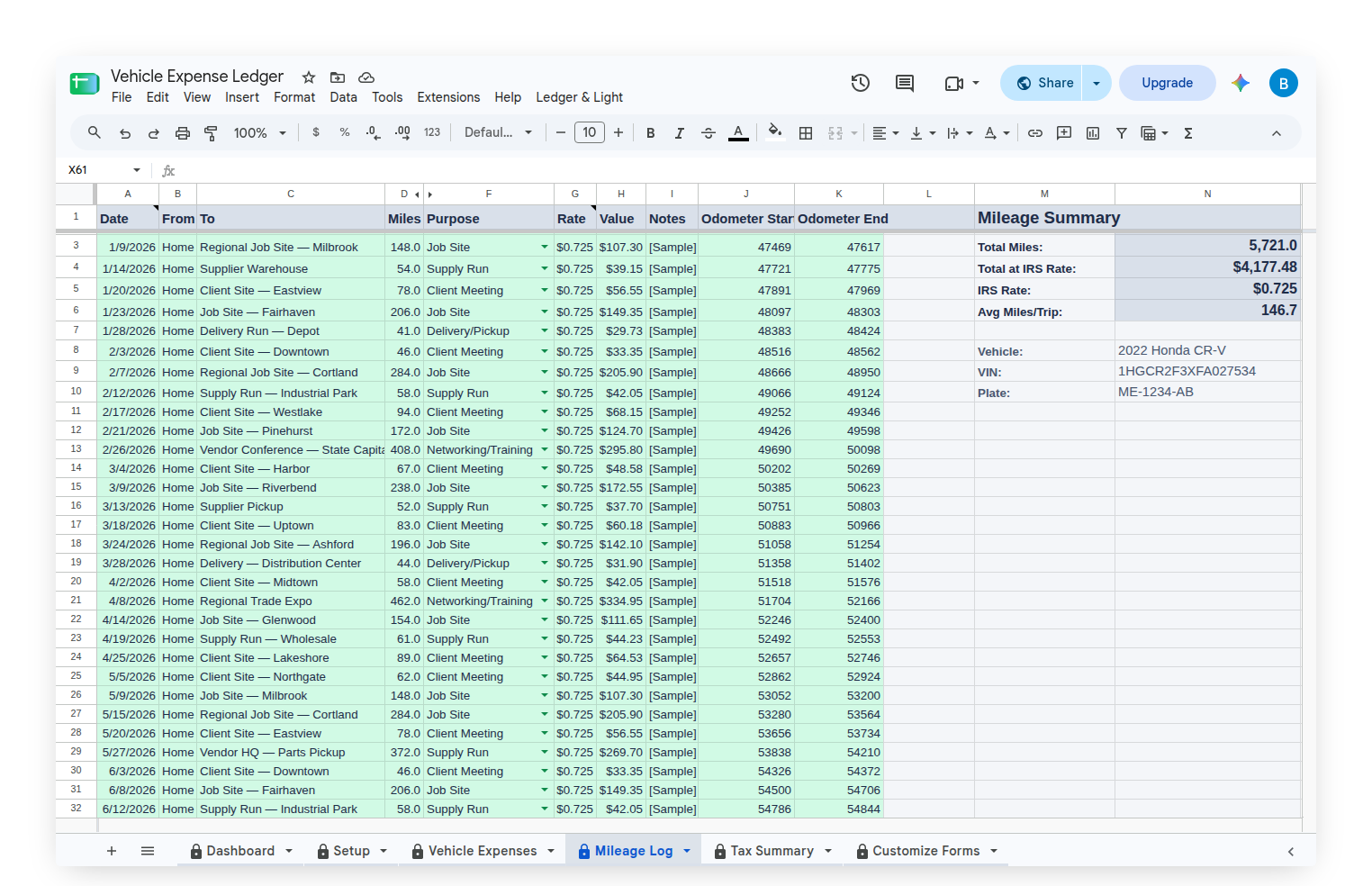
Four facts, per trip. The date you drove. Where you went. The business purpose, in plain words: the client, the site, the delivery, the reason the drive existed. And the miles.
Those four are the same elements the IRS names for a mileage record, which is why almost every employer mileage policy asks for the same set. Policies differ on the edges, and an employer can always ask for more, but a record carrying those four is a record almost any reimbursement process can act on.
The miles figure has two forms and they are not equally strong. A total typed in from a maps lookup is an estimate. A start and end odometer reading is a reading, and it carries its own proof: the numbers line up across a year of driving, and a gap in them is visible. When there is a choice, the odometer version is the one worth writing.
Why "contemporaneous" is the word that does the work
Contemporaneous means written at or near the time of the trip. It sounds like a formality and it is not. It is the whole mechanism.
Here is the part that makes it click. A mileage reimbursement reaches you untaxed because it was substantiated, and the log is the substantiation. An employer paying mileage under what the IRS calls an accountable plan needs three things to hold: the driving had a business connection, the amounts were substantiated within a reasonable time, and anything paid beyond what was substantiated is returned. Where substantiation is missing, the same money stops being a reimbursement and is treated as wages instead: added to the W-2, taxed like the rest of the pay. The record is not paperwork about the money. It is what makes the money the kind of money it is.
That is also why a log written in January for the previous October is worth less than the same log written in October. Not because anyone doubts the driver, but because a reconstruction is evidence of a different quality than a contemporaneous record, and the standard the plan runs on is the second one.
The second number worth having: what the vehicle actually costs
A reimbursement is paid per mile. What a mile is actually worth to you depends on what the car costs to run, and that is a separate number nobody hands you.
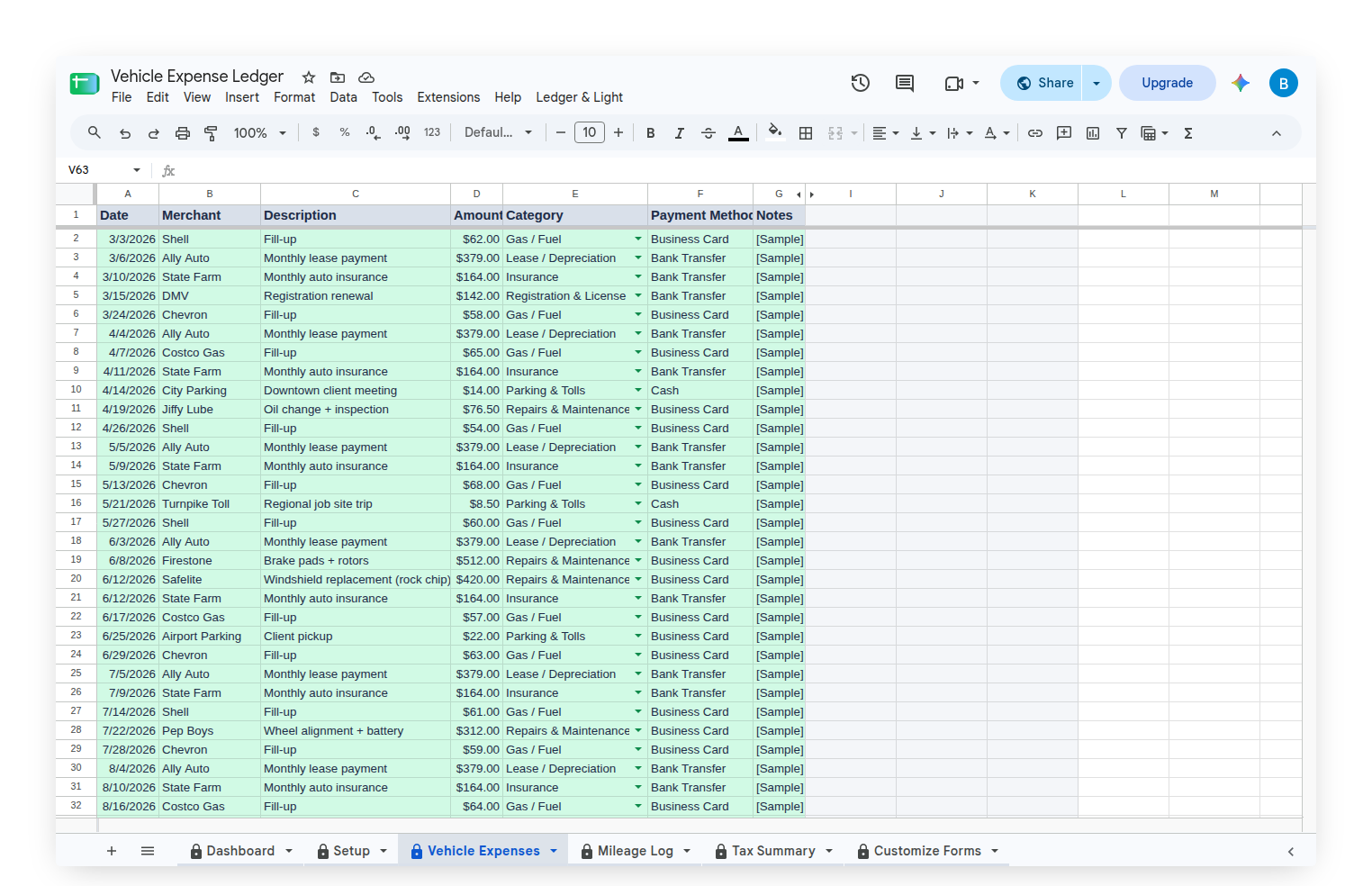
Gas. Repairs and maintenance. Insurance. Registration and license fees. Tires. Logged across a year, those stop being scattered receipts and become a figure: what this vehicle costs to keep on the road, and therefore what it costs per mile driven. That figure is the difference between guessing whether a rate covers the driving and knowing. It informs a conversation with an employer about a policy, and it informs which vehicle is worth putting the work miles on. It is not a tax question, and it does not have to become one to be worth having.
Where a record like that lives
The Vehicle Expense Ledger is built around exactly those two records. It is a Google Sheet with forms attached to it, and the forms are the point: the sheet is where the record lives, the form on the phone is how the record gets made.
The Mileage Form logs one trip per submission, with the date, the purpose, the odometer readings and the miles. There are three ways to enter the distance, including the odometer trip-counter route, and the current IRS standard mileage rate is applied to every trip by its date automatically. The Vehicle Expense Form is where you log a cost after you pay it, into one of seven built-in categories. You can attach a photo of the receipt as well — Google won't let the setup script create that question, so you add it yourself using the setup guide, and from then on every submission files its receipt straight into your Drive. Parking and tolls stay in their own bucket, separate from the miles, because they behave differently from both.
The Tax Summary tab then holds two totals side by side: the miles at the IRS standard rate on one side, the actual vehicle costs on the other. The sheet reports both and recommends neither. What either total means for a specific driver depends on how that driver is paid, and that is a question for a tax professional, not for a spreadsheet formula.
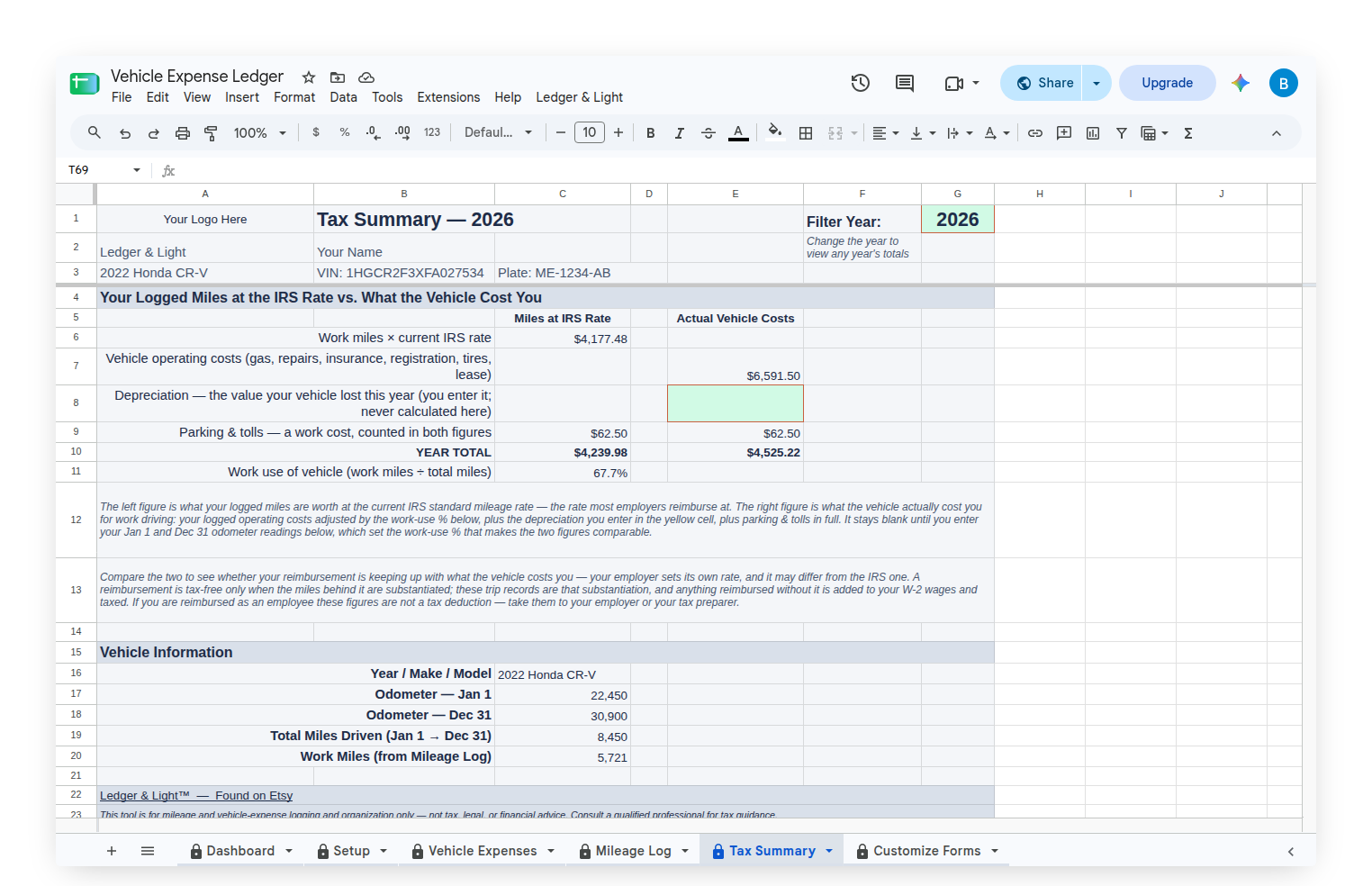
Every entry is dated, and past dates are accepted, so a trip from three weeks ago lands in the right place rather than nowhere. One file holds many years of driving with a year filter to move between them, so there is no fresh copy to start in January and no history to leave behind. It is a one-time purchase that lives in a personal Google Drive, not a subscription that has to be kept current for the records to stay readable.
Filing a claim is the short half of the job. The record is the half that has to already exist when the claim is filed, and the only reliable way to have one is to write each trip down while the trip is still fresh. That is the habit the whole thing is built to make small.
This article is general information, not tax or legal advice. Reimbursement rules vary by employer, and how any of this applies to a specific job is worth confirming against an employer's own policy and with a tax professional.