
Mileage Tracker Apps vs. a Simple Google Sheet
Mileage tracker apps vs a Google Sheet comes down to ownership, cost, and which one keeps IRS-ready records without a recurring subscription


Here is the good news if you are weighing mileage tracker apps vs a Google Sheet for logging business miles: a paid subscription is not required to keep a deduction the IRS will accept. A sheet, kept consistently, does the job every bit as well as a paid app, and it comes with a few real advantages an app cannot match. The better question is not which one logs a trip fastest. It is which one still belongs to the driver, unbroken, five years from now.
What tracker apps get right
Give auto-tracking apps their due. GPS runs in the background and logs each drive without the driver doing anything at the wheel. That is a genuine strength, especially on a day with back-to-back stops. If the biggest obstacle to a good mileage log is remembering to make an entry at all, GPS removes that step entirely.
There is a limit to what the GPS knows, though. It records where the car went, not why, and purpose is what makes a mile deductible. That part still comes from the driver. Most apps leave each trip to be classified business or personal after the fact, so a stack of untagged drives waits to be sorted, often in April, which is its own small version of reconstructing the log. Some apps add project or client tags and rule-based auto-sorting, but the reason for a trip still starts with the person, not the satellite.
A Google Sheet asks more of the driver in the moment. Someone has to open the form and enter the trip. That is a real tradeoff, worth saying plainly rather than pretending otherwise.
Mileage tracker apps vs a Google Sheet: the axes that actually matter
Convenience at the wheel is one axis. It is not the only one, and for a self-employed driver thinking past this tax season, the others carry more weight.
Ownership. A Google Sheet lives in a personal Google Drive. The trip data belongs to the driver, in a file they control, that can be opened, copied, or exported any time. App data lives on the vendor's servers, and access to it usually depends on the account staying active and the subscription staying paid.
Cost shape. Most mileage tracker apps charge monthly or yearly, for as long as the driver wants the records to keep working. Mileage Ledger is a one-time purchase. The cost is paid once, not renewed every season the business keeps running.
Lock-in and longevity. A sheet built this year opens the same way in year five. No renewal, no account in good standing required, no risk that the records become unreadable because a subscription lapsed. An app's history can turn inaccessible the moment the billing stops. One file holds many years of trips, so nothing has to start over each January, and every entry carries its own date, which means logging can begin the day the sheet opens, with earlier trips backfilled to the dates they happened.
What the IRS actually wants. The requirement is a contemporaneous record: date, purpose, and miles, entered close to when the trip happened. A sheet logged in the moment meets that bar exactly. GPS auto-tracking is a convenience feature, not a legal requirement, and an entry made by hand at the time of the trip is just as defensible as one captured automatically. How to Log Business Mileage the IRS Will Accept covers what belongs in each entry.
Simplicity and transparency. Every row in a sheet is visible and editable. There is no black-box total to take on faith. What the driver sees is exactly what gets reported, trip by trip.
Where Mileage Ledger fits
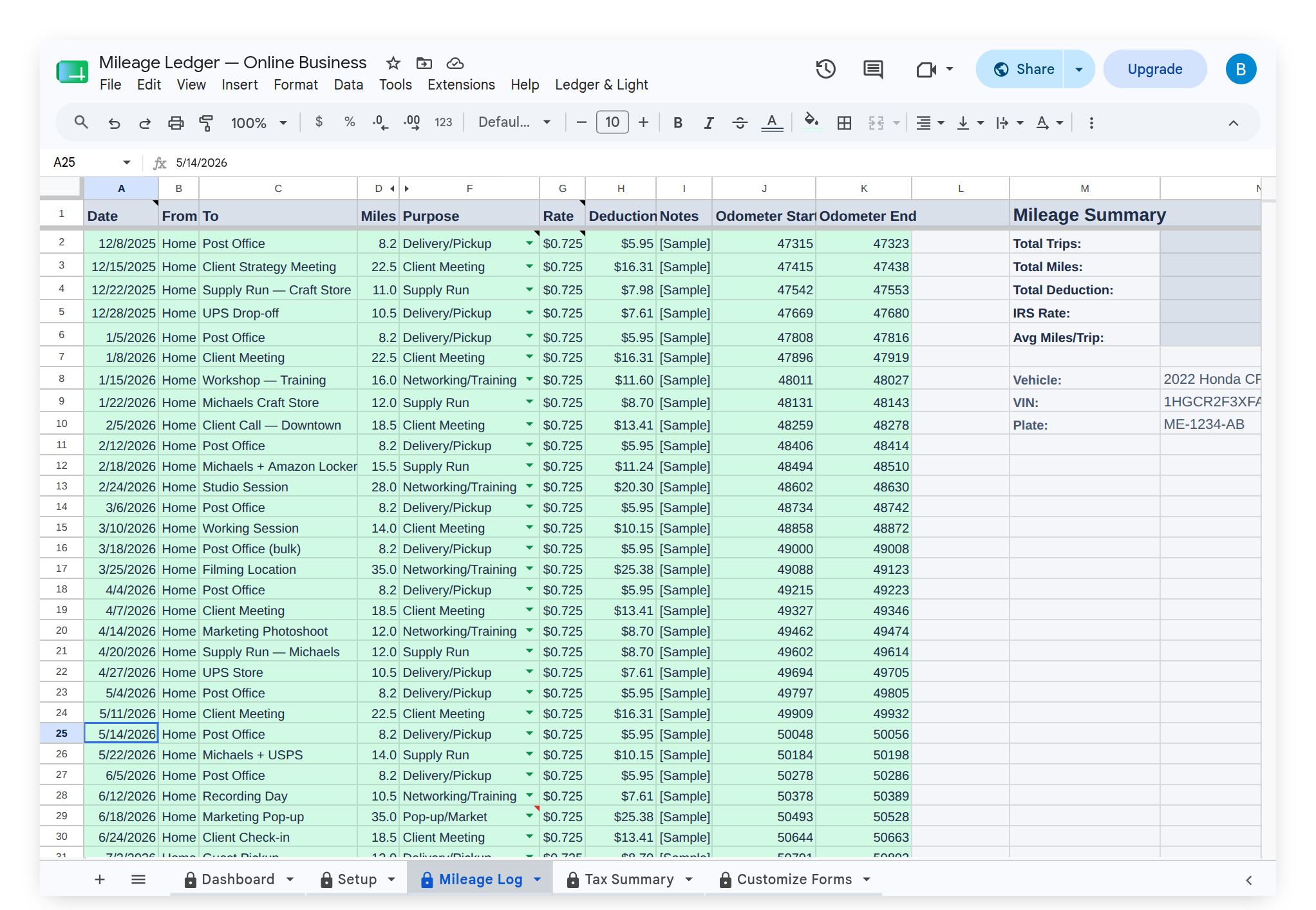
Mileage Ledger is built around the same in-the-moment habit an app is built around, minus the recurring bill. The Mileage Form opens in any mobile browser, no app to download, so a trip can be logged in the moment right after it happens. Each entry lands in the Mileage Log with the deduction calculated per trip at the current IRS standard mileage rate.
For the year-end handoff, upgrading to Expense & Mileage Ledger + Reporting adds Email Mileage Log Report, which sends the full mileage log to an accountant as a formatted PDF, and Tab Export, which saves every tab to Drive. Mileage Ledger itself is a one-time purchase that lives in a personal Google Drive, not a subscription that has to keep being paid to keep the records readable.
This article is general information, not tax or legal advice. Confirm what a specific mileage log needs to include with an accountant.